AI Ceiling Fan TrendChange Your Outfit on Every Blade Pass

The camera looks straight down through a slow ceiling fan at you on the floor. Each blade wipes across the lens, and you come back in a new outfit. Pick a pack of four looks or write your own outfits. One photo in, a vertical clip with the reel's sound out.

The AI ceiling fan trend is the TikTok clip filmed straight down through a slowly turning ceiling fan: you lie on the floor, a blade sweeps across the lens, and each time it passes you wear a new outfit. Real creators tape a phone to the ceiling and change four times. Here you need one photo with your face clear.

Also called Ceiling fan transition · Fan transition · Ceiling fan outfit change · Fan outfit transition · Under the fan · Fan spin outfit trend · Pet ceiling fan transition · Remote control outfit change

Example

What the Ceiling Fan video looks like

The Women's, Men's and Pet versions copy their original clips and restore the matching source song. Remote click and Couch are new scenes with model-generated sound. Your result will differ from run to run.

Input
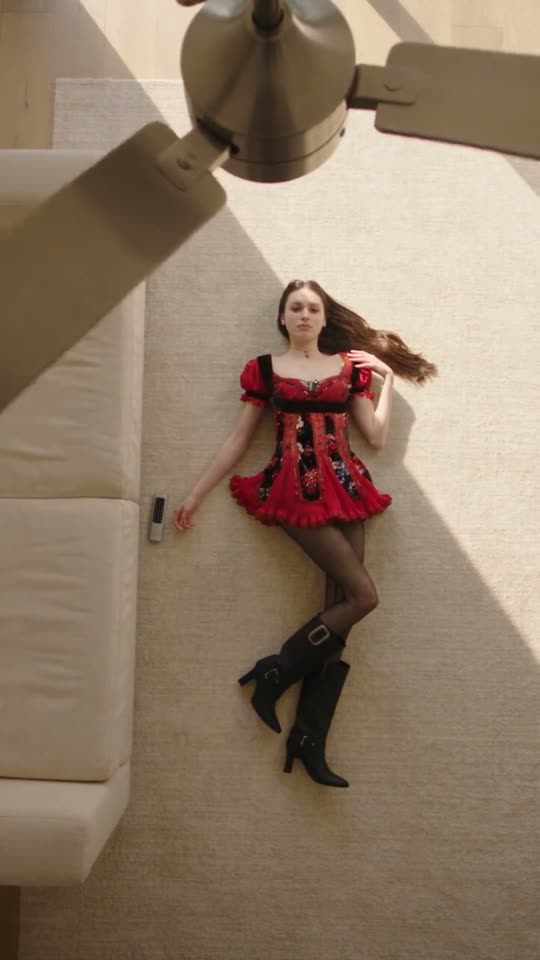
Women's pack, one photo: an AI-made woman goes from a cream blouse and an olive ruffle skirt to a red corset dress, a leather jacket and a frilly party look, one per blade pass.
Use this reference
Input
Men's pack, one photo: an AI-made man in a full-body hoodie photo gets the four streetwear fits of the reel, from a leather jacket to a red hoodie.
Use this reference
Original reel by @delinquent_doll, 13 s
The original reel by @delinquent_doll, which the Women's pack copies: four looks, one per blade pass.
Use this reference
Original reel by @talonsstyle, 13 s
The original reel by @talonsstyle, which the Men's pack copies: four streetwear fits under a steel fan.
Use this reference
Original reel by @mariaxpfps2, 15 s
The original reel by @mariaxpfps2, which the Pet version copies: an AI-made cat flops onto a green carpet and gets a new outfit on every blade pass, from a tweed jacket and beret to a white lace ball gown.
Use this reference
Step by step

How to make the Ceiling Fan video on Smew AI

Everything runs in the browser. No editing app, no prompt to write, no watermark.

  1. Add your photo

    Press "Create your own" and add you, face clear. Take it with the camera or pick it from your library.

  2. Press Generate

    The button shows the price. Seedance 2.5 puts your photos into the Ceiling fan trend clip and copies it shot by shot for 13 seconds, with the reel's original song. You write no prompt.

  3. Download or share

    The video is ready in up to several minutes as a 9:16 MP4. Download it, share it from your phone, or find it later in My videos.

Which photo works best?

Use one sharp photo with your face clear and big enough to see well, from the waist up or closer. The video shows you lying on the floor from above, so the face is small in the frame. A clear, front-facing face keeps you looking like you in every outfit.

  • The four outfits come from the pack you pick, or from your own words, never from your photo. Smew AI first makes a close portrait from your photo, so only your face and hair go into the video.
  • Face visible: no sunglasses, no hat, no heavy filter.
  • Daylight or a bright room. Any background works; the video sets the room.
  • One person per photo.
  • Use your own photo, or one of an adult who said yes. Never a celebrity or a stranger.

Where did the Ceiling Fan trend start?

No single creator owns the fan transition. A CapCut "fan transition" outfit-change template was already going round TikTok on 26 August 2026, in a Spanish-language tutorial by @fingertips1246. The AI version took off a month later. On 24 September @shabastudio20 posted four outfits under a dark wooden fan with the line "Pick four outfits, add your photo ... and let the ceiling fan do the styling", and the clip passed 1.3 million plays.

Autumn "outfit rotation" clips followed within days, and The Tab published a how-to on 28 September. On 1 October one trend tracker counted 76 posts from 67 creators and about 3.9 million views, according to Kavel. The most-watched clip of all is a joke about the AI: on 3 October @amyrebeccaowen filmed a real attempt, captioned "trying the ceiling fan trend but I didn't realise people were using AI", in which she rolls off the sofa between outfits. It had 8.1 million plays by 8 October.

  1. A Spanish-language TikTok tutorial by @fingertips1246 shows a CapCut "fan transition" outfit-change template. TikTok

  2. @shabastudio20 posts an AI version with four outfits under a wooden fan; it has 1.3 million plays on 8 October. TikTok

  3. The Tab publishes a how-to guide for "the vibey AI Ceiling Fan trend", and autumn outfit rotations spread on TikTok. The Tab

  4. A trend tracker counts 76 posts from 67 creators and about 3.9 million views, according to Kavel. Kavel

  5. @amyrebeccaowen films a real, chaotic attempt without AI; it reaches 8.1 million plays by 8 October. TikTok

Copy and paste

The Ceiling Fan prompts

You do not need these: the one-tap flow runs them for you, together with the trend clip. [Image 1] and [Image 2] are your two photos, and [Video 1] is the trend clip the video copies.

Women's pack

1 photo: you, face clearSeedance 2.513 s · 480P · 9:16, like the original200 credits
Video prompt

Recreate the reference video [Video 1] shot for shot: the same fixed top-down camera that looks straight down past the slowly turning ceiling fan, the same person lying on their back on the cream carpet next to the sofa, the same room, light, framing, timing and moves, one continuous take. The ONLY change is the face and the hair of the young woman with long chestnut-brown hair who lies on her back on the cream carpet under the ceiling fan: they are now the face and the hair of the person in [Image 1], in every look. The person = the person in [Image 1], in EVERY shot and in EVERY look: copy the exact face from [Image 1] (the face shape, eye color and eye shape, eyebrows, nose, mouth, skin tone, age, hair color, hair length and hairstyle, and any beard, moustache, glasses or freckles), so their friends recognize them at once. [Image 1] is only a head-and-shoulders portrait: take ONLY the face, the hair and the skin tone from it, never its plain black t-shirt and never its grey background. The same real person in every look, from the first frame to the last, also right after each blade pass and when the face is small or turned away. Never morph, never drift back to the original woman's face or hair. Every outfit stays exactly as in [Video 1]: the same clothes, shoes, bags and accessories, the same fit, in the same order, and each outfit change at the same moment as in [Video 1]. NO black t-shirt from [Image 1] in any look. NO long chestnut-brown hair unless [Image 1] shows it: the hair is the hair from [Image 1] in every look. The looks, at the times of [Video 1]: look 1 from 0 s, a blade pass at 3.6 s brings look 2, a blade pass at 7.4 s brings look 3, a blade pass at 10.7 s brings look 4 until the end. The ceiling fan keeps turning the same way at the same speed through the whole video. Each outfit change happens only while a blade covers the person, and the person lies in the same spot before and after each blade, with no jump. No glow, no particles, no dissolve, no flash. Never mix pieces of two looks. Anatomy rules: exactly one person, one head on that person's shoulders, two arms, two legs, five fingers on each hand. A face never appears on hands, clothes or the floor. No text, no captions, no logos, no watermark.

2262 characters

Men's pack

1 photo: you, face clearSeedance 2.513 s · 480P · 9:16, like the original200 credits
Video prompt

Recreate the reference video [Video 1] shot for shot: the same fixed top-down camera that looks straight down past the slowly turning steel ceiling fan, the same person lying on their back on the blue carpet next to the pink sofa, the same room, light, framing, timing and moves, one continuous take. The ONLY change is the face and the hair of the young man with curly black hair who lies on his back on the blue carpet under the ceiling fan: they are now the face and the hair of the person in [Image 1], in every look. The person = the person in [Image 1], in EVERY shot and in EVERY look: copy the exact face from [Image 1] (the face shape, eye color and eye shape, eyebrows, nose, mouth, skin tone, age, hair color, hair length and hairstyle, and any beard, moustache, glasses or freckles), so their friends recognize them at once. [Image 1] is only a head-and-shoulders portrait: take ONLY the face, the hair and the skin tone from it, never its plain black t-shirt and never its grey background. The same real person in every look, from the first frame to the last, also right after each blade pass and when the face is small or turned away. Never morph, never drift back to the original man's face or hair. Every outfit stays exactly as in [Video 1]: the same clothes, shoes, bags and accessories, the same fit, in the same order, and each outfit change at the same moment as in [Video 1]. NO black t-shirt from [Image 1] in any look. NO curly black hair unless [Image 1] shows it: the hair is the hair from [Image 1] in every look. The looks, as in [Video 1]: four looks. A new look comes only at the blade passes where [Video 1] changes the outfit; the other blade passes keep the outfit, as in [Video 1]. The ceiling fan keeps turning the same way at the same speed through the whole video. Each outfit change happens only while a blade covers the person, and the person lies in the same spot before and after each blade, with no jump. No glow, no particles, no dissolve, no flash. Never mix pieces of two looks. Anatomy rules: exactly one person, one head on that person's shoulders, two arms, two legs, five fingers on each hand. A face never appears on hands, clothes or the floor. No text, no captions, no logos, no watermark.

2245 characters

Remote click

1 photo: you, face clearSeedance 2.515 s · 480P · 9:16230 credits
Video prompt

Create a new 15-second vertical fashion video from [Image 1]: a fixed top-down camera looks past a steel ceiling fan at the person from the photo lying on a cream carpet beside a caramel sofa. Preserve the person's face, hair, skin tone and identity in every frame; do not copy the clothes or background from the photo. The person wears four complete high-fashion outfits in sequence. They point a small silver remote at the fan and click it; the fan starts turning, and each full blade pass hides a clean outfit change. Keep the person in the same place, preserve realistic anatomy, and use no morphing, glow, particles, dissolve or flash. Include the quiet remote click, fan and room ambience; no dialogue and no song. Exactly one person, no text, captions, logos or watermark.

779 characters

Remote click: pet

1 photo: your pet, face and whole bodySeedance 2.515 s · 480P · 9:16228 credits
Video prompt

Create a new 15-second vertical fashion video from [Image 1]: a fixed top-down camera looks past a ceiling fan at the pet from the photo lying on a cream carpet beside a sofa. Preserve the pet's species, breed, face, ears, fur colors, markings and natural body proportions in every frame; it never becomes a person and has no human hands. The pet wears four complete small outfits fitted to its body in sequence. It points a small remote at the fan with a paw and clicks it; the fan starts turning, and each full blade pass hides a clean outfit change. Keep the pet in the same place and use no morphing, glow, particles, dissolve or flash. Include the quiet remote click, fan and room ambience; no dialogue and no song. Exactly one animal, no people, no text, captions, logos or watermark.

790 characters

Couch

1 photo: you, face clearSeedance 2.515 s · 480P · 9:16189 credits
Video prompt

A vertical fashion photoshoot video, 15 seconds, four looks with hard cuts: a lazy-afternoon photoshoot on one couch. A bright, calm living room with pale grey concrete walls and a grey floor: a long, low, light baby-blue velvet lounge sofa with deep soft pleats and no legs, a tall floor lamp made of a stack of chrome balls behind its head end, and a red-and-grey plaid armchair beside it. Soft, even daylight. Photorealistic, like a real fashion video filmed on a phone, natural skin and natural colors. The person = the person in [Image 1], in EVERY shot: copy the exact face from [Image 1]: face shape, eye color and eye shape, eyebrows, nose, mouth, skin tone, age, hair color, hair length and hairstyle, and any beard, moustache, glasses or freckles exactly as in the photo. Take only the face, the hair, the skin tone and the body shape from [Image 1], never the clothes: each look has its own outfit below. The same real person in all four looks, so their friends recognize them at once. Never morph. If [Image 1] shows a man, each look is a menswear look in the same colors and fabrics (a black shirt and trousers, a leopard-print shirt, an olive knit sweater, a red overshirt), never a dress or a skirt. The camera move, the same in every look: one smooth crane move. It starts low beside the foot end of the sofa, where the person lies back with the legs crossed and the feet resting up on the sofa. The camera rises and tilts down until it looks straight down from above at the whole person lying on the sofa, the face turned up to the lens and sharp. It holds there while the person changes pose, then glides fast over the head toward the back of the sofa, and the hard cut comes on that motion blur. Shot 1 [0-5s]: a knee-length black satin dress with a cream lace trim and black strappy heels; the person scrolls on a phone, then looks up at the camera. Shot 2 [5-8.8s]: hard cut, a knee-length leopard-print dress with a square neckline and black heels; one arm rests above the head. Shot 3 [8.8-12.6s]: hard cut, an olive-green ribbed knit midi dress with a high neck and gold earrings; the person stretches one arm over the head and smiles softly. Shot 4 [12.6-15s]: hard cut, a red knee-length skirt, a white fitted top and a small brown handbag on the sofa; the person holds an open book above the face, then lowers it and looks up at the camera. A tasteful fashion editorial: every dress and skirt reaches the knee, nothing see-through, calm and relaxed poses. The camera never looks up a dress or a skirt. Audio: a soft, warm lo-fi instrumental beat with light bass and the quiet rustle of fabric on velvet. No dialogue throughout the entire video. No singing. No logos, no brand names, no designer names, no text, no captions, no watermark. Exactly one person, no other people, no pets. One head, two arms, two hands with five fingers each, two legs.

2880 characters

Ty + zwierzak

1 photo: twój zwierzak w słuchawkach (zostaje)Seedance 2.515 s · 480P · 9:16, like the original228 credits
Video prompt

Recreate the reference video [Video 1] shot for shot: the same fixed vertical top-down camera, the same green carpet, the same orange velvet sofa edge on the left, the same ceiling fan with brown wooden blades very close to the lens, the same framing, light, timing and moves, one continuous take. The ONLY change: the cat that drops in from the sofa and lies on its back in the middle of the green carpet is now the pet in [Image 1]. The pet = the pet in [Image 1], in EVERY frame: the same species and breed, head shape, muzzle, eyes, ears, fur colors, fur length and markings as in [Image 1], with the natural body volume and proportions of that animal: never flattened, squashed, stretched or merged with anything, so its owner instantly recognizes it in every outfit. A dog stays a dog and a cat stays a cat: if [Image 1] shows a dog or another animal, that animal drops in, rolls onto its back and lies in the same spot, with its own face, ears, whiskers and tail. Never drift back to the cat of the original video: not the coat, face, ears or tail of the cat in the video, unless [Image 1] shows them. Only the head, the face, the ears, the fur and the tail change: the pet wears every outfit, hat, pair of glasses, necklace and bag of the video, never a collar or clothes from [Image 1]. The looks, exactly as in [Video 1]: 0-1.5 s: the pet drops in from the sofa on the left and rolls onto its back in the middle of the carpet. 1.5-5 s: it lies on its back, paws up, no clothes, a pink pacifier in its mouth. 6-7.75 s: a black-and-white tweed jacket with pearl buttons, a black beret, a small black quilted bag on a chain. 8.5-10.75 s: a cream beret, round gold glasses, a pink jacket with a big white satin bow, a yellow tweed skirt with a pink feather hem, a pink sparkly purse with a pearl handle; one front paw waves by the face. 11.5-13.75 s: a grey beret, a pale blue cable-knit cardigan, a grey pleated skirt, a brown leather satchel beside it. 14.5-15 s: a cream hat with a white feather, a pearl necklace with a green brooch, a white lace ball gown, a pearl handbag. The ceiling fan above keeps rotating through the whole video. Every outfit change happens when the fan blades pass in front of the camera, at 5-6 s, 7.75-8.5 s, 10.75-11.5 s and 13.75-14.5 s. The blades are very close to the lens, so they look enlarged with natural motion blur and briefly cover the pet and the center of the frame. When a blade covers the pet, the outfit changes; when it moves away, the next full outfit shows. The pet stays in the same spot before and after each blade, with no jump. No glow, no particles, no dissolve, no flash. Never mix pieces of two looks, never leave a piece of the previous outfit. The clothes fit the pet's own body, with real folds. Real animal anatomy: one head, four legs, furry paws, never human hands or fingers. Exactly one animal, no people, no extra animals. No text, no captions, no logos, no watermark.

2945 characters

How many credits does it cost?

You pay in credits. The Generate button shows this price before you spend anything. These are the options on this page.

OptionModelWhat you getCredits
Women's packSeedance 2.513 s · 480P · 9:16, like the original200
Men's packSeedance 2.513 s · 480P · 9:16, like the original200
Remote clickSeedance 2.515 s · 480P · 9:16230
Remote click: petSeedance 2.515 s · 480P · 9:16228
CouchSeedance 2.515 s · 480P · 9:16189
Ty + zwierzakSeedance 2.515 s · 480P · 9:16, like the original228

One-time packs and plans are on the pricing page. A failed video gives its credits back.

How does the ceiling fan transition work?

The fan blade is the edit. In the real clips a phone is taped to the ceiling and looks straight down past a slowly turning fan at a person lying on a rug or a wooden floor. Each time a wide blade sweeps across the lens, it covers the person for a split second, and that is where the cut hides. When the blade has passed, the person is back in the same spot in a new outfit.

The clips we sampled show three to five changes in 13 to 16 seconds, with one blade pass every three seconds or so. The outfits contrast hard in color and style, and the shoes, bags and hats change too. That makes it a magic trick and an outfit inspiration post at the same time, which is why autumn "outfit rotation" clips took it over at the end of September.

The Smew AI version copies two viral AI reels of the trend, one with women's looks and one with men's looks. First Nano Banana 2.1 makes a close portrait from your photo, so only your face and hair go into the reel. Then Seedance 2.5 puts you in place of the person in the reel, shot by shot, so every blade pass and every outfit change lands exactly where it does in the original. Your face, hair and skin tone come from your photo. The four outfits, the fan and the room come from the reel.

For Halloween costumes, see the Halloween ceiling fan trend: a witch, a vampire, a skeleton and a red devil, one per blade pass, for you or your pet.

With Your outfits you write your own look for any of the four changes. Smew AI first changes those looks in the reel itself (FLUX.3 Edit Video), so the new outfits still change under the blades, and then puts you in.

Which looks are in each pack, and can you write your own?

Women's pack copies the reel by @delinquent_doll:

  1. A cream lace blouse with a black velvet bow, a full olive-green ruffle skirt and white heels.
  2. A red corset mini dress with sheer black tights and black knee boots.
  3. A black leather biker jacket over a dusty-pink lace maxi skirt, with black lace-up boots.
  4. A pink-and-black frilly party look with a black tutu, striped over-knee socks and ankle boots.

Men's pack copies the reel by @talonsstyle:

  1. A black leather jacket over a graphic tee, black jeans and red sneakers.
  2. A pink knit sweater, white baggy trousers and a printed beanie.
  3. A white long-sleeve tee with a scarf, black jeans and red sneakers.
  4. A red college hoodie, long black shorts, white socks and slides.

Couch has no fan and no reel: a camera glides over you on a light blue sofa in four looks, a black satin dress, a leopard-print dress, a green knit dress and a red skirt with a book, one per cut.

Remote click is a new 15-second Smew AI scene, not a copy of an existing reel: the camera sits under a steel fan that is off at first, you click its remote, and each blade pass brings another outfit. Remote click: pet makes the same new scene for your dog or cat. Both have model-generated ambience rather than a restored source song.

Either pack works for anyone: pick the looks you like. The model redraws the clothes on your body, so small details can change from run to run, for example the print on a shirt or the color of a scarf. The cut and the colors of each look stay close to the reel.

Your outfits: on the create page, open Your outfits and write any look you want, for example "red dress with red high heels" for outfit 1. Name the clothes, the colors, the shoes and the accessories. Every look you leave empty stays as in the pack, so you can change one look or all four. A written look costs a few credits more, because Smew AI first changes the outfits in the reel itself, and that is what keeps every change on a blade pass. Logos, brand names and copies of famous characters are left out.

Which sound should you post it with?

There is no one official song for this trend. Most clips use an "original sound", and creators pick whatever is trending that week.

The Women's, Men's and Pet versions restore the matching source reel's sound. Remote click, Remote click: pet and Couch are new scenes with model-generated ambience instead. You can turn the sound off on the result screen. Third-party music belongs to its owners, and Smew AI gives you no rights to it.

To use a trending sound, add it in TikTok, Instagram or YouTube when you post, from their licensed library, and lower the original sound. Hashtags: #ceilingfantransition, #outfittransition and #ceilingfantrend.

What can go wrong, and how do you fix it?

We tested every version with adult test photos before we published it. In every run the person stayed the same in all four looks, and each change happened under a blade. On 2 November 2026 the packs moved to Seedance 2.5 at 480P, and we have not run that setup with test photos yet. These are the problems we saw, and the ones to look out for:

What goes wrongWhyWhat to do
The face looks less like youThe face is small in a top-down shotUse a sharp, front-facing photo with the face big and in good light, then run it again.
Some hair from the reel shows, for example curls under a hatThe model keeps a little of the reel's lookRun it again. Every run is a new take.
An outfit detail differs from the reelThe model redraws the clothes on your bodyThat is normal. The cut and the colors stay close to the reel.
A written outfit looks a little different from your wordsThe model draws the look in the reel's pose and lightName fewer things, for example a color and one piece of clothing, and run it again.
FAQ

Ceiling Fan trend questions

What is the AI ceiling fan trend?
It is a TikTok outfit-change trend from September 2026. The camera looks straight down through a slowly turning ceiling fan at a person lying on the floor, and each time a blade sweeps across the lens, the person appears in a new outfit. The AI version makes the whole clip from one photo, with no fan and no filming.
Is the ceiling fan transition real or AI?
Both exist. Some creators really tape a phone to the ceiling and change clothes between takes, but most of the clips since late September 2026 come from AI apps and CapCut templates. The most-watched clip, with 8.1 million plays, is @amyrebeccaowen's real attempt, captioned "trying the ceiling fan trend but I didn't realise people were using AI".
Is the ceiling fan trend the same as the fan transition trend?
Yes. People call it the ceiling fan trend, the ceiling fan transition, the fan transition, the fan outfit trend and "under the fan". They all mean the overhead clip where a fan blade wipes to a new outfit. On TikTok the most used tag is #ceilingfantransition.
How do I do the ceiling fan trend without a ceiling fan?
Use AI. Press "Create your own" on this page, pick the Women's or Men's pack, add one photo with your face clear and press Generate. Smew AI puts you into a viral ceiling fan reel, so each blade pass gives you a new outfit. You write no prompt, and the clip lands in My videos as a vertical MP4.
How do you do the ceiling fan trend for real?
Fix your phone to the ceiling or a tall stand above the fan, pointing straight down, and make sure nothing can touch the blades. Lie in the same spot for every take, change outfits between takes, then cut the takes together in an editor on the frames where a blade covers the lens. It takes a lot of takes, which is why most people use AI.
How many outfits are in the video?
Four looks in every pack, copied from its reel: you start in look 1, and each blade pass brings the next one. The clips we sampled on TikTok have three to five changes in 13 to 16 seconds, so four looks fit the trend.
Can I choose the outfits?
Yes. Pick a pack (Women's or Men's), then open Your outfits on the create page and write your own look for any of the four changes, for example "red dress with red high heels". An empty look stays as in the pack. Smew AI changes those looks in the reel first, so each new outfit still appears under a blade.
Will it still look like me in every outfit?
Yes. Seedance 2.5 puts your face, hair and skin tone into every shot of the reel, and keeps the outfits of the reel. A sharp photo with your face clear helps most. If a look drifts, run it again: every run is different.
Is there a Halloween version of the ceiling fan trend?
Yes, and it has its own page: the [Halloween ceiling fan trend](/templates/halloween-ceiling-fan-trend). You start as a witch, and after each blade pass you are a vampire, then a skeleton, then a red devil, with your face always uncovered. You can write your own costumes, and there is a Pet version too.
Can my dog or cat do the ceiling fan trend?
Yes. Pick the **Pet** version and add one sharp photo of your dog or cat with its face and whole body in view. Smew AI puts your pet into the most-watched AI pet clip of the trend we found: @mariaxpfps2's cat, posted on 21 October 2026 with the caption "Guess the next cat outfit" (663,500 views on 24 October). Your pet flops onto a green carpet under the fan, and each blade pass brings a new outfit: a black tweed jacket and beret, a pink jacket with a big bow, a blue cardigan with a pleated skirt, then a white lace ball gown. It keeps its own face, fur and markings. The clip is 15 seconds, vertical, with the reel's sound. On TikTok these pet clips also go by the "fan spin outfit trend", and the same transition works as an AI outfit change for a dog.
Is there a couch outfit change version without the fan?
Yes. Pick **Couch** and add one photo with your face clear. It makes an AI couch photoshoot from your photo: you lie on a light blue sofa, and in each of four looks a camera glides from your feet to straight above you, then cuts to the next outfit: a black satin dress, a leopard-print dress, a green knit dress, then a red skirt with a book. This sofa outfit change showed up in AI app ads on 2 November 2026. It is made from your photo, not copied from a reel, so it is 15 seconds with a soft instrumental beat, and Your outfits works only on the fan packs.
What is the remote control outfit change?
It is a new Smew AI ceiling-fan scene: the fan is off, you point a remote and click, then each blade pass brings a new outfit. Pick **Remote click** for you or **Remote click: pet** for your dog or cat: 15 seconds, vertical, with model-generated ambience. It is not presented as a copy of an existing source reel.
What song is used for the ceiling fan trend?
There is no single song. The Women's, Men's and Pet versions restore the sound of the reel they copy. Remote click, Remote click: pet and Couch use model-generated ambience. You can turn the sound off or add a licensed trending sound when you post.
Is this the Dress change template?
Yes. The CapCut dress change template ("Dress changed", 5 Nov 2026) is this trend: the dress change trend TikTok creators post from the room with the pink sofa and the teal carpet under the steel fan. Pick Men's pack: it copies that same room, and each blade pass brings a new outfit.
How long is the video?
The Women's and Men's packs make 13 seconds, vertical 9:16 at 480P, with the reel's sound, in 5 to 15 minutes. You can leave the page while it runs, and the finished clip waits in My videos.
Does the ceiling fan video cost credits?
Yes. Each video costs credits, and the create page shows the exact price on the Generate button before you spend anything. Both packs cost the same, because Seedance 2.5 copies the reel shot by shot. Your own outfits cost a few credits more, because the reel is changed first. If a video fails, the credits come back.
Can I post my ceiling fan video on TikTok or Instagram?
Yes. The MP4 has no watermark, so you can post it to TikTok, Reels or Shorts as it is. The reel's sound belongs to its owners: check the platform's music rules before you use the clip in an ad. Keep the platform's AI label on, and tag it #ceilingfantransition or #ceilingfantrend.

Make your own Ceiling Fan video

Add one photo and tap once. No prompt to write. 200 credits.

No watermark. A failed video gives its credits back. Secure checkout by Stripe.