AI 나이 필터는 "모든 나이의 나" 트렌드입니다. 사진 한 장이 나이가 들어가는 영상이 되어 비트마다 한 나이씩, 같은 포즈와 장소에서 보여줍니다. TikTok에서는 나이 필터라고 부르며 5가지 나이 필터라고도 합니다. Smew AI는 당신의 사진에서 만듭니다. 현재 모습, 그리고 25세, 40세, 60세, 80세입니다.
Also called 나이 타임라인 필터 · 모든 나이의 나 트렌드 · 비트 싱크 나이 효과
Example
AI 나이 필터 영상 예시
예시는 크리에이터가 만든 트렌드 버전으로 성인 나이만 편집한 것입니다. Smew AI는 이 클립을 복사하지 않고 당신의 사진에서 새로운 나이 영상을 만들며, 성인만 포함하고 화면에 숫자는 없습니다.
@georgi.secundar15의 원본 릴, 3초
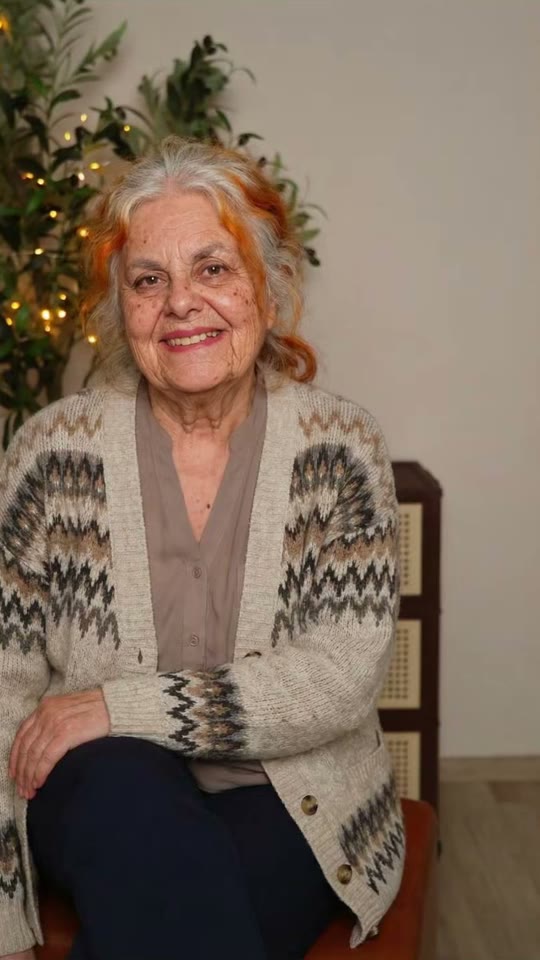
A take of the age filter by @georgi.secundar15 (April 2026, 171,000 views): her own photo, then her at 80. Solo makes the full aging video from your photo.
"직접 만들기"를 누르고 본인(18세 이상) 사진을 추가하세요. 얼굴이 선명하고 허리 위까지 나온 사진이어야 합니다. 카메라로 찍거나 라이브러리에서 선택하세요.
생성 버튼 클릭
버튼에 가격이 표시됩니다. Seedance 2.5가 사진에서 바로 AI 나이 필터 장면을 촬영하며 중간 사진 없이 오리지널 사운드로 10초간 진행됩니다. 프롬프트 작성이 필요 없습니다.
다운로드 또는 공유
몇 분 안에 9:16 MP4로 영상이 준비됩니다. 다운로드하거나, 휴대폰에서 공유하거나, 나중에 내 영상에서 찾을 수 있습니다.
어떤 사진이 가장 좋을까요?
성인(18세 이상) 한 명의 사진 한 장이 필요합니다.
카메라를 향한 얼굴, 선명하고 조명이 좋으며 허리 위까지. 영상이 포즈와 장소를 유지하므로 마음에 드는 사진을 선택하세요.
선글라스, 마스크, 뷰티 필터 없이, 사진에 다른 사람이 없어야 합니다.
모든 나이에서 옷이 동일하게 유지됩니다. 무지 옷이 가장 잘 작동하며, 셔츠의 로고나 프린트는 무지로 나옵니다.
단순한 배경(벽, 거리, 정원)이 각 단계를 깔끔하게 유지합니다.
이 템플릿은 성인용입니다. 본인의 사진이나 동의한 성인 친구의 사진을 사용하세요. 어린이, 유명인, 낯선 사람의 사진은 절대 사용하지 마세요.
AI 나이 필터 트렌드는 어디서 시작되었나요?
The aging filter that fills TikTok in 2026 is a phone editor template known as the "5 ages filter". It takes one photo and shows you at 4, 12, 21, 40 and 80 in the same place, one age on each beat, while the numbers fly onto your face. It started in the UK on 25 March 2026, when @aitrendsdaily1 posted "Me at 5 ages trend" on the sound "original sound - aitrends". A day later @youngcapcutg's "5 ages filter trend" was on its way to 10 million views, and on 31 March @phoenixwilder67's take ("Ok, but 40 is literally my Mum!") reached 16.9 million, the biggest so far.
New waves followed: "Different ages filter" in June (5 million views), "Aging AI filter trend" in August (2.1 million), and how-to posts in the US in September and October that call it the "aging timeline face trend". In April a 12, 20, 40, 80 version spread on a sound from Burkina Faso with "AI beat-synced effect" tutorials (1.8 million views), and that sound was still adding about 100 videos a day on 26 October.
@aitrendsdaily1 posts "Me at 5 ages trend", the first post on the template's sound: one photo, then the same person at 4, 12, 21, 40 and 80 (463,000 views by 26 October). TikTok
@youngcapcutg posts "5 ages filter trend": the first take to pass a million views, 10 million by 26 October. TikTok
@phoenixwilder67's take ("Ok, but 40 is literally my Mum!") reaches 16.9 million views, the biggest of the trend. TikTok
A 12, 20, 40, 80 version spreads with "AI beat-synced effect" tutorials on a sound from Burkina Faso: @faas6486's reaches 1.8 million views. TikTok
A new wave as the "Different ages filter": @zfrjnozdo8's post reaches 5 million views. TikTok
미국 하우투 게시물이 "viral age filter aging timeline face trend"라고 부름: @mengg4872가 조회수 638,000 도달. TikTok
Copy and paste
AI 나이 필터 프롬프트
이것은 필요 없습니다. 원탭 흐름이 자동으로 실행합니다. [Image 1]은 당신의 사진입니다. 영상 모델이 이것을 참조로 사용하여 먼저 사진 단계 없이 바로 장면을 촬영합니다.
Solo
1 photo: you (18+), face clear, waist upSeedance 2.510 s · 480P · 9:16126 credits
Video prompt
A viral AI aging filter video: the person in [Image 1] gets older step by step, one age on each beat, like their own photo coming to life. Vertical 9:16, photorealistic, a locked-off camera: the same framing, the same pose, the same place, the same light and the same background as [Image 1] in every frame. Only the age changes.
THE PERSON is the person in [Image 1], in every frame: copy the exact face from [Image 1] (the face shape, eye color and eye shape, eyebrows, nose, mouth, ears, skin tone, and any moles, freckles or glasses), so their friends recognize them at once at every age. A woman stays a woman, a man stays a man. The same clothes as in [Image 1] at every age (any print or logo stays plain), their own hairstyle and hair length, the hair color turning grey and then white. A beard only if [Image 1] has one. Exactly one person.
The steps, each one a quick, smooth morph of about half a second on the beat, with no cut, no flash and no camera move:
0-2 s: the person exactly as in [Image 1], at their age in the photo, with a small natural blink and breath.
2-4 s: the same person at about 25, a young adult: smooth skin, full hair in their own color, bright eyes.
4-6 s: the same person at about 40: the first fine lines around the eyes and the mouth, a few grey hairs at the temples, a slightly fuller face.
6-8 s: the same person at about 60: deeper lines, mostly grey hair, thinner hair or a higher hairline, a softer jawline.
8-10 s: the same person at about 80: white or silver hair, deep wrinkles, age spots, thinner lips, the shoulders a little bent, and a warm, calm smile into the camera.
Audio: an original, upbeat instrumental beat with a soft whoosh on each change. No voice, no lyrics, no known song.
Every step shows a grown adult with an adult face and body: never a child, a teen or a baby, never a teenage look. No text, no numbers, no letters, no age labels, no captions on the screen. No logos, no watermark. No second person, no mirror double. One head, two arms and five fingers on each hand. Never a famous person's face.
You pay in credits. The Generate button shows this price before you spend anything. These are the options on this page.
Option
Model
What you get
Credits
Solo
Seedance 2.5
10 s · 480P · 9:16
126
One-time packs and plans are on the pricing page. A failed video gives its credits back.
AI 나이 필터 영상에서는 초마다 무슨 일이 일어나나요?
10초짜리 세로 클립 한 개를 받으며, 카메라는 절대 움직이지 않습니다. 2초마다 다음 나이로 넘어가며, 비트에 맞춰 빠르고 부드러운 변형이 이루어집니다.
초
나이
변화 내용
0-2
현재 모습
사진이 살아남: 깜빡임과 호흡
2-4
약 25세
매끄러운 피부, 본래 색상의 풍성한 머리카락
4-6
약 40세
눈가의 잔주름, 관자놀이 첫 백발
6-8
약 60세
깊어진 주름, 대부분 회색 머리, 부드러운 턱선
8-10
약 80세
흰 머리, 깊은 주름, 약간 구부러진 자세와 따뜻한 미소
얼굴 윤곽, 눈, 피부 톤, 안경은 당신 그대로이고 포즈, 옷, 장소도 마찬가지입니다. 이것이 AI 나이 영상이 작동하는 이유입니다. 분명히 당신이되 더 나이가 들었을 뿐입니다. 사운드는 클립과 함께 제공됩니다. 각 변화마다 부드러운 휘파람 소리가 나는 오리지널 비트입니다. 영상은 Seedance 2.5를 포함한 최고 품질의 AI 영상 모델에서 나옵니다. 매번 새로운 촬영이므로 각 나이의 모습이 조금씩 다릅니다.
트렌드처럼 화면에 나이를 추가하는 방법
The trend shows the ages as numbers on screen. AI video models write numbers badly, so your clip has no text: you add the ages yourself in the TikTok editor (or any video editor) in under a minute.
Add this text
At
Now (or your age)
0 s
25
2 s
40
4 s
60
6 s
80
8 s
Put them in a column on the left, like the 5 ages filter, or one at a time over your face. The original template starts at 4 and 12. This one starts at 25, because it is for adults only, so it works as an all ages filter for grown-ups: the different ages filter look, with you as an adult at every step. It is also an ai age progression in one clip, or an age progression ai video if you want to answer what will i look like when i'm older.
무엇이 잘못될 수 있고 어떻게 고치나요
문제
이유
해결
80세에 다른 사람처럼 보임
강한 노화가 얼굴을 가림
좋은 조명에서 선명하고 정면을 향한 사진을 사용하고 다시 실행하세요
클립이 끊기거나 카메라가 움직임
AI가 가끔 샷을 변경함
다시 실행하세요. 대부분의 촬영은 한 고정 샷을 유지합니다
옷이나 장소가 바뀜
AI가 나이에 맞게 옷을 입힘
다시 실행하세요. 무지 옷이 가장 잘 유지됩니다
머리카락이 80세에도 어두운 색
어둡거나 염색했거나 매우 짧은 머리
다시 실행하세요. 실행마다 달라집니다
사진당 성인 한 명. 얼굴이 작은 먼 사진은 AI가 작업할 것이 적습니다.
게시 팁: 사운드, 해시태그, 캡션
클립에는 오리지널 비트가 포함되어 있어 사운드를 선택할 수 있습니다. TikTok 나이 필터 트렌드에 참여하려면 게시할 때 TikTok에서 인기 있는 사운드를 추가하세요. 변화는 2초마다 발생하므로 대부분의 비트가 맞습니다.
It is the age filter trend of 2026: one photo becomes a short video of you at different ages, one age on each beat, in the same pose and place, with the ages on screen. It started in the UK in March 2026 as the 5 ages filter and came back in new waves through October.
내 사진에서 AI 나이 필터 영상을 어떻게 만드나요?+
"직접 만들기"를 누르고 자신의 사진 한 장을 추가한 후 생성을 누르세요. 버튼에 먼저 가격이 표시됩니다. 10초짜리 AI 나이 필터 영상을 받습니다. 사진 속 당신, 그 다음 약 25세, 40세, 60세, 80세의 모습. 게시할 때 나이를 텍스트로 추가하세요.
이것은 나이 필터 영상인가요 사진인가요?+
A video. Most of the old age filter apps give you one still picture of you at 70 or 80. This aging filter video shows every step, from you now to you at 80, with a smooth morph on each beat, 10 seconds and vertical.
트렌드처럼 4세가 아닌 25세로 시작하는 이유는 무엇인가요?+
이 템플릿은 성인 전용이기 때문입니다. 원래 나이 필터는 먼저 어린이의 모습을 보여주지만 저희는 절대 어린이나 십대를 만들지 않습니다. 사진, 그 다음 25세, 40세, 60세, 80세를 받습니다.
나이 타임라인 얼굴 트렌드란 무엇인가요?+
It is the US name for the same trend in September and October 2026: how-to posts call it the "viral age filter aging timeline face trend" and ask "what I look like at 80 years old". The aging timeline here is you now, 25, 40, 60 and 80.
AI 나이 필터는 정확한가요?+
어떤 AI도 실제로 어떻게 나이가 들지 알 수 없습니다. 얼굴에서 좋은 추측을 할 뿐입니다. 그래서 사람들이 "40세는 완전 우리 엄마"같은 캡션으로 게시합니다. 이 AI 나이 필터를 예측이 아닌 재미있는 모습으로 대하세요.
다른 사람을 위한 AI 나이 영상 생성기로 사용할 수 있나요?+
동의한 성인에게만 가능합니다. 친구, 파트너 또는 부모. AI 나이 영상 생성기로서 모든 성인 사진에 동일하게 작동합니다. 어린이, 유명인, 낯선 사람의 사진은 절대 사용하지 마세요.
비트 싱크 나이 효과란 무엇인가요?+
프로모터 튜토리얼이 사용하는 이름입니다. "이 AI 비트 싱크 효과를 만드는 방법". 나이가 음악 비트에 맞춰 바뀝니다. 클립은 자체 비트로 2초마다 바뀌므로 대부분의 인기 사운드와 동기화 상태를 유지합니다.
영상에 숫자가 표시되나요?+
아니요. AI 영상 모델이 숫자를 잘 쓰지 못하기 때문에 클립에는 텍스트가 없습니다. TikTok 편집기에서 몇 번의 탭으로 나이를 추가하세요. 현재, 25세, 40세, 60세, 80세를 0초, 2초, 4초, 6초, 8초에 추가합니다.
No watermark. A failed video gives its credits back. Secure checkout by Stripe.
AI Aging Filter video126 credits · ready in a few minutesCreate your own
Cookie Settings
We use cookies to improve your experience, analyze site usage and support our marketing. You can accept or reject non-essential cookies; essential cookies needed for sign-in always stay on.

 AI Aging Filter