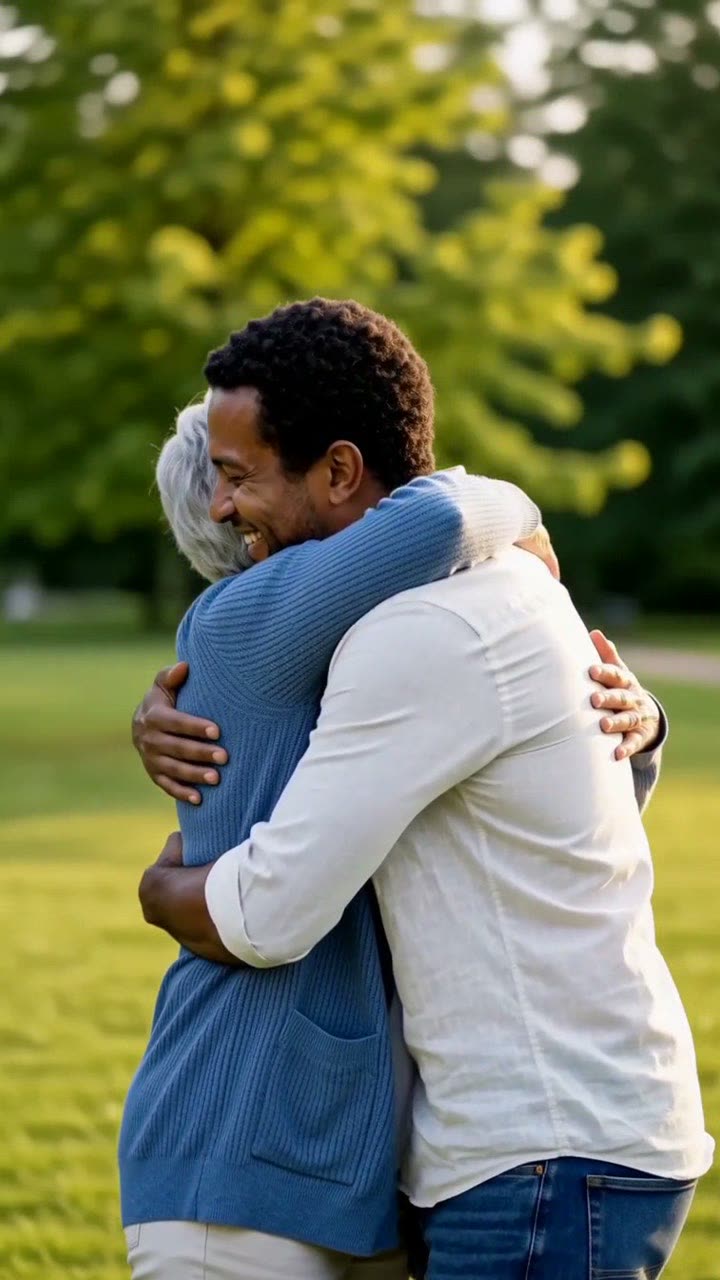
AI Hug Video: Create a Heartfelt Hug from Two Photos

In a bright park, two people walk up to one another and embrace warmly. Upload two images, get an 8-second video with soft original audio.

The original AI Hug reelOriginal reel
  • 2 photos you upload
  • 8 s video with audio
  • 9:16 for TikTok, Reels, Shorts
  • No watermark

No prompt to write: Add your photos and tap once

Create your own

Ready in a few minutes · From 103 credits

An AI hug video shows two people from separate photos walking together and embracing. Users create them with friends, partners, parents, or childhood photos of themselves. You provide two photos with one person each, and both individuals must consent.

Also called hug my younger self · trend hug my younger self · trend hug your younger self · ai hugging · hug video · Polaroid hug trend · Hug yourself trend

Step by step

Create the AI Hug video with Smew AI

Everything happens in your browser. No editing software, no prompts to write, no watermark.

  1. Upload the two photos

    Click "Create your own" and upload the first person, then the second. Upload order matters because it determines positions in the scene. Use your camera or select from your library.

  2. Click Generate

    The button displays the cost. You get an 8-second video directly from your two photos, with its own audio. No prompt writing needed.

  3. Save or share

    Your video arrives in minutes as a 9:16 MP4. Save it, share directly from your device, or access it later in your Library.

What photos work best?

Choose two photos with one person each, showing from the waist or knees upward. The prompt positions both people in a park from the knees up, so tight face crops make the model guess body and clothing details.

  • Clear, forward-facing faces with good lighting. Both faces need to stay recognizable when they turn during the embrace.
  • Matching lighting in both photos makes the two people appear in the same location.
  • Simple clothing performs better. The prompt maintains each outfit, and complex patterns may blur when bodies touch.
  • Only use photos of yourself and consenting adults.

Origins of the AI Hug trend

The AI hug predates most AI video trends. During fall 2024, TikTok creators placed two images next to each other, told an image-to-video tool to "make them hug", then shared the output; Dexerto published a guide on 1 October 2024. A fresh take arrived on Instagram in September 2025: "hug my younger self", where creators used an AI image tool to generate a photo of their grown-up self embracing their childhood version. Storyboard18 reported on it on 16 September 2025.

The hug has since evolved into a standard format instead of a one-off meme. When we looked on 29 September 2026, five of the AI video platforms we reviewed included a hug format. In the gallery that displays usage numbers, "AI Hug" recorded 281,900 total uses, topping every format with a visible count; the runner-up had 157,100.

Our take keeps things simple and heartwarming: a bright park, a cozy friendly embrace, gentle piano with birdsong.

  1. Dexerto documents the viral TikTok "AI hugging" trend: side-by-side photos animated into an embrace. Dexerto

  2. Storyboard18 reports on "hug my younger self", an Instagram trend featuring AI photos of adults embracing their younger selves. Storyboard18

  3. A template gallery displays 281,900 total uses for its "AI Hug" template, exceeding all other templates with public counts.

  4. Five AI video platforms we reviewed provide hug templates; one gallery features two options, "Hug Together" and "Hug Your Love", in its main display.

Copy and paste

The AI Hug prompts

These aren't required: the one-tap workflow runs them automatically. A photo prompt inserts your photo into the scene, followed by a video prompt that animates it. Want customization? Copy and edit them on the Create page.

Two people hug

2 photos: first person + second personSeedance 2.58 s · 720p · 9:16103 credits
Video prompt

An 8-second vertical video in a sunny park with soft golden light, one continuous shot. The person from [Image 1] and the person from [Image 2] stay recognizable: each keeps their own face, hair, age, body and clothes, and the two faces never blend. Both are shown from the knees up. 0-3 s: they stand a few steps apart, smile, and walk toward each other. 3-6 s: they meet and share a warm, tight, friendly hug, arms around each other, relaxed and natural. 6-8 s: they stay in the hug, smiling. Exactly two people. No text, no logos, no watermark. Audio: soft piano and birdsong.

579 characters

Credit cost breakdown

You pay in credits. The Generate button shows this price before you spend anything. These are the options on this page.

OptionModelWhat you getCredits
Two people hugSeedance 2.58 s · 720p · 9:16103

One-time packs and plans are on the pricing page. A failed video gives its credits back.

How do you create the "hug my younger self" video?

Apply the same prompts with different photos: an old childhood photo of yourself first, then a current photo of yourself second. The photo step positions both versions of you in the park, and the video step animates you walking together and hugging. Upload sequence doesn't affect the hug, so either order works.

Suggestions for this variation:

  • Scan or photograph old prints flat without glare. A clear old photo preserves your child face.
  • If the child appears as tall as the adult, add "the first person is a small child about 7 years old" to the photo prompt and regenerate the image.
  • In the video prompt, replace "a warm, tight, friendly hug" with "the adult kneels down and hugs the child" for better height proportions.

This matches the 2025 Instagram trend concept, but as a moving video with audio, not just a still image.

Why do AI hug videos get shared widely?

A hug is brief, straightforward and touching. Viewers grasp it immediately, and the emotional moment arrives quickly. The format also includes a natural sharing incentive: the other person in the video wants to repost.

The most viral versions add narrative context. Distant friends in different countries. A parent with their grown child. Your present self with your seven-year-old self. Include the backstory in your caption, like "we haven't seen each other in four years", and let the video convey the emotion.

Common issues and solutions

ProblemFix
The two faces blend into oneUpload clearer photos with one person each, then run it again.
One face changes when it turns during the hugNormal in hug videos. Running it again often resolves this. Clearer photos help.
Arms or hands mergeSimple clothing helps. Run the video again.
The people look stiffRun it again.
The video model refuses the photoSome models reject certain real faces or photos. Your credits are refunded. Try another photo, or run it again.

Do you need consent for an AI hug video?

Absolutely. Both people must give permission. Creating a hug video of someone without consent can violate platform policies and personal rights, and cause harm. Only use yourself, consenting adults, or your own childhood photos.

Avoid using celebrity photos, strangers, or anyone you're not in touch with. For children's photos, only use your own childhood images or those with parental approval, and keep the prompt appropriate, as ours does.

FAQ

AI Hug trend questions

What is the AI hug trend?
It's a trend where AI converts two separate photos into a video of those people hugging. It gained traction on TikTok in fall 2024, resurged in 2025 as "hug my younger self", and has become one of the most popular templates in AI video apps.
How does an AI hug video generator work?
Upload two photos, one person each. Seedance 2.5 makes an 8-second park clip directly from those photos: they walk together and hug, with piano and birdsong.
Is there a hug my younger self AI generator?
This page hugs the two people in your two photos. It does not have a separate younger-self pose, and you cannot rewrite the hug on this page.
Is this the Polaroid hug trend?
It's the same concept, as a video. In the 2025 "hug my younger self" posts, users employed Google's Nano Banana image model to create nostalgic, Polaroid-style images, as Storyboard18 reported. This page makes an 8-second hug in a park directly from two photos.
Can I make an AI hug video from one photo with two people?
The prompts are designed for two separate photos with one person each, as this maintains facial clarity. If you have one photo of both people, split it into two separate photos, one person per photo, and upload both.
Can I make an AI hug video with someone who has passed away?
This is a deeply personal and sensitive decision, so approach it thoughtfully. Discuss with your family first, choose a photo they're comfortable with, and consider how relatives will respond before sharing publicly. If uncertain, keep it private. Remember the video is an AI creation, not an actual memory.
How long is the AI hug video and what format is it?
The default is 8 seconds, vertical 9:16, 720p, with sound, as an MP4 you can post to TikTok, Reels or Shorts. It lands in your Library with no watermark. You can change the length in AI Video, and the price updates on the button.
Is there an AI hug generator?
Yes, this page serves that purpose. Step 1 creates a hug AI photo, a single image of both people in a park, and step 2 animates that image into a hug video.
Where is the hug trend prompt?
Right here on this page: our hug AI prompt includes a tested photo prompt and video prompt, with the steps above serving as a guide. No external hug trend AI prompt from Gemini or other sources needed.
Is the hug trend on TikTok a photo or a video?
TikTok and Instagram posts of this trend are sometimes stills and sometimes videos. This page only makes the 8-second video from two photos. A separate hug photo is not offered here.

More trends

Other AI video templates

Template

La Tormenta de Arena AI Trend: Te He Perdido Entre la Gente

Someone gazes down from a balcony overlooking a crowded club, the view shifts to the dance floor below, and a bright spotlight reveals another person looking upward. Upload two photos or pet images to generate your video with its soundtrack.

Read more
Template

Hotel Lobby AI: Create the Hotel Lobby Trend Video

Put two pets in the orange booth from the popular cat reel, song included, or put two people in a new 10-second duet with a new beat.

Read more
Template

Gas Station Dance AI: Climb Out of the Car and Do the Mop Dance

One photo puts you in the night-time gas station mop dance: you climb out of a dark car and dance on the empty forecourt for 15 seconds, with the song. The three-friend road trip version is not offered on this page.

Read more
Template

80s AI Trend: Your 1985 Photo and Home Video

A single selfie transforms into a vintage 1985 photograph with period hair and a date stamp. Keep just the image, or bring it to life as a 10-second VHS-style clip with audio.

Read more
Template

AI Baby Generator: Create a Future Baby Home Video

Upload photos of two partners and watch an imagined baby come to life: a retro camcorder sequence featuring first steps, breakfast chaos, and shoulder rides.

Read more
Template

AI Crying Video: Create the Tears Effect From a Single Photo

Your photo transforms into a cinematic nighttime goodbye: facing someone special, tears glistening as you try to smile, the expression crumbling, then turning to leave.

Read more

Create your own AI Hug video

Upload two photos and click once. No prompts to write. 103 credits.

No watermark. A failed video gives its credits back. Secure checkout by Stripe.