AI Caricature: An oversized head with a familiar face

Give a portrait a sculpted caricature look: a larger head, a smaller body and an exaggerated expression. Animate yourself, a couple or a pet, or choose Photo for a still image.

The original AI Caricature reel by @danny.kabintoOriginal reel
  • 1 photo you add
  • 10 s video or a still photo
  • No prompt to write
  • No watermark

No prompt to write: Add your photo and tap once

Create your own

Ready in a few minutes · From 3 credits

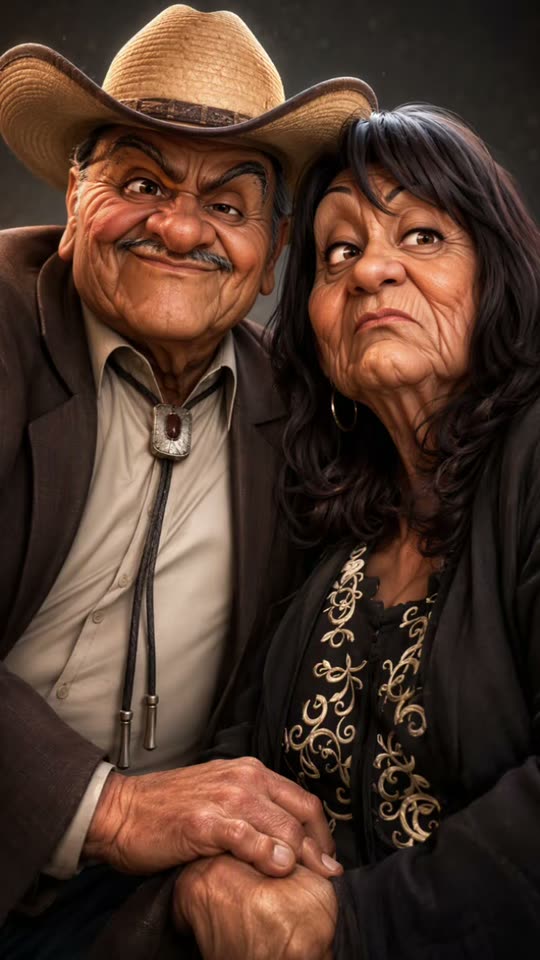
The familiar face becomes an animated-character exaggeration: a large head, a smaller body and an expression that seems to know exactly what you are thinking. The AI Caricature format adds a playful older-self interpretation, turning a neutral portrait into a skeptical frown, a smug smile or a shared couple joke.

Smew offers You, Couple and Pet videos, plus Photo for a still image. The video choices are 10-second, 1080p vertical takes and are silent in the current configuration. Photo is a separate 2K image choice. The age styling is fiction and exaggeration, not a prediction of how you will really look.

Example

A closer look at AI Caricature

Visual references for the format, not Smew customer results. Your generation can change fine details, expressions and movement.

Visual reference

A visual reference, not a Smew customer result. Your generated details will differ.

Use this reference
Step by step

Make your AI Caricature video

Choose a version, add the required photos and check the displayed credits before generating.

  1. Choose a person, couple, pet or still

    You takes one adult photo. Couple uses one image of both consenting adults together, with both faces clear. Pet takes one animal image. Photo uses an adult portrait or couple image for a still caricature rather than animation.

  2. Review video versus image output

    The current video choices use Kling 3.0 at 56 credits for 10 seconds, 1080p and vertical 9:16, after caricature-image preparation. They are silent. Photo uses Nano Banana 2.1 at 3 credits for a 2K vertical image.

  3. Review resemblance and expression

    Follow the task on Dashboard and open the saved result in Library. Check whether the exaggerated features still read as the intended subject, whether a couple stays on the correct sides and whether the expression remains friendly enough for your intended post.

Choose a photo that keeps the subject recognizable

Choose a sharp frontal image in even light. Waist-up or full-body framing gives the caricature clothing and pose information as well as a face. Glasses and a distinctive outfit can provide useful recognition cues, but sunglasses, a hand across the face or a strong filter can hide what the model needs.

Couple is unusual among multi-person workflows because it takes one photo of both adults together, not two separate portrait slots. Keep both faces clear and large enough to read. The relative left and right positions guide the paired image. Avoid a crowded party photo where the intended pair is ambiguous.

For Pet, use one animal facing the camera with clear coat markings, preferably with enough body visible to guide proportions. Use adult photographs with permission for the human choices and your own or an owner-approved animal image. Printed logos and fine lettering are not reliable details to preserve in a stylized result.

Where the format comes from

The oversized-head caricature predates AI tools, from street portraits to animated character design. Recent photo-driven versions borrow that visual language while allowing someone to generate a polished still rather than commission or draw one manually. Related formats include 3D-character portraits, job-themed caricatures and playful older-self interpretations.

The examples linked below show those related uses rather than prove a single inventor. The older-couple variation turns aging into a relationship joke: familiar clothing and facial cues remain while wrinkles, grey hair and expressive eyebrows are exaggerated. It should be treated as a stylized imagined future, not a biological assessment.

Smew's workflow offers both a still and animation. The reference context does not establish that all services use the same models, age treatment or sound. In particular, this page's video choices are currently silent, even though a source example may include cartoon music or vocal reactions.

  1. A written report discusses a photo-to-3D-caricature image trend. Credited example

  2. A tutorial illustrates a cartoon-caricature effect workflow. Credited example

  3. A job-themed post shows another use of the caricature idea. Credited example

  4. A later how-to revisits a caricature filter interpretation. Credited example

  5. An older-self template variation adds a comic aging treatment to the caricature format.

  6. A couple example applies the exaggerated style to a shared photo. Credited example

  7. Another tutorial shows the effect discussed in Spanish-language captions. Credited example

  8. Later posts continue using funny-caricature labels, without establishing a fixed popularity ranking.

Copy and paste

What the built-in recipe controls

These instructions are included in the template. Your uploads provide the identities; the selected version controls the scene and movement.

You

1 photo: you (18+), face clear, waist up or full bodyKling 3.010 s · 1080p · 9:1656 credits
1. Prepare the image · Nano Banana 2.1

Render the uploaded adult as a friendly polished 3D caricature, visibly about thirty years older. Keep the underlying face shape, eye color, skin tone, recognizable hair pattern, facial hair and visible glasses or jewelry. Turn the hair silver, introduce soft wrinkles and fuller brows, and exaggerate the nose and ears gently. Give the head roughly one third of the figure’s height, on a smaller coherent body dressed like the input. Pose the character with an unimpressed raised-brow expression. Simplify the original setting into a softly blurred warm backdrop; use a dark brown studio glow if the setting is unsuitable. Compose a vertical portrait with natural soft light and smooth sculpted materials. This must be a fully rendered character face, not a photograph pasted onto a cartoon. Include one adult only, no lettering, logos, borders or extra limbs.

This image is prepared automatically before the video step. Both steps are included in the displayed credit cost.

2. Animate the prepared image

Animate the prepared portrait with a gentle camera push. Hold the initial pose and blink over 0–2 s. During 2–5 s lower the brows into an exaggerated grumpy frown, purse the lips and add a skeptical sideways glance. Let that tension soften into a self-satisfied grin during 5–8 s, raising the chin and briefly wiggling the eyebrows. Finish with a small shrug and wink over 8–10 s. Animate the prepared still as the established starting frame. Preserve its cast, face design, body proportions, styling, palette, outfit and background; do not redraw the scene or replace it with a new character between movements. Use quiet character reactions and restrained playful instrumental sound, without words or a recognizable recording. Avoid unintended duplicates, fused bodies, extra limbs, captions, logos, watermarks and visible interface elements.

846 characters

Couple

1 photo: a photo of you two together (adults), both faces clearKling 3.010 s · 1080p · 9:1656 credits
1. Prepare the image · Nano Banana 2.1

Create a warm 3D caricature still of the same two adults in the uploaded photograph, retaining their left-to-right order and individual features. Age both appearances by roughly thirty years: silver their respective hairstyles, add gentle wrinkles and prominent expressive brows, and enlarge noses and ears slightly. Keep each person’s own complexion, eyes, facial hair, glasses, jewelry and clothing recognizable. Oversized heads should occupy about a third of each small, anatomically coherent body. Begin with the left character grumpy and the right character contentedly amused. Keep their original pose relationship against a simplified warm background with soft, cinematic light. Frame both complete figures or the same comfortable portrait crop as the input. Render faces as dimensional characters throughout, never flat photo cutouts. Exactly two adults, no merged faces, extra people, writing, logos or borders.

This image is prepared automatically before the video step. Both steps are included in the displayed credit cost.

2. Animate the prepared image

Animate the two prepared caricatures in one slowly approaching shot. Both hold and blink during 0–2 s. Over 2–5 s the left character turns a grumpy sideways look toward the right character, who remains smugly cheerful toward camera. During 5–8 s the left rolls their eyes while the right gives a gentle shoulder bump. Close with their large heads leaning together; the left finally smiles and the right winks. Animate the prepared still as the established starting frame. Preserve its cast, face design, body proportions, styling, palette, outfit and background; do not redraw the scene or replace it with a new character between movements. Use quiet character reactions and restrained playful instrumental sound, without words or a recognizable recording. Avoid unintended duplicates, fused bodies, extra limbs, captions, logos, watermarks and visible interface elements.

875 characters

Pet

1 photo: your pet, face clear, facing the cameraKling 3.010 s · 1080p · 9:1656 credits
1. Prepare the image · Nano Banana 2.1

Make a polished 3D caricature portrait of the uploaded pet, keeping its species, breed, coat pattern, fur length, eye color, ear shape and visible collar recognizable. Exaggerate the head to about half the total figure height and keep the smaller body consistent with the animal’s own pose and proportions. Add a little gray around the muzzle, large expressive eyes and thick furry brows for an affectionate old-timer look. Establish a skeptical raised-brow expression before animation. Simplify the photo’s setting into a warm blurred background, or use a softly glowing dark brown studio backdrop. Use gentle light and clean sculpted surfaces while retaining clear fur details. Include exactly one animal with real paws and the proper number of limbs. Do not add human hands, people, writing, logos or clothing absent from the upload.

This image is prepared automatically before the video step. Both steps are included in the displayed credit cost.

2. Animate the prepared image

Start with the prepared animal looking still into camera and blinking during 0–2 s. Lower the furry brows into a skeptical side-eye during 2–5 s, adding a small ear twitch. Through 5–8 s let it huff softly and tilt its oversized head with an unimpressed expression. Finish with a quick nose lick and direct eye contact over 8–10 s. Use one slow camera approach. Animate the prepared still as the established starting frame. Preserve its cast, face design, body proportions, styling, palette, outfit and background; do not redraw the scene or replace it with a new character between movements. Keep the prepared animal’s specified anatomy, with its own species-appropriate paws or feet; never substitute a human torso or human hands. Use quiet character reactions and restrained playful instrumental sound, without words or a recognizable recording. Avoid unintended duplicates, fused bodies, extra limbs, captions, logos, watermarks and visible interface elements.

968 characters

Photo

1 photo: your photo: you, or you two (adults), faces clearNano Banana 2.1Photo · 2K · 9:163 credits
Photo prompt

Produce a finished vertical 3D caricature portrait from the uploaded photo. Keep the same one or two adults and their arrangement, with no new subject. Age their appearance about thirty years through silver hair, gentle wrinkles, expressive brows and subtly enlarged noses and ears. Preserve each person’s facial structure, coloring, glasses, facial hair and recognizable clothing. Exaggerate each head to roughly one third of the figure while giving the small body coherent anatomy. Use smooth dimensional materials and warm soft lighting against a simplified source setting or a dark brown studio glow. Give them an affectionately grumpy or amused expression. This is a fully illustrated sculptural face, never a flat photo-face collage. Keep the mood kind rather than cruel; add no illness, grotesque distortion, printed words, logos or watermark.

850 characters

Models, duration and credit cost

You pay in credits. The Generate button shows this price before you spend anything. These are the options on this page.

OptionModelWhat you getCredits
YouKling 3.010 s · 1080p · 9:1656
CoupleKling 3.010 s · 1080p · 9:1656
PetKling 3.010 s · 1080p · 9:1656
PhotoNano Banana 2.1Photo · 2K · 9:163

One-time packs and plans are on the pricing page. A failed video gives its credits back.

An exaggerated portrait that changes expression

The visual language is polished 3D illustration rather than a natural photograph. A larger head and compact body concentrate attention on eyebrows, eyes and mouth. The older-self interpretation adds grey or softened hair cues and expression lines, pushing an ordinary face toward either amused confidence or comic grumpiness.

In a video take, a blink can establish the character before the expression changes. You may see a skeptical look soften into a grin or a playful head movement. A couple can exchange looks and lean toward one another, while a pet gets an exaggerated muzzle, eyebrows or head tilt. These are intended expression arcs, not exact frame promises.

The current videos are 10 seconds at 1080p in vertical 9:16 and use Kling 3.0 after a caricature image is prepared. They do not include native audio or a configured soundtrack. Expect a silent animated portrait rather than cartoon music, a chuckle or a copied social sound.

The exaggeration should still leave recognizable cues. Review face shape, glasses, hair and clothing as a whole rather than judging similarity by one enlarged feature. The imagined age is a visual joke, not an estimate of the subject's actual future appearance.

Pick animation or a still without confusing the inputs

You is for one adult identity and a short expressive animation. Couple uses one photograph of two consenting adults together, keeping their relative sides as guidance. Pet applies the same big-head caricature idea to one animal rather than requiring a human-shaped character.

These three video choices currently cost 56 credits each. Photo is different: it uses Nano Banana 2.1 for a 2K image at 3 credits, with no 10-second movement to wait for or soundtrack to expect. It is appropriate when you want an avatar, comparison image or still portrait rather than an animated reaction.

All current outputs use vertical 9:16. Choose the output first so the cost and result match your goal. The Kling video choices on this page are silent; add a soundtrack in your publishing app if you want one. Likewise, selecting a still is not a promise that a video will also be created. The saved recipe handles the stylization without requiring you to write a caricature prompt.

Several names, one family of visual ideas

Caricature filter, funny caricature, big-head portrait and 3D caricature are overlapping labels. Older-self and growing-old-together captions describe a specific joke within that family, while job-themed caricatures may use a completely different composition. A shared word does not mean every tool produces the same output.

This page emphasizes a polished character interpretation and, for the video choices, a short expression sequence. It is not a live camera filter, a hand-drawn commission or a general editor for every illustration style. The source photograph supplies appearance cues; the model interprets them rather than preserving every accessory and printed word exactly.

That distinction matters when choosing between a couple photo and two individual portraits. Couple expects both adults together in one image, while You expects one subject. Use the explicit role labels instead of assuming all AI caricature makers use the same upload scheme. The still and video choices also use different models and prices, which are displayed before submission.

Share the transformation as a friendly fiction

A before-and-after post makes the exaggeration easy to read: viewers see the source context and then the character interpretation. You can assemble that comparison in a separate editor or post the still and animation together where the platform supports it. This template does not promise an automatic wipe from the original photograph.

For a couple, agree on the joke before tagging a partner. A caption imagining a future argument over the remote or a shared retirement expression can be warm without asserting a real age prediction. Avoid cruel comparisons or implying the caricature reveals a hidden truth about the subject.

The current video is silent, so any music you add later is a separate rights and editing choice. Keep an AI disclosure and permission for the source photo. Review the full expression change before sharing: an unintended face blend, altered glasses or a harsh expression may change the tone of an otherwise friendly idea.

FAQ

AI Caricature questions

What is the AI caricature trend?

It turns a photograph into a stylized character with an enlarged head and exaggerated features. The older-self variation adds playful aging cues and expressive reactions. Smew offers a still image or a short silent animation. The look is fictional illustration, not a prediction or factual assessment of the subject.

How do I make an AI caricature from my photo?

Choose You, Couple, Pet or Photo, upload the appropriate clear image and check the cost before starting. The video choices create a 10-second expressive take after image preparation; Photo creates only a still. Dashboard tracks the task and Library holds the saved result.

Is there a caricature filter app?

No separate application or external project link is required for this website workflow. It is a photo-generation process rather than a live camera lens. You provide the image and select the output; the recipe supplies the stylization and, for video, the expression movement.

Why do I look older in my caricature?

The older-self treatment is part of this interpretation's humor: hair and expression lines are exaggerated along with head size and eyebrows. It is not a scientific age forecast. Review whether the result feels friendly and recognizable, especially before posting another person's caricature or a couple comparison.

Can I make an old couple caricature of me and my partner?

Select Couple and upload one photograph of both consenting adults together, with both faces clear. The relative sides guide the paired composition. This differs from a two-slot workflow using separate portraits. The current result is a silent 10-second 1080p video at 56 credits.

Can I make a caricature of my dog or cat?

Use Pet with one clear animal photograph. The recipe exaggerates head and expression while using the coat and face as identity cues. Inspect markings, muzzle and paws in the animation. No real costume or performance is required from the animal, and the current video is silent.

Can I get only the caricature picture?

Photo is the still-only choice. It currently uses Nano Banana 2.1 for a 2K image in vertical 9:16 at 3 credits. It does not create a 10-second animation as an extra result. Choose a video mode if expressive movement is the goal.

Can I use a photo of a child or a celebrity?

Use yourself or consenting adults aged 18 or over for the human choices. A public photograph is not automatically permission to create an expressive caricature. Pet has its own explicit slot. Keep the AI nature clear and obtain agreement to the joke as well as the image use.

Try AI Caricature with your photos

Choose your version, review its output and credits, then start your own take.

No watermark. A failed video gives its credits back. Secure checkout by Stripe.