ai 老化濾鏡是「每個年齡的我」趨勢:一張照片變成你逐漸變老的影片,每個節拍一個年齡,在相同姿勢和地點。在 TikTok 上稱為老化濾鏡,也稱為 5 ages filter。Smew AI 從你的照片製作:現在的你,然後是 25、40、60 和 80 歲。
Also called 年齡時間軸濾鏡 · 每個年齡的我趨勢 · 節拍同步年齡效果
Example
AI 年齡濾鏡影片的樣子
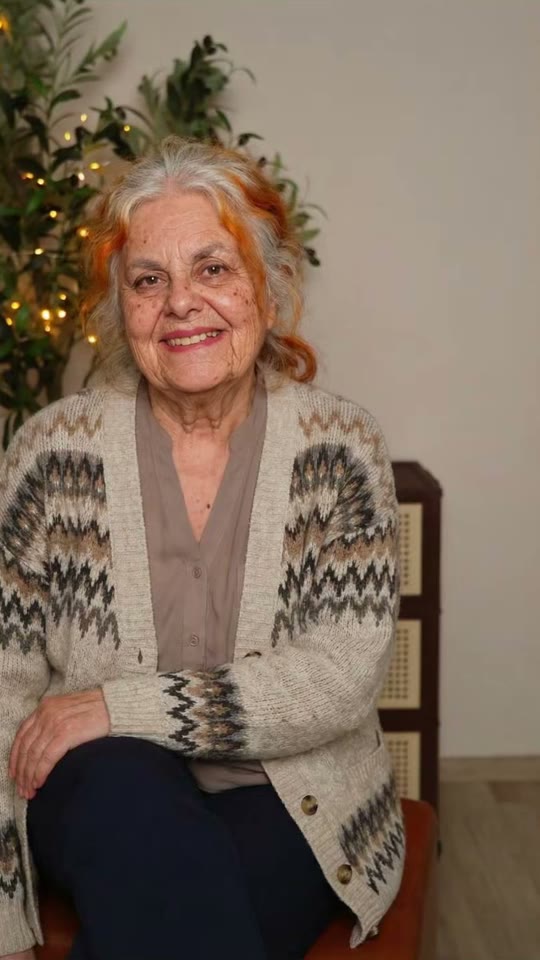
範例是創作者對趨勢的演繹,剪輯為成年年齡。Smew AI 不會複製這段片段:它會從你的照片製作新的年齡影片,僅限成人,螢幕上不顯示數字。
@georgi.secundar15 的原始 reel,3 秒
A take of the age filter by @georgi.secundar15 (April 2026, 171,000 views): her own photo, then her at 80. Solo makes the full aging video from your photo.
按鈕會顯示價格。Seedance 2.5 直接從你的照片拍攝 AI 年齡濾鏡場景,無需中間圖片,10 秒含原創音效。你無需撰寫提示詞。
下載或分享
影片幾分鐘內即可完成,格式為 9:16 MP4。下載它、從手機分享,或稍後在「我的影片」中找到它。
哪種照片效果最好?
你需要一張照片,一位成人(18 歲以上)。
面向相機,清晰且光線充足,腰部以上。影片會保留你的姿勢和位置,所以選一張你喜歡的照片。
不戴太陽眼鏡、不戴口罩、不使用美顏濾鏡,照片中沒有其他人。
你的衣服在每個年齡都保持不變。素色衣服效果最好;襯衫上的標誌或圖案會變成素色。
簡單的背景(牆壁、街道、花園)能讓步驟保持乾淨。
此範本僅適用於成人:使用你自己的照片或已同意的成年朋友的照片。絕不使用兒童、名人或陌生人的照片。
AI 年齡濾鏡趨勢從哪裡開始?
The aging filter that fills TikTok in 2026 is a phone editor template known as the "5 ages filter". It takes one photo and shows you at 4, 12, 21, 40 and 80 in the same place, one age on each beat, while the numbers fly onto your face. It started in the UK on 25 March 2026, when @aitrendsdaily1 posted "Me at 5 ages trend" on the sound "original sound - aitrends". A day later @youngcapcutg's "5 ages filter trend" was on its way to 10 million views, and on 31 March @phoenixwilder67's take ("Ok, but 40 is literally my Mum!") reached 16.9 million, the biggest so far.
New waves followed: "Different ages filter" in June (5 million views), "Aging AI filter trend" in August (2.1 million), and how-to posts in the US in September and October that call it the "aging timeline face trend". In April a 12, 20, 40, 80 version spread on a sound from Burkina Faso with "AI beat-synced effect" tutorials (1.8 million views), and that sound was still adding about 100 videos a day on 26 October.
@aitrendsdaily1 posts "Me at 5 ages trend", the first post on the template's sound: one photo, then the same person at 4, 12, 21, 40 and 80 (463,000 views by 26 October). TikTok
@youngcapcutg posts "5 ages filter trend": the first take to pass a million views, 10 million by 26 October. TikTok
@phoenixwilder67's take ("Ok, but 40 is literally my Mum!") reaches 16.9 million views, the biggest of the trend. TikTok
A 12, 20, 40, 80 version spreads with "AI beat-synced effect" tutorials on a sound from Burkina Faso: @faas6486's reaches 1.8 million views. TikTok
A new wave as the "Different ages filter": @zfrjnozdo8's post reaches 5 million views. TikTok
美國教學貼文稱其為「viral age filter aging timeline face trend」:@mengg4872 的達到 638,000 次觀看。TikTok
1 photo: you (18+), face clear, waist upSeedance 2.510 s · 480P · 9:16126 credits
Video prompt
A viral AI aging filter video: the person in [Image 1] gets older step by step, one age on each beat, like their own photo coming to life. Vertical 9:16, photorealistic, a locked-off camera: the same framing, the same pose, the same place, the same light and the same background as [Image 1] in every frame. Only the age changes.
THE PERSON is the person in [Image 1], in every frame: copy the exact face from [Image 1] (the face shape, eye color and eye shape, eyebrows, nose, mouth, ears, skin tone, and any moles, freckles or glasses), so their friends recognize them at once at every age. A woman stays a woman, a man stays a man. The same clothes as in [Image 1] at every age (any print or logo stays plain), their own hairstyle and hair length, the hair color turning grey and then white. A beard only if [Image 1] has one. Exactly one person.
The steps, each one a quick, smooth morph of about half a second on the beat, with no cut, no flash and no camera move:
0-2 s: the person exactly as in [Image 1], at their age in the photo, with a small natural blink and breath.
2-4 s: the same person at about 25, a young adult: smooth skin, full hair in their own color, bright eyes.
4-6 s: the same person at about 40: the first fine lines around the eyes and the mouth, a few grey hairs at the temples, a slightly fuller face.
6-8 s: the same person at about 60: deeper lines, mostly grey hair, thinner hair or a higher hairline, a softer jawline.
8-10 s: the same person at about 80: white or silver hair, deep wrinkles, age spots, thinner lips, the shoulders a little bent, and a warm, calm smile into the camera.
Audio: an original, upbeat instrumental beat with a soft whoosh on each change. No voice, no lyrics, no known song.
Every step shows a grown adult with an adult face and body: never a child, a teen or a baby, never a teenage look. No text, no numbers, no letters, no age labels, no captions on the screen. No logos, no watermark. No second person, no mirror double. One head, two arms and five fingers on each hand. Never a famous person's face.
你的臉型、眼睛、膚色和眼鏡保持不變,姿勢、衣服和地點也一樣。這就是 AI 年齡影片的魅力所在:那明顯是你,只是更老了。音效與片段一起提供:原創節拍,每次變化時都有輕柔的嗖嗖聲。影片來自頂級 AI 影片模型,包括 Seedance 2.5。每次運行都是新的演繹,所以每個年齡的外觀會略有不同。
如何像趨勢一樣在螢幕上添加年齡
The trend shows the ages as numbers on screen. AI video models write numbers badly, so your clip has no text: you add the ages yourself in the TikTok editor (or any video editor) in under a minute.
Add this text
At
Now (or your age)
0 s
25
2 s
40
4 s
60
6 s
80
8 s
Put them in a column on the left, like the 5 ages filter, or one at a time over your face. The original template starts at 4 and 12. This one starts at 25, because it is for adults only, so it works as an all ages filter for grown-ups: the different ages filter look, with you as an adult at every step. It is also an ai age progression in one clip, or an age progression ai video if you want to answer what will i look like when i'm older.
It is the age filter trend of 2026: one photo becomes a short video of you at different ages, one age on each beat, in the same pose and place, with the ages on screen. It started in the UK in March 2026 as the 5 ages filter and came back in new waves through October.
如何從我的照片製作 AI 年齡濾鏡影片?+
按「建立你自己的」,新增一張你自己的照片並按生成;按鈕會先顯示價格。你會得到一個 10 秒的 AI 年齡濾鏡影片:你照片中的樣子,然後是你約 25、40、60 和 80 歲的樣子。發布時將年齡添加為文字。
這是年齡濾鏡影片還是照片?+
A video. Most of the old age filter apps give you one still picture of you at 70 or 80. This aging filter video shows every step, from you now to you at 80, with a smooth morph on each beat, 10 seconds and vertical.
It is the US name for the same trend in September and October 2026: how-to posts call it the "viral age filter aging timeline face trend" and ask "what I look like at 80 years old". The aging timeline here is you now, 25, 40, 60 and 80.
AI 年齡濾鏡準確嗎?+
沒有 AI 能知道你將來真正如何老化:它根據你的臉部做出良好的猜測。這就是為什麼人們發布時會附上「40 歲完全是我媽」之類的標題。將此 AI 年齡濾鏡視為有趣的樣貌,而不是預測。
我可以將它用作為其他人製作的 AI 年齡影片生成器嗎?+
只能用於已同意的成人:朋友、伴侶或父母。作為 AI 年齡影片生成器,它對任何成人照片的工作方式相同。絕不使用兒童照片、名人或陌生人。
什麼是節拍同步年齡效果?+
這是推廣教學使用的名稱:「如何製作這個 AI 節拍同步效果」。年齡隨音樂節拍變化。你的片段每 2 秒在自己的節拍上變化,所以它與大多數熱門音效保持同步。

 AI Aging Filter