24 Unforgettable Car Trend AI: Flash the 2 and 4, Show Your Car

Step toward the camera, show a 2 and a 4, toss both cards toward the lens, and a sports car sits parked behind you. Upload one photo, include a photo of your preferred car, replace the car with a private jet, or watch the car perform a thruster-powered backflip. 10 to 14 seconds, featuring the song from the viral videos.

The original 24 Unforgettable Car reel by @phm_hangOriginal reel
  • 1 photo you add
  • 10 to 14 s clip with sound
  • 9:16 for TikTok, Reels, Shorts
  • No watermark

No prompt to write: Add your photos and tap once

Create your own

Ready in a few minutes · From 152 credits

The 24 Unforgettable car trend, sometimes known as the 24 car trend or Twenty-Four, is a popular TikTok and Instagram video set to the song "Unforgettable": you display a 2 and a 4 card, toss them toward the camera, and a sports car sits parked behind you. Upload one waist-up photo, or a second photo of a car for Your dream car. Thruster flip is not offered on this page.

Also called unforgettable car trend · 24 car trend · twenty four car trend · twentyfour trend · uno card car reveal · uno card trend · unforgettable car 24 card

Example

How the 24 Unforgettable Car video appears

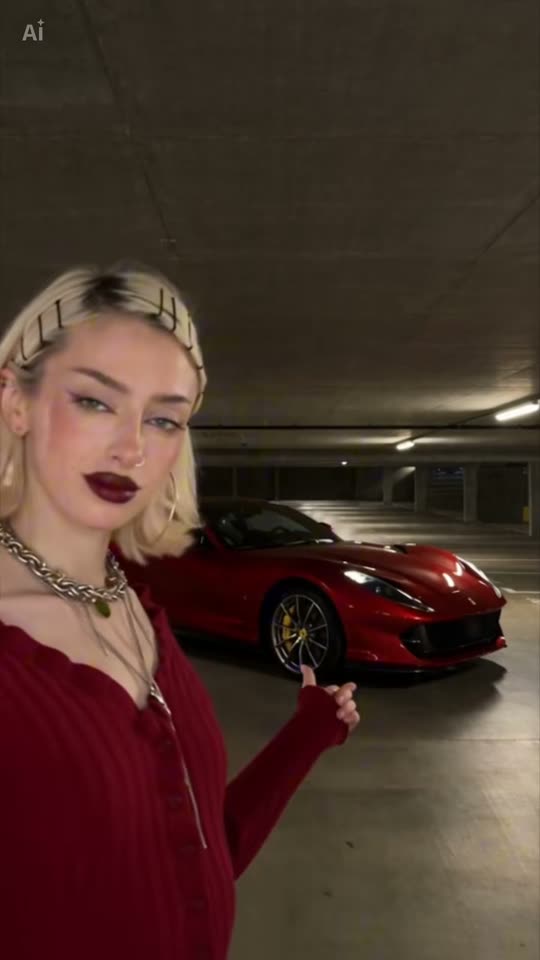
Here's the source reel. Your photos swap in for its characters, so your video has the same shots with your faces. Each run is unique.

Source reel by @phm_hang, 10 s
The source reel by @phm_hang, created using a CapCut AI template: an AI-generated woman approaches, tosses the 2 and 4 of hearts at the camera, and a red sports car sits parked behind her. Your photo replaces her.
Use this reference
Step by step

Creating the 24 Unforgettable Car video on Smew AI

The process runs in your browser. No editing app, no prompt writing, no watermark.

  1. Upload your photo

    Click "Create your own" and upload your photo. Capture it with the camera or choose from your library.

  2. Click Generate

    The button displays the price. Seedance 2.5 inserts your photos into the Unforgettable 24 Car trend video and recreates it shot by shot for 10 seconds, including the reel's source song. No prompt writing needed.

  3. Download or share

    The video completes in up to several minutes as a 9:16 MP4. Download it, share from your phone, or access it later in your Library.

What photo gives the best result?

Photo 1 is you (or someone who gave permission).

  • Waist up or half body, looking at the camera, with good lighting. Your face appears close to the lens when showing the cards, so photo sharpness is important.
  • No sunglasses or anything covering your face.
  • Dress how you want to appear. The video preserves the clothing from your photo. For Your dream car, add a second photo of the whole car.
  • One person in the photo. Upload a photo of yourself or of an adult who gave consent, never a celebrity or a stranger.

The Private jet and Thruster flip versions require only photo 1.

How did the 24 Unforgettable Car trend begin?

The format began as a real-life transition. On 2 September 2026, @y0kun shared a video captioned "24": he tosses two cards at the lens in a nighttime parking lot, and a dark sports car appears behind him. By 12 October it reached 1.6 million views. On 28 September, LA camera operator @vladkreii shared a sunset version captioned "unforgettable" (711,200 views), and on 3 October @supercarvicky shared hers in a parking garage, using a cut of the 2017 song "Unforgettable" by French Montana and Swae Lee. That video surpassed 1.5 million views, and its audio appeared in over 660 videos.

People without a sports car used AI. On 9 October CapCut template tutorials went viral (one from @dshaun.abilene reached 275,000 views), the hashtag #unforgettablecartrend launched, and @phm_hang shared an AI version from a CapCut template: a woman in a garage tosses the 2 and 4 of hearts, and a red sports car appears. On 11 October Kling tutorials demonstrated a recreate prompt that substitutes your photo and a car photo. Smew AI recreates @phm_hang's AI reel using that prompt.

  1. @y0kun shares a video captioned "24": he tosses two cards at the camera and a dark sports car appears behind him. By 12 October it reaches 1.6 million views and 306,000 likes. TikTok

  2. @supercarvicky shares her version in a parking garage, captioned "Unforgettable". It surpasses 1.5 million views, and over 660 TikTok videos use its audio by 12 October. TikTok

  3. A CapCut AI template tutorial by @dshaun.abilene appears. By 11 October it reaches 275,600 views and 2,566 saves, and the hashtag #unforgettablecartrend launches the same day. TikTok

  4. @phm_hang shares an AI version created with a CapCut template: a woman tosses the 2 and 4 of hearts, and a red sports car appears behind her. This template recreates that reel. TikTok

  5. @sashaylang shares a tutorial reel on Instagram for her AI "Twenty-Four" car reveals: the source video provides the movements and reveal timing, a character created from multiple face angles provides the person, and a car photo on a plain green background provides the car, all using Kling's Video 3.0 Omni. By 14 October it has 862 likes and 700 comments, mostly requesting the prompt. Instagram

  6. Kling tutorial videos demonstrate a recreate prompt that substitutes one photo of you and one photo of a car. The one from @meowstardaily surpasses 67,000 views within a day. TikTok

Copy and paste

The 24 Unforgettable Car prompts

You don't need these. [Image 1] is your photo, and [Video 1] is the clip the result copies.

Red sports car

1 photo: your photoSeedance 2.510 s · 720p · 9:16152 credits
Video prompt

Replace the woman in the video with the person in [Image 1]. Keep the original actions, facial expressions, poses, body movements, camera movement, background, lighting, and timing. Only replace the woman and keep everything else unchanged. Recreate the reference video [Video 1] shot for shot: the same underground parking garage, the same red sports car parked behind, the same 2 of hearts and 4 of hearts that fly at the lens, the same handheld phone camera, the same framing and timing. The ONLY change: the woman with the blonde bob is now the person in [Image 1]. The one who walks toward the camera = the person in [Image 1], in every frame: copy the exact face from [Image 1] - face shape, eye color and eye shape, eyebrows, nose, mouth, skin tone, age, hair color, hair length and hairstyle, and any beard, moustache, glasses or freckles exactly as in the photo. The same real person in every frame, so their friends instantly recognize them, also in the close-up when the cards come to the lens. Never morph, never drift back to the original woman's face, never add or remove facial hair. No blonde bob, no hair clips, no dark red lipstick, no hoop earrings, no chain necklaces and no red ribbed cardigan unless [Image 1] shows them. They have the body and the clothes of the person in [Image 1]; if [Image 1] shows only the head or the upper body, invent the rest so it matches naturally. The moves, matching the reference second by second: 0-2.5 s: walks toward the camera through the garage. 2.5-4.2 s: holds up the 2 and the 4 of hearts close to the lens and flicks both cards at it. 4.2-7 s: the cards fly past the lens, the red sports car is now parked behind, a confident look into the camera. 7-10 s: turns to the car, points at it with the thumb and walks out of the frame. Anatomy rules: one head only, on their own shoulders. Two arms and two hands. No badges, emblems or lettering on the car, no readable number plates, no text, no logos, no watermark, no extra people.

1995 characters

Private jet

1 photo: your photoSeedance 2.510 s · 720p · 9:16152 credits
Video prompt

Replace the woman in the video with the person in [Image 1] and the car with a private jet. Keep the original actions, facial expressions, poses, body movements, camera movement, lighting, and timing. Only replace the woman, the car and the parking garage and keep everything else unchanged. Recreate the reference video [Video 1] shot for shot, with the same handheld phone camera, framing, light and timing, in a tall private jet hangar with a polished grey concrete floor and long rows of ceiling lights instead of the parking garage. The same 2 of hearts and 4 of hearts fly at the lens. The one who walks toward the camera = the person in [Image 1], in every frame: copy the exact face from [Image 1] - face shape, eye color and eye shape, eyebrows, nose, mouth, skin tone, age, hair color, hair length and hairstyle, and any beard, moustache, glasses or freckles exactly as in the photo. The same real person in every frame, so their friends instantly recognize them, also in the close-up when the cards come to the lens. Never drift back to the original woman's face. No blonde bob, no hair clips, no dark red lipstick, no hoop earrings, no chain necklaces and no red ribbed cardigan unless [Image 1] shows them. They have the body and the clothes of the person in [Image 1]. Before the cards fly past the lens, the hangar behind them is empty. After the cards fly past the lens, a sleek white private jet is parked behind them, in the same spot as the red car in [Video 1]: its nose, cockpit windows and the front of the cabin in view, the cabin door open with its airstair down. The red car never appears, and there is no car anywhere. The moves, matching the reference second by second: 0-2.5 s: walks toward the camera through the hangar. 2.5-4.2 s: holds up the 2 and the 4 of hearts close to the lens and flicks both cards at it. 4.2-7 s: the cards fly past the lens, the private jet is now parked behind, a confident look into the camera. 7-10 s: turns to the jet, points at it with the thumb and walks out of the frame. Anatomy rules: one head only. Two arms and two hands. No airline names, logos, flags or lettering on the jet, no readable registration numbers, no text, no logos, no watermark, no extra people.

2233 characters

Your dream car

2 photos: you, waist up + the car, the whole vehicleSeedance 2.510 s · 720p · 9:16152 credits
Video prompt

Recreate the reference video [Video 1] shot for shot: the same garage, the same card toss, the same timing. The person is [Image 1]. Keep that face, hair and the clothes from the photo. The car that appears after the cards fly past is the vehicle in [Image 2], the same car in the final shot, with no badge and no readable plate. The red sports car from the clip does not appear. Exactly one person. No text, no logos, no watermark.

432 characters

What's the credit cost?

You pay in credits. The Generate button shows this price before you spend anything. These are the options on this page.

OptionModelWhat you getCredits
Red sports carSeedance 2.510 s · 720p · 9:16152
Private jetSeedance 2.510 s · 720p · 9:16152
Your dream carSeedance 2.510 s · 720p · 9:16152

One-time packs and plans are on the pricing page. A failed video gives its credits back.

What happens in the Unforgettable car video, moment by moment?

Your video matches the 10 seconds of the AI reel by @phm_hang, shot in one continuous take in an underground parking garage:

SecondsWhat happens
0 to 2You approach the camera through the empty garage.
2 to 4You display a 2 and a 4, then toss both cards at the lens.
4 to 6.5The cards fly past the camera, and a sports car suddenly sits parked behind you. You gaze into the lens.
6.5 to 9You turn toward the car, gesture at it with your thumb and glance back with a slight smile.
9 to 10You exit the frame, and the car gets the final shot.

Three versions. Thruster flip is not offered. "Red sports car" keeps the red car from the reel. "Private jet" changes the garage into a hangar and puts a white jet behind you. Both use one photo of you.

Which model? Each version uses one quality setting.

Red sports car and Private jet
ModelSeedance 2.5
How it worksInserts you into the reel directly: the same movements, camera and timing, with the garage and the red car, or the hangar and the jet
FrameVertical 9:16, 720p
Length10 s
SoundThe reel's song, which you can disable
Price152 credits

The exact price appears on the Generate button before any charge. No prompt writing needed, and the video appears in your Library when complete.

How do creators produce the 24 car reveal in Kling, and what does Smew AI handle for you?

The most shared tutorial for the AI version, by @sashaylang on Instagram (11 October 2026), uses three references in Kling's Video 3.0 Omni:

  1. Preserve the source video. It provides the movements, the card toss and the timing of the car appearance.
  2. Create the character. A collection of sharp face photos from the front, the side and angles between, all wearing the same outfit, so the face remains consistent in every shot.
  3. Include the car. One photo of the car on a plain green background, so the model copies just the car.
  4. Select all three and insert the prompt. Review the credit cost before generating.
  5. Export as 9:16 and preserve the entire scene within the frame.

On Smew AI, steps 1, 4 and 5 are handled for you: the reel is preloaded, the prompt is prepared and the output is a video with the song (landscape for "Your dream car"). You provide step 2 as one sharp waist-up photo, and "Your dream car" converts it into a character sheet for you, and step 3 as a car photo in the "Your dream car" version. The same advice applies here: a sharp, well-lit photo of your face, the same clothing you want visible, and a car photo on a simple background.

Can you feature your own car, your dream car or a private jet?

Your dream car adds a second photo of a car. Red sports car and Private jet each use one photo of you. The dream-car version is the one the tutorials describe: That matches the trend's AI tutorials: the Kling recreate template requests one photo of you and one photo of a car, and substitutes the person and the car in the video while preserving everything else.

  • Your own car. A photo from the side or the front corner, taken in daylight, showing the entire car.
  • The car you dream of. A sharp photo of it works as well. Some tutorial videos describe this as a dream car manifestation video.
  • Something humorous. A compact old hatchback, a scooter or a golf cart makes the reveal more amusing than another supercar.
  • A private jet. Choose the Private jet version and include only your own photo. The garage transforms into a private jet hangar, and when the cards fly past the lens a white private jet with its door open stands behind you, stairs extended. No jet photo required.
  • A thruster flip. Choose the Thruster flip version and include only your own photo. The red sports car appears behind you, ignites its rocket thrusters and performs a full backflip in the air, then touches down in smoke: a car backflip AI video within the 24 car trend, created from one photo. Want the car from your own photo to flip? The Ramp flip version of the Flying roadster AI trend does that on a giant curved ramp.

The video matches the shape, color and wheels of the car in your photo. Looking for another flex trend? Exit the arrivals hall as a star in the AI Airport Star Arrival, or score a famous solo goal in the Ozil goal AI trend.

Which song and hashtags should you include when posting?

Your video includes the audio of the reel it recreates: a cut of "Unforgettable" by French Montana and Swae Lee, the song most versions of the trend feature. On TikTok it appears as "original sound", and over 660 videos used that cut by 12 October 2026. You can disable the song on the result screen and include the trend audio when posting instead. The song is owned by its rights holders, and Smew AI grants you no rights to it. Review the music guidelines before using the video in an ad or a paid post.

Hashtags: #unforgettablecartrend had 152 TikTok videos and 345,600 views on 12 October 2026, three days after launching. Many creators also include #unforgettable, #24 and #transition. Keep the platform's AI label visible, so nobody assumes you actually purchased the car.

What can go wrong, and how do you correct it?

ProblemFix
A blonde bob, hair clips or a red cardigan appearsThe woman from the reel bleeds through. Use a sharp waist-up photo where your own hair and clothing are clearly visible, then generate again.
The face resembles you lessYour face appears close to the camera for several seconds. Use a front-facing photo with good lighting and no sunglasses, then generate again.
The cards display incorrect numbersSmall card details challenge video models. Generate again.
The run failsSome photos get rejected. The credits are returned; attempt another photo.
FAQ

24 Unforgettable Car trend questions

What is the Unforgettable car trend?
It's a popular TikTok format from September and October 2026. You display a 2 and a 4 card, toss them at the camera, and when they fly past the lens a sports car sits parked behind you. It's set to a cut of the song "Unforgettable". Real versions feature real cars; AI versions insert anyone in front of any car.
Why is it named the 24 car trend?
The two cards form 24. The earliest major video of the format we located, shared by @y0kun on 2 September 2026, was captioned simply "24". People search for it as the 24 car trend, the 24 UNO trend and the Unforgettable car trend.
Why is it named the unforgettable trend?
The videos are set to a cut of the song "Unforgettable", and the two cards make it the unforgettable 24 car trend. Some call it the uno car trend, referring to the green UNO cards in some videos.
Is the Uno reverse car transition the same trend?
Yes, it's the same 2 and 4 card car trend: some people describe the card toss as an Uno reverse transition, since the cards resemble UNO cards. In Spanish it's the unforgettable trend IA, and here you can create it with AI, featuring a car or a private jet.
Is the Twenty-Four car reveal on Instagram the same trend?
Yes. AI creators on Instagram label their versions "Twenty-Four" or "24" car reveals: a person tosses the 2 and 4 cards at the lens, and a car appears behind them. Many of those reels feature film or racing stars with their famous cars. On Smew AI you create it with your own photo; the template doesn't create videos of celebrities.
How do I create the 24 Unforgettable car trend video with my own photo?
Click "Create your own", upload one waist-up photo of yourself and click Generate. The button displays the price first. You receive a 10-second vertical video with the song, and no prompt writing is needed. The video appears in your Library when complete.
Can I select the car?
Yes. Select Your dream car. Photo 1 is you and photo 2 is the car. Red sports car keeps the reel's red sports car. Private jet uses one photo of you.
Can I do the 24 card trend with a private jet rather than a car?
Yes. Choose the "Private jet" version and upload one photo of yourself. You approach in a private jet hangar, toss the 2 and the 4 at the camera, and a white private jet with its door open sits parked behind you. You receive 10 seconds with the reel's song, created with Seedance 2.5.
Is there a 24 car trend backflip version?
Thruster flip is not offered on this page. This page makes Red sports car, Your dream car and Private jet. On other sites, a thruster version adds rocket thrusters and a backflip to the car.
What is the Unforgettable Car 24 card trend?
It's the same trend under a different name: the 24 card car trend, referring to the 2 and the 4 card you toss at the camera. Template sites and tutorial captions call it the Unforgettable Car 24 card trend, and one introduced a version where the car itself performs the backflip: an AI backflip video starring the car. Thruster flip is not offered on this page.
Does this template use the same prompt as the trend?
Yes. It uses the recreate prompt that the trend's Kling tutorials shared: substitute the person in the video with you, and preserve the actions, expressions, camera, background, lighting and timing. The car or jet stays the one in the clip. We only included the photo labels our video model requires and a few lines that exclude the reel's woman and the car badges.
Which AI models create the videos?
Red sports car and Private jet use Seedance 2.5. It puts you into the reel at 720p and keeps the reel's movement, camera and timing. Your dream car uses the same 10 seconds and the song. Thruster flip is not offered on this page.

Which song is featured in the Unforgettable car trend?
A cut of "Unforgettable" by French Montana and Swae Lee (2017). Your video includes the same portion of the song as the video it recreates, and you can disable the song on the result screen.
Do I need Kling or CapCut for this trend?
No. The 24 car trend AI tutorials reference a CapCut AI template or a Kling recreate template, and many comments note that those are paid. On Smew AI you upload one photo of you and receive the finished video with the song.
Is there an unforgettable car trend tutorial?
Yes: the 24 car trend Kling workflow appears in the section above. On Smew AI you bypass it and need no unforgettable car trend template: upload a photo and click Generate.
Is the person in the example a real person?
No. The example is an AI-generated reel by @phm_hang, created with a CapCut AI template and labeled as AI-generated on TikTok. The real-life videos of the trend aren't used. In your video, your photo replaces the woman.
How long is the video and what format is it?
Red sports car and Private jet are 10 seconds, vertical 9:16, 720p, with the song. Your dream car uses the same 10 seconds and the song. Thruster flip is not offered on this page.
More trends

Other AI video templates

Template

Bby Wow Guy AI: Insert Your Face Into the Guy Dancing at a Quince Meme

Groove toward the camera at a quinceañera, take a bite of the concha, lock eyes with the lens while chewing with stuffed cheeks, then groove back into the crowd. Upload one photo to star as the bby wow guy, complete with the song.

Read more
Template

Bad Times AI Trend: Turn One Photo Into the Viral Argument Video

The viral argument routine: hands to head, hip pose, stop gestures and that long camera stare, all set to Imael Angel's "Bad Times". Upload a single photo of yourself or your pet and get the complete video with music.

Read more
Template

Hotel Lobby AI: Create the Hotel Lobby Trend Video

Put two pets in the orange booth from the popular cat reel, song included, or put two people in a new 10-second duet with a new beat.

Read more
Template

Tecktonik Dance AI: Step onto the String-Light Stage

Wide arm swings, hands reaching toward the head, both arms shooting upward, followed by rapid, precise arm choreography on a compact stage lit by string lights: the electro dance from the 2000s that Cheba Man revived in 2026. Upload a single photo of yourself to generate the dance complete with its soundtrack.

Read more
Template

AI Airport Celebrity Video: Exit Arrivals Like a Star

Security clears a path, phones point at you, cameras flash, fans press against the barriers: you exit the arrival gate like a celebrity, acknowledge a fan and climb into your car. Or pull up at a hotel after dark: step from a black luxury sedan onto the red carpet. Upload one photo of yourself or your pet, get a 15-second video with crowd audio.

Read more
Template

Ozil Goal AI Trend: Put Yourself in the Legendary Solo Strike

Chip the ball over the rushing keeper, control it on your chest, watch two defenders slide by, and roll it home under the lights—all in your everyday outfit. Upload one photo for a 15-second clip with the viral song.

Read more

Create your own 24 Unforgettable Car video

Upload one photo and tap once. No prompt writing. 152 credits.

No watermark. A failed video gives its credits back. Secure checkout by Stripe.