AI Cupid Trend: A romantic setup turns into a handbag punchline—or a missed arrow.

Put yourself into the Cupid gag with one portrait. Choose the handbag encounter or the alternative arrow story before generating the reference-led sequence.

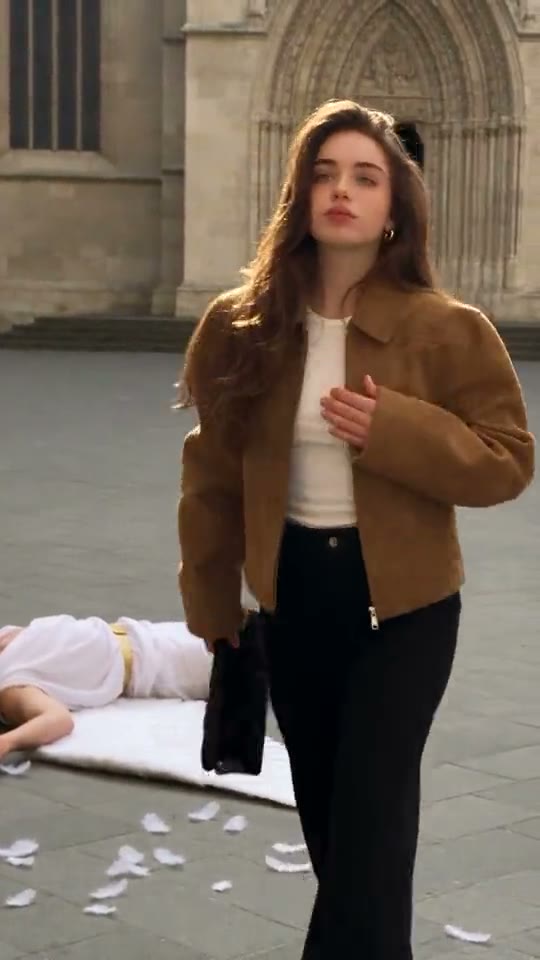
The original AI Cupid Trend reel by @emily.skye.officialOriginal reel
  • 1 photo depending on version
  • 15 seconds
  • Price shown before generating

No prompt to write: Add your photo and tap once

Create your own

Ready in a few minutes · From 228 credits

The AI Cupid joke turns romance into a failed delivery. In one scene, a winged matchmaker dives toward the lead and is swatted aside with a handbag. In the other, an arrow’s mistake makes a shop-window coat more appealing than the intended romantic partner. The comedy comes from refusing Cupid’s plan, with cinematic architecture and a calm lead making the absurdity feel grand.

Smew offers Handbag and Arrow, each using one adult portrait for a fifteen-second vertical scene. The reference video provides the action structure and the template soundtrack is added separately. You do not need a costume, a handbag photo or a second person’s portrait. Your image supplies the lead identity; the remaining characters belong to the scene.

Also called Cupid fail, Cupid versus handbag, anti-Cupid, arrow-and-coat joke

Example

See the AI Cupid Trend reference

Credited examples explain the trend’s staging. They are visual references, not Smew customer results; your generated details and movement can differ.

Trend reference

A reference for the scene and timing by @emily.skye.official. This sample is not a Smew customer generation. Compare the framing and sequence rather than expecting a frame-for-frame duplicate.

Use this reference
Trend reference

A reference for the scene and timing by @emily.skye.official. This sample is not a Smew customer generation. Compare the framing and sequence rather than expecting a frame-for-frame duplicate.

Use this reference
Step by step

How to make your AI Cupid Trend version

Start with the right version and clear photos; the template provides the scene instructions.

  1. Choose the scene and cast

    Open Create and choose the version that matches the result you want. Check the photo-slot labels before uploading: one identity belongs in each slot. A reference sample shows the idea; the choices on Create define which people or pets Smew can actually place in that scene.

  2. Add photos and review the output

    Upload the requested photos, wait for processing and confirm that the preview shows the correct subject. Compare the selected output, model and credit total. You do not need to record the action or paste a prompt: the template supplies the setting and movement. Submit only when those details match your choice.

  3. Follow the task, then review the finished file

    After submission, follow the task on Dashboard while it generates; you can browse templates and see your other tasks there. Once it finishes, open the saved result in Library and inspect the whole clip before downloading. The generated interpretation can vary, especially during fast turns, occlusion and close contact.

Which photo gives this template a fair start?

Use one clear adult portrait with the face looking toward the camera and normal hair visible. A waist-up image can give useful clothing and posture cues, but facial detail matters because the scene ends closer to the lead. Sunglasses, a very distant subject or a dramatic profile leave more for the model to invent.

The handbag, coat and architectural setting are supplied by the template; you do not need to stage them in the upload. Keep one person per photo so the lead role is unambiguous. Use yourself or an adult who agreed to be depicted. A public example’s appearance is not permission to upload a celebrity, stranger or child as the lead.

The background of AI Cupid Trend

The references show an older cartoon-like handbag joke followed by photoreal AI adaptations. The common premise is a person who has no intention of cooperating with Cupid. The handbag scene turns that refusal into slapstick; the arrow scene makes it a fashion joke about falling for an item in a shop window.

The linked Instagram examples credit @anamadeai for the coat-and-arrow interpretation and @emily.skye.official for the cathedral handbag scene. They explain the two branches available here, without establishing that either account invented the general Cupid meme. Smew’s result is a new generated interpretation using your photo, not an endorsed collaboration or a claim that the reference actors appear with you. It is also separate from the unrelated K-pop hand-dance trend named Cupid.

  1. A cartoon-like handbag sketch illustrates the older refusal-of-Cupid joke. TikTok

  2. A photoreal AI adaptation develops the dive-and-handbag scene in a larger architectural setting. TikTok

  3. @anamadeai’s reference redirects a heart-arrow romance toward a coat in a shop window. Instagram

  4. @emily.skye.official’s cathedral reference supplies the handbag action used to explain that choice. Instagram

Copy and paste

The scene instructions are already included

The built-in recipe sets the setting, roles and sequence. Your photos provide the subjects; you can read the recipe below without needing to paste or rewrite it.

Handbag

1 photo: you, face clearSeedance 2.515 s · 720p · 9:16228 credits
Video prompt

Render a photorealistic 9:16 sequence using [Video 1] as the visual guide. [Image 1] replaces the walking handbag carrier, keeping that adult’s own face, hair and selected appearance. The winged background character keeps its separate identity. Follow the reference camera, scene continuity, relative action timing and cuts unless the scene instructions below explicitly change the setting. Preserve the cathedral square and the sequence from the elevated archer to the downward glide. At street level, the small winged character approaches the lead, who swings the handbag and knocks it away in a stylized comic beat. Keep the following flip, loose feathers and fallen bow, then the lead’s composed hair-adjustment, bag pickup and walk toward the camera. The lead’s face should be identifiable near the finish; the fantasy character stays behind on the paving without graphic injury. Keep each uploaded identity distinguishable through every view: consistent face structure, complexion, hair, age and build. Never transfer a target face onto another body. Retain the selected outfit rules rather than reverting to the reference performer. Change only the assigned performers, leaving other roles and props coherent. The soundtrack is handled separately: match visible mouth shapes and rhythmic gestures to the reference performance without generating a recording, sung words or dialogue from it. Add no unrelated people, extra body parts, captions, signatures or watermarks.

1478 characters

Arrow

1 photo: you, face clearSeedance 2.515 s · 720p · 9:16228 credits
Video prompt

Render a photorealistic 9:16 sequence using [Video 1] as the visual guide. The woman who is targeted first is [Image 1]; other people and the balcony archer retain their separate reference identities. Follow the reference camera, scene continuity, relative action timing and cuts unless the scene instructions below explicitly change the setting. Follow the reference order: the archer aims from the stone balcony, a heart-tipped arrow catches on the lead’s coat, and a second shot is aimed at the passing man. The man leans away and redirects that projectile toward the shop display. It ends in the green coat on the mannequin, and the lead gazes affectionately at that garment through the glass. Preserve camera travel, the shop-window depth and the final archer cut. Keep this a non-graphic fantasy gag with no wounds. Keep each uploaded identity distinguishable through every view: consistent face structure, complexion, hair, age and build. Never transfer a target face onto another body. Retain the selected outfit rules rather than reverting to the reference performer. Change only the assigned performers, leaving other roles and props coherent. The soundtrack is handled separately: match visible mouth shapes and rhythmic gestures to the reference performance without generating a recording, sung words or dialogue from it. Add no unrelated people, extra body parts, captions, signatures or watermarks.

1415 characters

Current Smew choices and credit prices

You pay in credits. The Generate button shows this price before you spend anything. These are the options on this page.

OptionModelWhat you getCredits
HandbagSeedance 2.515 s · 720p · 9:16228
ArrowSeedance 2.515 s · 720p · 9:16228

One-time packs and plans are on the pricing page. A failed video gives its credits back.

Two ways for Cupid’s plan to go wrong

Handbag begins high above a cathedral-like square with Cupid preparing his approach. The camera follows the dive toward the lead, who responds with a bag swing. A tumble and scattered feathers turn the attempted romantic intervention into physical comedy, after which the lead collects herself and walks on. It is staged slapstick rather than a realistic injury scene.

Arrow uses a softer chain of cause and effect. A heart-tipped shot is meant to create romance, but a later arrow finds a coat in a shop window instead of the intended person. The lead’s attention shifts to fashion. Review whether the cause of the joke is readable, not merely whether the architecture looks beautiful; the arrow and bag interactions are the information viewers need.

Handbag for a bold refusal, Arrow for a shopping joke

Choose Handbag if the point is a confident rejection of the matchmaker’s interference. Choose Arrow if the joke is preferring the coat to the prospective romance. Each uses one lead portrait, with the other scene roles generated from the reference context. A second upload is not needed and would not give you control over Cupid’s face.

Both choices are currently fifteen seconds, use Seedance 2.5 and cost the same number of credits. The difference is the reference action, not a model-quality tier. Compare the examples before uploading so you do not expect the handbag’s flight and feathers from the shop-window version.

The current Smew options are listed below. The photo count belongs to the selected version: an extra person in a single upload is not a substitute for an additional photo slot. The model name describes how the output is made; it does not promise identical faces or motion on every run. Review the selected option and credit total on Create before submitting.

ChoicePhotosModelOutputCredits
Handbag1Seedance 2.515 seconds, 9:16, 720p228
Arrow1Seedance 2.515 seconds, 9:16, 720p228

Sound: these choices produce the template soundtrack, added separately to the finished video. Sound heard in a credited reference is not automatically included in every Smew option. If you add platform music later, choose it from that platform’s available library and check the intended use; generating a video does not transfer music rights.

The many names for an anti-Cupid scene

Search names tend to describe the punchline: Cupid fail, Cupid versus handbag, not-today-Cupid or an anti-Valentine meme. Arrow posts may instead be described as Cupid missing, a Cupid arrow meme or falling in love with a coat. Those labels point to related jokes rather than a single universally named filter.

The handbag scene includes a comic collapse, not a promise of graphic harm. The coat scene is a fashion short, not a product recommendation or a way to select any specific garment from a catalog. Keep a caption focused on your own twist—romantic independence or an irresistible wardrobe—so viewers understand which joke you intended.

Review the fast action and the lead identity

A dive, a swinging bag and a tumble involve overlap, wings and moving limbs. Check those frames as well as the final close-up. Extra limbs or a bag that misses the action can weaken the punchline. A clearer portrait helps the lead’s identity, but does not guarantee flawless flight or contact animation.

If the lead reverts toward the reference performer’s hair or clothing, choose an input that shows your own features clearly. If another scene character inherits your face, treat that as an identity-blending artifact. The template soundtrack does not guarantee exact physical timing on every beat. Review the entire result before sharing, and make a deliberate change rather than repeatedly paying for the same uncertain input.

FAQ

AI Cupid Trend — questions before you create

What is the AI Cupid trend?

It is a comic AI scene in which Cupid’s romantic plan fails: a handbag knocks him aside, or an arrow makes a coat the object of affection. Smew offers those two interpretations from one adult portrait. It is a fictional cinematic joke, not a real stunt or a romance prediction.

How do I make the AI Cupid video?

Choose Handbag or Arrow, upload one clear adult portrait and check the displayed output and credits. The scene instructions and supporting characters are included. Submit, follow the task on Dashboard and review the finished file in Library. You do not need a bag photo, costume or performance footage.

Which AI makes the cupid AI video?

Both current choices use Seedance 2.5, with a reference-video scene and a separately supplied template soundtrack. The output is fifteen seconds at 720p in a vertical frame. That is the supported configuration, not a promise that a different site’s backup models or refusal-handling process applies here.

What is the prompt for the AI Cupid trend?

No. The included recipe specifies the lead role, action and camera sequence for the selected reference. You only provide the portrait and choose the scene. A recipe can direct the model toward the intended joke, but cannot guarantee exact wing motion, perfect contact or a frame-identical remake.

Is there a cupid AI version where his arrow misses?

Yes. Choose Arrow. Its comic sequence redirects the romantic setup toward clothing in a shop window. The lead’s identity comes from your photo; the supporting characters and fashion setting are part of the template. It is not a garment-selection tool for any product you upload.

Does Cupid get hurt in the video?

The intended tone is slapstick: a knockdown, feathers and the lead walking away. It is not a realistic injury effect or a request for blood. Review the generated take before sharing, since fast action can produce unintended details and the template cannot guarantee every frame.

How long is the video, and does it have sound?

Handbag and Arrow each currently produce fifteen-second, 9:16, 720p videos. The template soundtrack is added separately to the generated video. It is not a recording of your voice or a general license to use the reference music in any context; check your publishing platform’s rules.

Does the AI Cupid video cost credits?

Each current scene costs 228 credits. The selected total appears on Create before you submit. The cast and output do not change because the soundtrack or setting differs between the two references; choose the scene for its joke rather than assuming Arrow is a cheaper quality tier.

Will the woman from the original reel be in my video?

The intended identity change places the uploaded adult in the lead role. Cupid and other supporting scene roles remain part of the template context. A model can still blend reference features, so inspect the face and hair in the finished take. The credited creators are not affiliated participants in your video.

Is this the K-pop Cupid dance trend?

No. That search name also refers to a hand-dance trend associated with a pop song. This page is about Cupid’s failed matchmaking, using either a handbag or a misplaced arrow. Compare the visual reference before choosing so you do not expect a dance routine from these scenes.

Make your own AI Cupid Trend scene

Choose a version, add the requested photos and check the output and credit total before you start.

No watermark. A failed video gives its credits back. Secure checkout by Stripe.