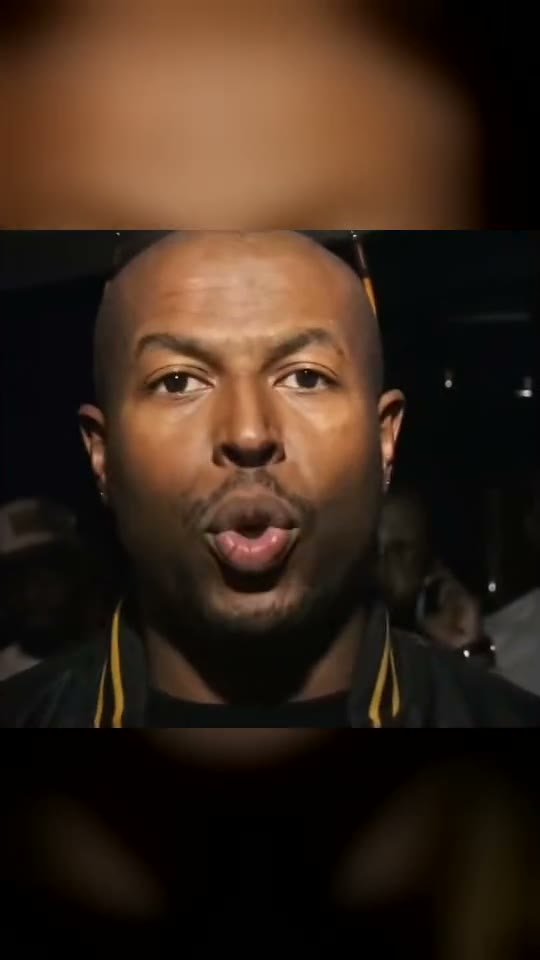
What the close-up performance shows
The opening establishes people in a night crowd before attention moves to the lead performer. The lead leans toward the lens and performs with eyebrow lifts, pointing and small forward movements. In Duo, the second person reacts alongside the lead rather than delivering a separate verse. That shoulder role is part of the composition, so do not judge it as a two-rapper duet.
The original clip is a useful timing reference, but Smew’s configured output is nine seconds in a vertical frame. Faces can stretch during a very close camera move, and the model interprets the mouth shapes rather than making a new voice clone. Watch the ending as well as the first close-up: a convincing opening does not guarantee that lip movement stays aligned throughout the result.
Solo or Duo: decide who is performing
Solo needs one photo and concentrates the identity change on the lead. Duo needs two photos, with the lead first and the shoulder friend second. Both choices currently use the same model, duration and credit amount, so the reason to choose Duo is the cast, not an extra verse or a longer clip.
A second face can be partly obscured by the lead or by a camera move. Choose Duo because you want that social reaction, while accepting that every frame will not be an evenly composed portrait of both people. The table below gives Smew’s actual settings; it replaces assumptions from a tutorial for another app. No subscription purchase or other template’s credit rate changes the output listed for this choice.
The current Smew options are listed below. The photo count belongs to the selected version: an extra person in a single upload is not a substitute for an additional photo slot. The model name describes how the output is made; it does not promise identical faces or motion on every run. Review the selected option and credit total on Create before submitting.
| Choice | Photos | Model | Output | Credits |
|---|
| Solo | 1 | Seedance 2.5 | 9 seconds, 9:16, 720p | 152 |
| Duo | 2 | Seedance 2.5 | 9 seconds, 9:16, 720p | 152 |
Sound: these choices produce the template soundtrack, added separately to the finished video. Sound heard in a credited reference is not automatically included in every Smew option. If you add platform music later, choose it from that platform’s available library and check the intended use; generating a video does not transfer music rights.
How to spot input and identity problems
If the reference rapper’s appearance dominates, use a clearer photo where your own face and hair occupy more of the image. If accessories appear unexpectedly, inspect whether the upload itself contains a hat, earring or shadows that may have been interpreted as one. For Duo, confirm that photo 1 and photo 2 are in the intended roles and that neither upload includes several faces.
The vocal is pre-existing audio; the generated video does not establish that you said those words. A small mismatch can appear when the camera angle changes or the mouth opens widely. Decide whether the completed take works before sharing. Re-running is a new generation, so improve a weak input or make a deliberate cast change rather than assuming another run will necessarily fix every frame.
Posting the performance without hiding the face
The face is the main information in this meme. Keep captions and stickers away from the eyes and mouth, and check that the platform crop does not cut off the friend in Duo. A short personal caption, such as “Our turn at the mic” or “The quiet friend found a verse,” explains the joke without reproducing the song’s lyrics. Relevant trend and grime tags are enough.
The template supplies the original vocal separately. If you use a platform sound instead, avoid accidentally playing both tracks at full volume. Recording rights are not included merely because an AI file contains audio, and a normal personal post is different from an advertisement. Label the result as AI and do not present it as genuine footage of an artist collaboration.