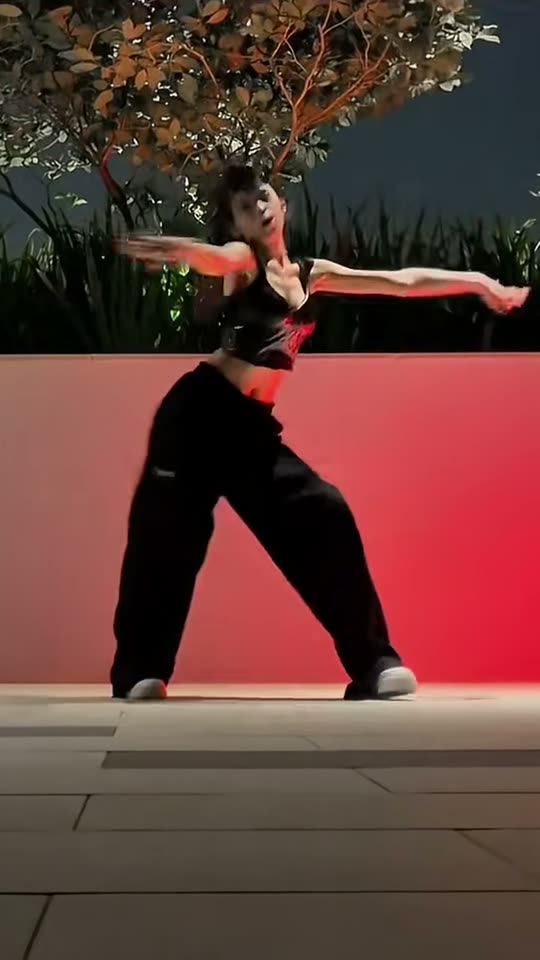
The chorus movement in a single standing frame
The opening uses small traveling steps and a quick kick to establish the beat. A deep, wide stance and arms pushing to one side create the first strong silhouette. Rising with an arm high changes the level before hair movement and body rolls shift attention toward the upper body.
The middle asks the arms to frame the head and torso, with crossed legs and a low bend adding variation. A wider lunge and crossed-arm movement prepare the final hair whip and hand-on-hip pose. Those changes in level are why full-body framing is more useful than a tightly cropped portrait.
The motion-control choice uses the subject, clothes and location from your image as appearance guidance while following the reference routine. It is not meant to inherit every hairstyle or costume of the reference dancer. Fine hand shapes, body proportions and timing can vary. The current result is 13 seconds at 720p in vertical 9:16, so choose a photo with enough room for the widest and highest movements.
Learn the routine or create an imagined cover
A tutorial and an AI dance serve different goals. The official choreography video linked above can help someone physically learn the sequence, compare mirrored movement and practice transitions. A fan cover can show how another dancer interprets the chorus in a real room or street.
This template does not require that practice. You upload a suitable standing photo, and the saved motion recipe creates an artificial performance. That is useful for a playful personal take, but it should not be presented as proof that the subject actually rehearsed or filmed the dance. An AI disclosure keeps the distinction clear.
The current Solo choice uses Kling 3.0 Motion Control at 52 credits. It has one adult identity and no pet or partner slot. A source site's generic mention of multiple top models does not change that choice. If you want a different cast, environment or routine, compare other templates rather than expecting a tutorial name or caption to alter this recipe.
Song and sharing context
The configured FIRESTARTER reference soundtrack is added after the picture is generated and saved in the completed file. Library preview and download use that result. This is not a new song generated in your voice and does not imply a connection with the artists or virtual group.
Music and choreography credits remain separate from access to the generation tool. Check how the destination platform treats an embedded track, especially for business accounts, advertisements and sponsored posts. An authorized platform sound may have terms different from an MP4 you upload with audio already present.
A caption can introduce your own setting as the unexpected rehearsal room or invite friends to compare the final pose. Avoid copying lyrics or claiming an official collaboration. Use clear AI labeling and the subject's consent. Song and dance tags can explain the reference, but audience totals attached to those tags are not a promise about the performance of your finished take.
Framing and fast hands are the important checks
If the dance appears small or cut off, inspect the source image first. A full-body standing photo with room at the sides gives the routine space to lunge and raise its arms. A crop at the knees cannot reliably supply a convincing full-body finish. A cluttered floor or another object across the legs may also disrupt the silhouette.
Hands around the head and quick hair movement are demanding parts of the routine. Watch for extra fingers, a drifting face or a reference-like ponytail that does not belong to your source. Clear lighting and a visible hairstyle give stronger guidance, but fast movement can still blur.
A new generation can differ without guaranteeing a specific repair. Improve an unsuitable standing photo before repeating the same request. Judge the complete chorus, not just one clean still frame, and keep the generated nature clear when sharing. No difficult pose or unsafe filming location is necessary to make the input.