AI Doodle Dance Partner: Dance beside a line-drawn version of yourself

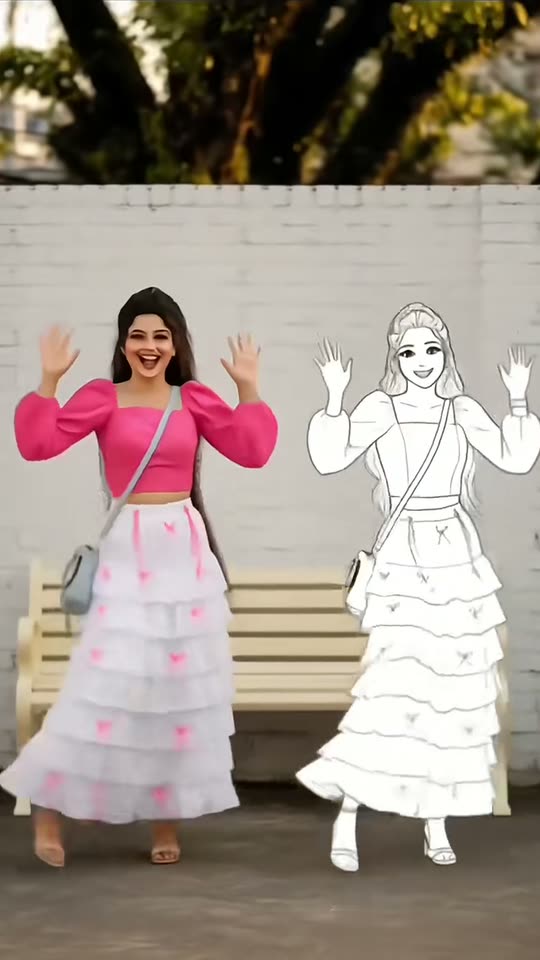
Give a solo photo a playful second character. A white doodle companion appears beside you, reacts to you and joins the dance. Choose the daytime scene or the night variation for the setting.

The original AI Doodle Dance reel by @xl5ajzoyy7Original reel
  • 1 photo you add
  • 10 s video
  • No prompt to write
  • No watermark

No prompt to write: Add your photo and tap once

Create your own

Ready in a few minutes · From 126 credits

Your dance partner is a sketch of you: a flat white, ink-outlined twin with the same visual cues from your hair and outfit. It enters beside the real-looking subject, exchanges a playful reaction and joins a short synchronized routine. The contrast between the photographed person and the drawn copy is what makes the doodle-partner format work.

Smew creates the pair from one adult photograph. Choose Sunny wall for a bright setting or Night street for a darker backdrop. You are not uploading a second friend or selecting an existing anime character; the extra performer is a generated drawn counterpart of the person in the source image.

Also called Also searched as doodle twin dance, manga clone, cartoon sketch doppelganger and baila con tu yo anime.

Example

A closer look at AI Doodle Dance Partner

Visual references for the format, not Smew customer results. Your generation can change fine details, expressions and movement.

Visual reference

A visual reference, not a Smew customer result. Your generated details will differ.

Use this reference
Step by step

Create your AI Doodle Dance Partner version

Choose the cast and output before adding your photos.

  1. Add one clear adult and choose a place

    Upload a full-body or knees-up photo with visible clothing and a clear face. Select Sunny wall or Night street before starting. No drawing skill, existing cartoon image or second performer photograph is required.

  2. Check the matching output facts

    Both settings use Seedance 2.5 for a 10-second, 720p, vertical 9:16 video at 126 credits. Generated scene audio is enabled. The template supplies the drawn twin and interaction; the setting choice does not change the cast or create another upload slot.

  3. Watch both versions of the subject

    Track the task from Dashboard and open the finished Library file. Check that the real-looking subject stays recognizable and the twin stays drawn through the entrance, dance and final pose. Review sound and movement before downloading or sharing.

Choosing photos for this effect

Choose one adult in a full-body or knees-up photograph, with the face and outfit clearly visible. Clothing details and hair give the drawn twin something recognizable to echo. A tight face crop offers less information for the dance and may force the model to invent the lower body. Leave space around the person rather than filling the frame edge to edge.

Use even light and a clear face, with no sunglasses or hands blocking important features. The starting photograph does not need an empty wall or a doodle already added; the selected setting supplies the scene. Keep one intended person in the source. A busy group image or a second friend is not an extra cast slot, and the line-art twin should be interpreted as a creative copy rather than another real person.

The trend and its visual references

The reference material describes a phone-editor template labeled AI分身, meaning an AI clone, and tutorials showing a person with a line-art counterpart. Myanmar-language, Filipino, Spanish and English examples gave the format several names, including dancing with your anime self and a cartoon sketch doppelganger.

The links below document those interpretations without claiming a verified first creator or repeating changing template-use totals. This is distinct from a real dance challenge associated with a song called doodle. Here the defining feature is the drawn second performer beside the human-looking one. Smew’s fixed recipe uses that contrast in either of its listed settings rather than providing a general animation studio for any character or cast.

  1. Early multilingual tutorials present the photo-to-sketch-twin template and its two-style dance idea. TikTok

  2. The @ezmu.ezmu tutorial is a credited example of the format’s step-by-step presentation. TikTok

  3. Spanish and English posts describe the drawn counterpart as an anime self or sketch doppelganger. TikTok

  4. The @pattytyler8865v8ae tutorial provides another reference for the playful interaction and accompanying sound context. TikTok

Copy and paste

What the built-in recipe controls

These instructions are included in the template. Your uploads provide the identities; the selected version controls the scene and movement.

You

1 photo: you, full body or knees up, face clearSeedance 2.510 s · 720p · 9:16126 credits
Video prompt

Create a single ten-second full-body shot of the adult in [Image 1] and one white line-drawn companion. Keep a steady hip-height camera with both performers at equal scale and feet grounded. During 0–1.5 s the real person reacts with hands near the mouth as the doodle jumps in from screen-right. They face each other and wave through 3.5 s. From 3.5–8.5 s they face camera for raised-hand waves, hip sways, a clap, two side steps and a small bounce. Let the doodle follow about half a beat late. Finish with raised arms and smiling matched poses. Use a sunny brick wall and realistic daytime ground shadows. Keep the person photoreal and the companion a simple white line drawing; do not change this option into a nighttime scene. Keep assigned human faces individually recognizable: preserve facial structure, complexion, eye and hair coloring, age, and characteristic accessories through movement. Use the source hairstyle and clothing unless this scene explicitly changes them. Keep bodies coherent and identities attached to their own roles. The companion is an unfilled white manga-like outline echoing the person’s silhouette and outfit, never a second photoreal person or colored character. Use a fresh bouncy instrumental with claps and light movement accents; no quoted lyrics or familiar melody. Avoid unintended duplicates, fused bodies, extra limbs, captions, logos, watermarks and visible interface elements.

1426 characters

Compare the current template options

You pay in credits. The Generate button shows this price before you spend anything. These are the options on this page.

OptionModelWhat you getCredits
You: Sunny wallSeedance 2.510 s · 720p · 9:16126
You: Night streetSeedance 2.510 s · 720p · 9:16126

One-time packs and plans are on the pricing page. A failed video gives its credits back.

How the person and drawn twin interact

The entrance makes the relationship clear before the dance begins. The human-looking subject reacts, the sketch arrives from the side, and a brief exchange lets viewers recognize them as counterparts. Shared gestures, sways and a final pose then turn a two-style portrait into a small performance.

The drawn subject should remain visually different from the real-looking one: flat fill, line detail and an illustrated face rather than realistic skin. Matching hair and clothing help communicate that it is a twin. Generated timing can vary, so the point is a coherent interaction rather than a guaranteed half-beat delay or an exact number of claps. Watch both figures throughout instead of judging only the opening surprise.

Sunny wall and Night street change the mood

Sunny wall gives the pair a bright, simple backdrop where the white drawing and darker outlines can be read clearly. Night street uses a warmer pool of artificial light against a darker setting. Both are scene options, not instructions to preserve the exact location in your uploaded photograph.

Their current output facts are identical: 10 seconds, 720p, vertical 9:16 and 126 credits with Seedance 2.5. Choose by the mood of the post rather than expecting one setting to include more performers or a longer dance. A clear source outfit matters in both, because the sketched counterpart needs visible cues to echo. Fine set details and lighting can differ between generated results.

The AI sketch format versus a recorded dance challenge

A live dance challenge asks you to learn moves and record a performance. A manual doodle edit asks you to draw or animate a companion over footage. This template starts from one still photo and generates both the person’s movement and the illustrated partner, so neither a recorded routine nor hand-drawn animation is a required input.

It also differs from an existing anime-character crossover. The intended twin is a stylized interpretation of the uploaded adult, not a licensed character selected by name. When you share, call it an AI doodle dance and keep the synthetic-media disclosure visible. That makes the playful fiction clear without suggesting a real interaction, an actual second person or a handmade animation process you did not perform.

When the doodle becomes too real or loses the outfit

If the illustrated partner turns into a realistic person, the two-style contrast has been lost. Check the whole sequence for skin texture, pasted photographic facial features or changing fill. The intended design is a drawn twin, even while it moves beside a more realistic subject.

A clear outfit and hairstyle in the source help make that relationship recognizable. If clothes are cropped away or a second person overlaps the subject, the model has less useful detail to echo. Also inspect hands, arm count and the distance between the figures during the dance. Better inputs can improve the starting information, but they do not guarantee perfect line consistency or identical choreography in every frame.

FAQ

AI Doodle Dance Partner questions, answered

What is the AI doodle dance partner trend?

It is a short scene in which a person is joined by a flat, line-drawn counterpart that echoes their hair and clothes, then dances beside them. The twin is intentionally illustrated rather than another realistic person. Smew builds that interaction from one adult photograph in the chosen setting. Your result is a generated performance, not a live recording or a preexisting anime character appearing beside you.

How do I make the AI doodle dance with my photo?

Choose Sunny wall or Night street on Create, upload one clear adult photo and review the price. Full-body or knees-up framing helps the dance and gives the drawn twin visible clothing to echo. Smew includes the scene instructions, so no separate cartoon image or copied prompt is needed. Follow progress on Dashboard, then review both figures in the saved Library result.

Is this an AI dance partner app?

No separate app is required for the Smew browser workflow. This template generates a drawn counterpart rather than matching you with another real dancer. It is a fixed scene for the doodle-twin idea, not a general partner marketplace or open-ended character editor. An optional editor can add your caption or authorized music afterward, but it is not necessary to create the two-style dance sequence.

Who started the AI doodle trend?

The reference collection includes tutorials for a photo template described as an AI clone, including examples in several languages. The timeline keeps credited links so you can see how creators presented the drawn counterpart. It does not establish a verified first inventor or rely on changing use counts. The format is recognizable through the flat sketch dancing beside its human-looking source, regardless of the tutorial language.

Is it the same as the doodle dance from 2024?

No. A real dance challenge associated with a song called doodle is a different search context. This page means the AI sketch-twin scene, where the extra performer is a drawn copy of the photographed adult. Compare the example before submitting if a search result brought you here. A shared word does not mean the choreography, soundtrack or required inputs are the same.

Can I dance with your anime self, like the Spanish posts say?

That phrase describes the illustrated counterpart as a version of the person in the photograph. It is a loose description of the manga-like face and line-art body, not a feature for selecting an existing anime hero. Smew’s twin is generated from the uploaded adult’s visual cues. You can explain it in your own caption without claiming an official character collaboration or a real second identity.

Is there a prompt for the AI doodle dance partner?

No. The recipe already describes the entrance, interaction, dance and final pose for the chosen setting. Your photo establishes the person and outfit. The prompt section explains that direction rather than requiring private text from a tutorial. This is not a promise of arbitrary changes to cast, cartoon style or music just because those changes appear in a caption or another editor’s template.

Is it a cartoon twin filter?

The intended result keeps a human-looking person and adds a separate drawn counterpart beside them. That is different from applying a cartoon overlay to the only face in a video. Check both figures after generation: the subject should remain recognizable, while the twin should retain its illustrated appearance. A model can vary small details, so a convincing thumbnail is not enough to judge the entire interaction.

Can a man or two friends use it?

The one-adult workflow is not limited to women. A clear image of the chosen adult supplies the hair, outfit and identity cues. There is only one person slot here, so a pair of friends is not a supported two-identity mode. Each can create a separate clip if desired. Do not expect a group source to automatically produce a faithful drawn twin for everyone in it.

Does the video have sound?

The Seedance recipe enables generated scene audio rather than attaching the exact sound from a tutorial. A specific beat, clap pattern or commercial recording is not guaranteed. Listen to the completed file before posting, and check permissions if you add a different platform track. The visual twin interaction remains the main format even when you choose to change the sound in a later publishing workflow.

Does the AI doodle dance partner cost credits?

Both Sunny wall and Night street currently cost 126 credits with Seedance 2.5. Each lists a 10-second, 720p, vertical 9:16 video. The setting changes the scene direction rather than the duration or number of uploaded identities. Confirm the live selection before submitting, and review the final movement instead of assuming another creator’s reference clip predicts every detail of your generation.

Is my photo private?

Use your own image or a consenting adult’s photograph, and avoid including bystanders or personal information. Smew’s privacy policy provides the current handling terms; this template page does not create an additional retention or deletion promise. Agree on public sharing separately if another adult is the subject, and make the AI nature clear when associating the drawn and real-looking versions with their name.

More trends

Other AI video templates

Template

Stones to Castle: A visual comeback: turn the stones into your own castle.

Use one portrait for a story that moves from criticism to a castle reveal. Choose the everyday character or the pink-gown scene, then select the full sequence or the shorter edit.

Read more
Template

Bby Wow Guy AI: Insert Your Face Into the Guy Dancing at a Quince Meme

Groove toward the camera at a quinceañera, take a bite of the concha, lock eyes with the lens while chewing with stuffed cheeks, then groove back into the crowd. Upload one photo to star as the bby wow guy, complete with the song.

Read more
Template

Hit the Road Dude: Become the Private Property Meme Driver

"State? This? It ain't. Hit the road, dude. This ain't no state property. This is private property." Upload one photo of your dog or cat, and put that pet in the driver's seat of the viral pickup truck, with the original audio. A human driver is not offered on this page.

Read more
Template

Abra Kadabra Trend AI: Snap Your Fingers, Friend Steps In

Start dancing solo to the Brazilian funk beat, snap when the moment hits, and your friend, pet or a duplicate of yourself joins the frame. Dance the rest together. Upload your photos and you'll get the actual dance with your faces and the track.

Read more
Template

BbY WOW Dance AI Trend: Garage Dance, Quince Meme or Your Pet

The viral dance to "BbY WOW": a palms-up shrug, slicing arms, hands to your head and pointing at the camera. Or take a bite of sweet bread at the quince and dance off. Upload a photo of yourself or your pet to get the clip complete with song.

Read more
Template

Anime Face Trend: See Your Anime Twin in the Star Eye Photo

Upload a single selfie. AI creates an anime version of you, carves out a star from its face, places it over your eye and surrounds you with three to four anime stickers of your twin.

Read more

Make AI Doodle Dance Partner your own

Choose your version, add clear photos and review the credit total before starting.

No watermark. A failed video gives its credits back. Secure checkout by Stripe.