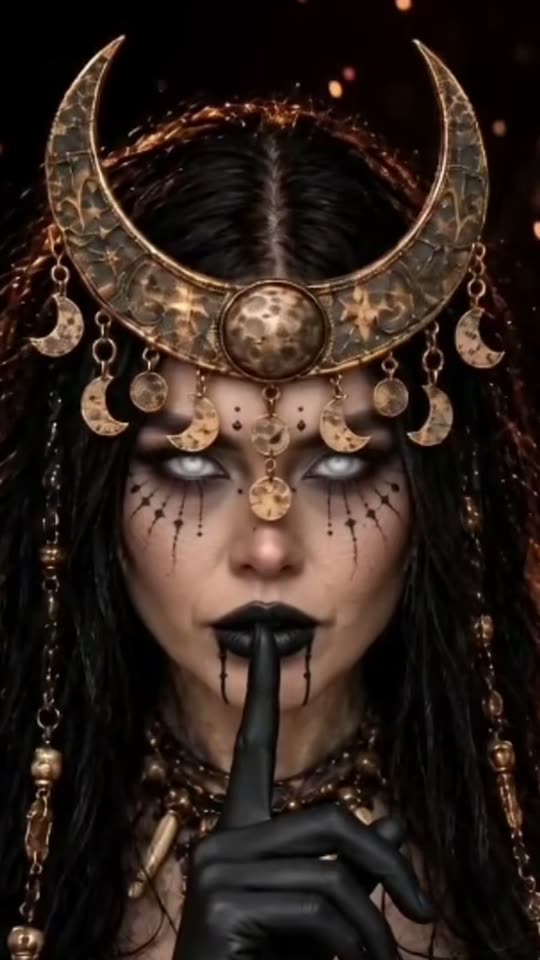
The hand transition and transformed reveal
The beginning should give viewers a moment to recognize the subject before the supernatural element enters. The reaching hand becomes the transition: it connects with the subject, passes over the view and hides the change. The final image then introduces the crescent crown, dark makeup and lace styling as a coherent character rather than unrelated accessories.
Moon witch uses the dark-and-gold direction. White witch changes the palette toward silver and ivory. Pet interprets the concept as a familiar rather than treating an animal as a human body. The timing and fine details can vary, so look for a clear before-and-after story rather than insisting that every finger or sparkle land at the exact instant seen in another creator’s clip.
A browser transformation rather than a separate editor template
Many tutorials use Enchantress filter to mean a photo template opened through CapCut. The result is then posted as a finished clip, which can make it look like a live camera filter. Smew instead takes a still photograph in its own Create flow and runs the configured scene recipe.
You do not need to locate a working template link, install that editor or reproduce a creator’s private prompt. The choices here are Moon witch, White witch and Pet, with their own listed models and outputs. Those are the controls to use when deciding what Smew will make. An editor can still be useful afterward for your own title or permitted music, but it is not required to build the reveal itself.
Using the reveal as Halloween makeup inspiration
The crescent shape, dark lips and fine decorative lines can help you plan a moon-witch costume palette. In the lighter option, ivory lace and silver details change the mood without changing the basic transformation story. A paused final frame can serve as a visual concept, but this page’s configured result is a video rather than a separate high-resolution makeup photograph.
Treat generated costume details as inspiration, not a product list or application tutorial. Real makeup and accessories need appropriate materials and care. The Hecate label is a cultural association used by some viewers, not a claim that the image accurately represents a religious tradition. Choose words that describe your creative look without turning the effect into a promise of supernatural power.
Improving the hands, eyes and likeness
The hand interaction and camera wipe create more opportunities for odd fingers or a drifting face than a simple still portrait. Start with clear eyes and an unobstructed face. A tight crop or hair covering one side can make it harder to preserve the subject when the crown and makeup appear.
After generation, inspect the clasp, the wipe and the final expression. A crown that looks good in one frame can still slide during motion, and generated hands may not remain anatomically neat. A brighter, straightforward source may help, but an instruction to preserve a face is not a guarantee. Review the audio too: the configured models can generate scene sound, not the exact soundtrack of the linked social post.