Grease Dance AI Trend: A carnival dance inspired by Sandy and Danny
Step into a carnival at dusk as a 1950s greaser couple for a playful dance inspired by the musical finale. One dancer wears a black off-shoulder top and red heels; the other takes the floor in a leather jacket. Choose two photos for Duo or one for Solo.
The Grease dance trend brings the mood of the musical finale to short videos: two dancers in 1950s-inspired outfits move together under carnival lights. People also revisit the film dance to “You’re the One That I Want” for Sandy and Danny costume posts, especially around Halloween.
For an AI version, add two photos to put yourself and a partner in the dance, or use one photo for a Solo scene. The dancers walk, turn and swing together in a vertical video with its own music, not the film song.
Also called Grease Trend AI · Grease AI dance · Sandy and Danny dance · Grease dance trend
Example
What the Grease Dance video looks like
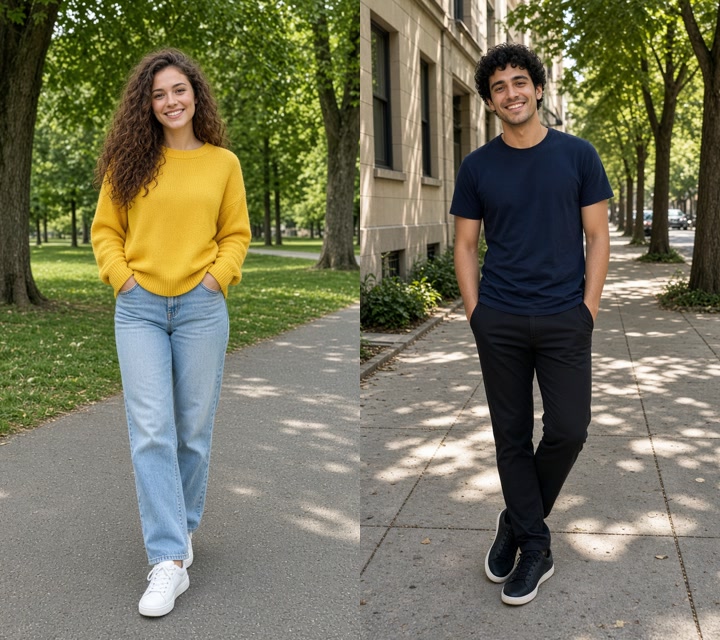
Made with Smew AI using two photos of AI-made adults in Duo: a 480P video with music, generated with Wan 3.0. Each result can look different.
InputSmew AI Duo result, 10 s, 480P, with sound
Made with Smew AI from two photos of AI-made adults: the woman in a yellow sweater becomes the dancer in a black off-shoulder top and red heels, while the man in a navy T-shirt takes the black leather-jacket role. At a carnival at dusk, they step forward, shimmy, turn under a raised arm, then swing hand in hand and finish close together. The finished Duo video includes music.
Step by step
How to make a Grease Dance video
Choose your roles, add clear photos and create the dance in your browser. There is no prompt to write or separate editing app to learn.
Choose Duo or Solo
Choose Duo to add two people, using one separate photo for each dancer. Choose Solo to add one person in the off-shoulder role while the leather-jacket dance partner stays in the scene. Select your photos from your device.
Add your photos and generate
For Duo, add the off-shoulder dancer first and the leather-jacket dancer second. For Solo, add one photo for the off-shoulder dancer. Check the credit price shown on the button and press Generate; the music is added when the video is finished.
Download or share
Find the finished vertical video in your Library. Download it to your device and share it as a retro dance, couples’ costume reveal or Halloween reel on TikTok, Instagram or Shorts.
Which photo works best?
Duo needs two separate photos, each showing one person; Solo needs one photo. The upload order assigns the roles, so swap the photos if you want the other person in the off-shoulder outfit.
Choose sharp, evenly lit photos with each face visible and facing the camera. Avoid sunglasses or a face hidden by hair.
A waist-up or full-body image gives more room to see the person. The scene supplies the retro outfits, so you do not need to dress up for the photo.
For Solo, your photo takes the off-shoulder role and the leather-jacket dancer remains as the partner. Results can vary, including face and outfit details.
Use your own photo or photos of consenting adults. Do not upload a child’s photo or a photo of someone who has not agreed.
Where did the Grease Dance trend start?
The inspiration goes back to the 1978 film Grease, where Sandy and Danny meet again at the school carnival. Her black off-shoulder outfit and red heels, his leather-jacket look, and their playful duet became an enduring costume and dance reference.
The film’s “You’re the One That I Want” was written by John Farrar and performed by Olivia Newton-John and John Travolta. The National Film and Sound Archive of Australia records the song’s 1978 release and chart success. On TikTok, Grease-themed posts revisit the song, outfits and dance; one sound is labelled “grease you are the one i want.”
Couples keep bringing the look back at Halloween: Kelsea Ballerini and Chase Stokes wore their own Sandy and Danny costumes in 2024. Photo-based AI dances added another take on the fairground scene in 2026. One Grease dance template dated 2 May 2026 was listed with 2.33K uses when checked on 28 October; that is the count for that template, not the whole trend.
The trend’s online timeline traces the sound back to April 2022; reports counted about 174,000 videos using it on 28 October 2026. A couples’ costume dance followed in October 2024. In 2026, AI clips brought in a solo fairground dancer, then a carnival dance with a partner. The seasonal costume trend and AI versions continued to spread together through October. This AI dance uses one or two uploaded photos and its own music rather than the film song.
The TikTok sound “grease you are the one i want” appears, giving creators a soundtrack for posts inspired by the film’s dance. Its first post is reported to have reached 4.5 million views.
A “Guess who we are” Halloween post features a couple dancing in Sandy and Danny-inspired costumes; its reported view count reaches 11.5 million.
A photo-based AI dance turns one photo into a woman in black leather and red heels, dancing in front of a fairground wheel; the clip is reported to have reached 438,000 views.
A carnival dance template adds a greaser partner, with Spanish-language posts spreading from October.
“Grease Trend AI” carnival-dance posts begin spreading alongside the seasonal Sandy and Danny costume wave.
Smew AI adds the Grease Dance template: Duo uses two photos, while Solo uses one photo with an AI-made dance partner.
Copy and paste
The Grease Dance prompts
The creation flow uses these instructions for you. In Duo, the two photos are assigned in upload order; in Solo, one photo takes the off-shoulder role.
Duo
2 photos: off-shoulder dancer, face clear + leather-jacket dancer, face clearWan 3.010 s · 480P · 9:16203 credits
Video prompt
Replace only the face and hair identity of the dancer in the black off-shoulder top with the adult in [Image 1], and only the face and hair identity of the dancer in the black leather jacket with the adult in [Image 2]. Keep both source bodies and outfits from [Video 1] in their original positions. Preserve each assigned face and hair identity consistently, and never swap or blend the two identities.
Edit [Video 1] in place. Use the uploaded images ONLY as references for each assigned person's facial identity and hair identity. The uploaded photos are NOT clothing, body, pose, background or lighting references. Do not copy or transfer any clothes, shoes or accessories from the uploaded photos onto either dancer.
WARDROBE IS LOCKED TO [Video 1] IN EVERY FRAME: The off-shoulder dancer keeps the original fitted black off-shoulder top, black high-waisted trousers, black belt and red heels. The leather-jacket dancer keeps the original black leather jacket, black shirt, black trousers and black shoes. Keep both original outfits and their exact colors, shapes and materials throughout the video, including during the turn, side views and close contact. Never replace these clothes with a sweater, T-shirt without the jacket, jeans, trainers or any other clothing from the uploaded photos. Do not change or swap the outfits.
Preserve the complete original performance, including frame order, duration, camera, lighting, location, body positions, the precise dance steps, timing, expressions and interaction. Do not restage the choreography or create new shots. Preserve the fairground, carousel and every background detail. Do not add or remove people or objects. Keep identities attached to their assigned bodies through the entire dance, including turns, overlap and close contact. Keep proportions, limbs, hands and fingers natural. Do not add text, logos, captions or watermark. Produce a silent video; the original reference soundtrack is added separately. The reference video is exactly 10 seconds. Preserve its full action and timing without retiming, extending, adding or removing shots.
1 photo: off-shoulder dancer, face clearWan 3.010 s · 480P · 9:16203 credits
Video prompt
Replace only the face and hair identity of the dancer in the black off-shoulder top with the adult in [Image 1]. Keep the source body and outfit from [Video 1], and preserve the assigned face and hair identity consistently. Keep the leather-jacket dancer, their identity, outfit and performance unchanged in every frame.
Edit [Video 1] in place. Use the uploaded images ONLY as references for each assigned person's facial identity and hair identity. The uploaded photos are NOT clothing, body, pose, background or lighting references. Do not copy or transfer any clothes, shoes or accessories from the uploaded photos onto either dancer.
WARDROBE IS LOCKED TO [Video 1] IN EVERY FRAME: The off-shoulder dancer keeps the original fitted black off-shoulder top, black high-waisted trousers, black belt and red heels. The leather-jacket dancer keeps the original black leather jacket, black shirt, black trousers and black shoes. Keep both original outfits and their exact colors, shapes and materials throughout the video, including during the turn, side views and close contact. Never replace these clothes with a sweater, T-shirt without the jacket, jeans, trainers or any other clothing from the uploaded photos. Do not change or swap the outfits.
Preserve the complete original performance, including frame order, duration, camera, lighting, location, body positions, the precise dance steps, timing, expressions and interaction. Do not restage the choreography or create new shots. Preserve the fairground, carousel and every background detail. Do not add or remove people or objects. Keep identities attached to their assigned bodies through the entire dance, including turns, overlap and close contact. Keep proportions, limbs, hands and fingers natural. Do not add text, logos, captions or watermark. Produce a silent video; the original reference soundtrack is added separately. The reference video is exactly 10 seconds. Preserve its full action and timing without retiming, extending, adding or removing shots.
You pay in credits. The Generate button shows this price before you spend anything. These are the options on this page.
Option
Model
What you get
Credits
Duo
Wan 3.0
10 s · 480P · 9:16
203
Solo
Wan 3.0
10 s · 480P · 9:16
203
One-time packs and plans are on the pricing page. A failed video gives its credits back.
What happens in the Grease trend AI video?
The dancers step into a fairground at dusk, with a lit carousel, striped tents, bunting and warm lights behind them. The example follows this approximate sequence:
Time
Scene
0–2 s
The off-shoulder dancer walks forward in black trousers and red heels, with the leather-jacket dancer following.
2–4 s
The pair move side by side with playful shoulder and hip movements.
4–6.5 s
They face and point toward one another, join hands, and the off-shoulder dancer turns under a raised arm.
6.5–10 s
They hold hands, swing together and finish close to the camera.
The vertical video is around ten seconds long. Its upbeat retro music is not the film song. You can choose music from the posting platform’s library if you want to use a different track; check the available sound and usage options there.
Your result uses the dance scene with the identities from your photos. Faces, details and motion can vary, so review the completed clip before sharing it.
Duo or Solo: which one should I pick?
Choose the option that matches your photos and the roles you want:
Option
Photos
Scene
Duo
Two separate photos
Photo 1 replaces the off-shoulder dancer; photo 2 replaces the leather-jacket dancer. Choose this to dance with a partner or friend.
Solo
One photo
Your photo replaces the off-shoulder dancer; the leather-jacket dancer remains as your partner.
For Duo, the order of the photos determines the two roles. Swap the photos to swap the roles. Solo always uses the off-shoulder position, regardless of who is in the photo.
What goes wrong, and how do you fix it?
Review both dancers through the whole clip, especially when they turn or move close together:
Possible issue
What to check
The roles are swapped
In Duo, photo 1 is assigned to the off-shoulder dancer and photo 2 to the leather-jacket dancer. Swap the photos if you intended the opposite order.
A face looks different
Try a sharp, front-facing photo in even light. Sunglasses, heavy shadows and side views can make the face harder to match.
The dancers blend
Use separate photos with one person in each; check faces, hands and bodies where the dancers touch.
Clothes, movement or sound differ
Review outfits and footwear as well as the steps and music. AI can change details between results.
An input is refused
Check the message and photo requirements before trying a different image. Failed videos return their credits.
FAQ
Grease Dance trend questions
What is the Grease trend on TikTok?+
The trend revisits the carnival finale of Grease, often with a couple dressed in Sandy and Danny-inspired outfits and dancing to the film song “You’re the One That I Want.” People share dance and costume clips around Halloween. The AI version brings the same retro fairground mood to a short video made with your photos, with its own music.
Why is Grease trending again?+
Sandy and Danny are an instantly recognizable costume pair, and Halloween gives couples a reason to bring the dance back into their feeds. Photo-based AI videos add another way to take part, even if you do not have the clothes or a fairground nearby.
How do I make the Grease AI trend video?+
Select Create your own, then choose Duo or Solo. Duo assigns the first photo to the off-shoulder dancer and the second to the leather-jacket dancer; Solo uses one photo for the off-shoulder role. Add clear photos from your device, check the price on Generate and start the video. You do not need to write a prompt or buy a costume. When it is ready, find it in your Library and download it.
Is this the Grease AI dance or the Grease AI filter?+
This is the Grease AI dance: a moving carnival scene, rather than a filter that only changes the look of a selfie. People use both “dance” and “filter” when searching for Grease-inspired AI effects, but the result here is a video of the two dancers.
Can I make it as a couple, like Sandy and Danny?+
Yes. Pick Duo and add one photo of each adult. The first takes the black off-shoulder outfit and the second the leather-jacket role, making it a fun idea for a Sandy and Danny-inspired couples’ costume post. To trade roles, swap the order of the photos.
Does the video use the film or the actors?+
No film footage is used. The dance scene is AI-made, with retro outfits inspired by the look rather than recordings of the film’s actors. Duo uses the people in your two photos; Solo uses your photo for one dancer while the scene’s other dancer remains.
Does the video have the song "You're the One That I Want"?+
No. The dance includes an upbeat original tune, not the song from the film. If you want that song for a post, look for it in the TikTok or Instagram sound library and check the platform’s available usage options before adding it.
Are these the real Grease dance moves?+
The scene takes inspiration from the finale’s playful mood: a confident walk, a shoulder shimmy, a hip sway, a turn and partner steps at a fairground. It is an AI dance interpretation rather than a frame-by-frame copy of the film choreography, and details may vary in the finished video.
Can I use it for a Grease Halloween costume post?+
Yes. The black off-shoulder look and leather jacket make a recognizable starting point for a Sandy and Danny-inspired Halloween post. Choose Duo for a couples’ idea, or Solo if you want to appear with the scene’s dance partner; no costume photo is required.
How long is the video and what format is it?+
The dance is approximately ten seconds long in a vertical 9:16 video, with music and no watermark. The listed template option is 720p and is intended for sharing as a TikTok, Reel or Short. You can download the finished MP4 from your Library.
Is the video real?+
No. The example is AI-made, not a recording of the pictured people dancing at the fair. Your result uses your uploaded photo or photos to create the dance. Use your own photo or one shared by a consenting adult, and follow the platform’s AI-labeling rules when posting.
No watermark. A failed video gives its credits back. Secure checkout by Stripe.
Grease Dance video203 credits · ready in a few minutesCreate your own
Cookie Settings
We use cookies to improve your experience, analyze site usage and support our marketing. You can accept or reject non-essential cookies; essential cookies needed for sign-in always stay on.