I Put My Heart in This: A street-interview setup becomes an unexpectedly committed performance.

Use one portrait for the microphone-taking meme. An AI-edited visual reference guides the handoff and reaction, while your face becomes the lead identity.

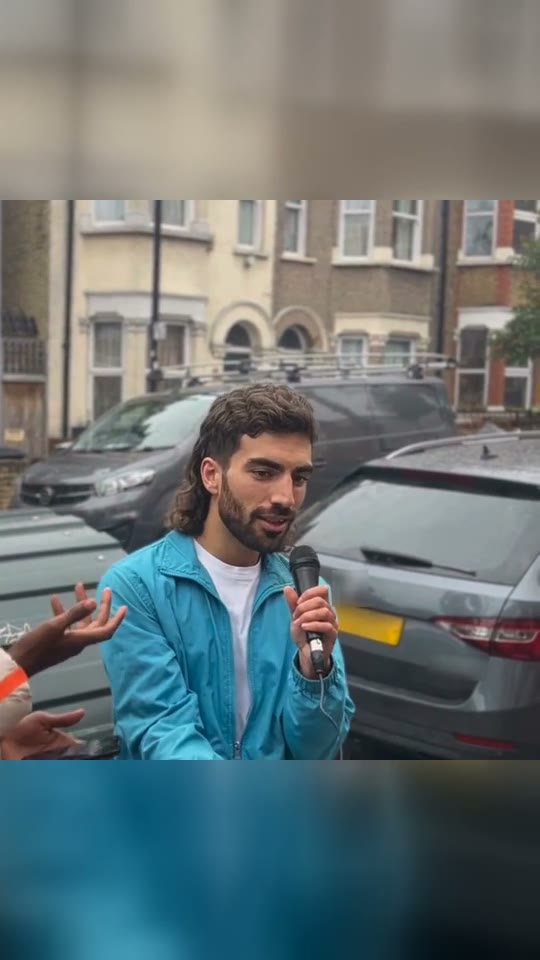
Illustrative AI reference for I Put My Heart in ThisAI reference
  • 1 photo depending on version
  • 12 seconds
  • Price shown before generating

No prompt to write: Add your photo and tap once

Create your own

Ready in a few minutes · From 183 credits

Someone asks an ordinary geography question. Instead of producing an answer, the interviewee takes the microphone and launches into a song with complete confidence. That change of subject is the I Put My Heart in This joke. Smew puts the consenting adult in your photo into the interview role, keeping the awkward setup and confident response as the central contrast.

This is a 12-second landscape video, rather than a vertical dance template. One clear chest-up photograph is enough. The configured interview soundtrack is added after the picture is generated, so the saved result contains the question and musical response. The example is an AI interpretation of the reference scene, not evidence that the uploaded person really met the interviewer.

Example

Preview the I Put My Heart in This format

Visual references explain the format. Generated details and timing can vary.

Visual reference
A format reference, not a Smew customer result.
Use this reference
Step by step

Make your I Put My Heart in This video

Choose a version, add the required photos and check the displayed credits before generating.

  1. Add a clear adult portrait

    Upload one chest-up photo of the person who should take the microphone. Keep the face visible and show the clothes you want the character to wear. Use your own image or an adult's permission, rather than a public figure's photograph.

  2. Confirm the landscape choice

    The current recipe uses Seedance 2.5, costs 183 credits and produces 12 seconds at 720p in 16:9. Those settings preserve the wide interview composition. The scene prompt is built in; no lyrics, voice recording or interview footage are required from you.

  3. Watch the response unfold

    Follow the task in Dashboard and open the completed file in Library. Review the moment the face looks down, the hand takes the microphone and the mouth begins the musical response. The soundtrack is joined before the result is marked complete.

Choose a photo that keeps the subject recognizable

The face has more screen space here than in a distant concert shot. Choose a sharp chest-up portrait in daylight or an evenly lit room, looking toward the camera. A hat shadow, dark glasses or a strong beauty filter can conceal the identity cues the model needs, especially when the head turns down toward the question.

Include the shoulders and top of the outfit. The aim is to use the uploaded person's clothing, not automatically copy the reference performer's tracksuit or facial hair. A hoodie or casual top suits the street-interview setting, but it is clarity rather than a specific costume that matters.

Only one adult should appear in the upload. A second face can confuse the assignment; the interviewer does not need another photo. Use an image you have permission to provide. This template is not intended for children, strangers or celebrity impersonation.

Where the format comes from

The reference is associated with London rapper YJ, whose social posts made the opening of his song recognizable in street interviews. The recurring act is simple: rather than answer what he has been asked, he takes control of the microphone and sings. The geography-captioned repost turns that act into a reaction to being put on the spot.

The source examples span song posts in 2024, street-interview appearances and a January 2025 repost by @theysamirollin_. Later reposts show why the setup works beyond the original music context: a class, meeting or quiz can all supply the question someone would rather avoid. The links document examples, without treating changing stream or view totals as fixed facts.

The song and performance belong to their respective creators. Smew's template is an independent AI recreation of the meme format. It does not imply a collaboration with YJ, and replacing the interviewee is not a claim that the generated person recorded a new live vocal performance.

  1. YJ shares a post associated with the song. Song post

  2. A street-interview example places the singing response in a London setting. Interview reference

  3. YJ posts another example of the musical response. Creator post

  4. A creator update provides further background on the song's release period. YJ update

  5. The geography-captioned interview repost supplies the familiar reaction-meme framing. Geography reference

  6. A later post revisits the format, showing its use as a recurring reaction. Later example

Copy and paste

The recipe behind the result

The template applies its configured instructions. No prompt writing is required for this flow.

You

1 photo: you, chest up, face clearSeedance 2.512 s · 720p · 16:9183 credits
Video prompt

Render a photorealistic 16:9 sequence using [Video 1] as the visual guide. [Image 1] replaces the interview respondent in the AI-edited [Video 1] reference. The interviewer’s visible hands and microphone remain separate props and roles. Follow the reference camera, scene continuity, relative action timing and cuts unless the scene instructions below explicitly change the setting. Retain the reference street composition and its wide frame. Begin with the respondent listening and checking the phone, then copy the microphone-taking gesture and the change to an emphatically committed performance. Match head tilts, eyebrows, hand position, mouth-shape rhythm and camera framing through the rest of the supplied segment. Keep the face consistently tied to the uploaded identity during close approaches, and do not turn the interviewer or background people into copies. This is a visual match to an AI-edited reference, not a request to reproduce the original recording. Keep each uploaded identity distinguishable through every view: consistent face structure, complexion, hair, age and build. Never transfer a target face onto another body. Retain the selected outfit rules rather than reverting to the reference performer. Change only the assigned performers, leaving other roles and props coherent. The soundtrack is handled separately: match visible mouth shapes and rhythmic gestures to the reference performance without generating a recording, sung words or dialogue from it. Add no unrelated people, extra body parts, captions, signatures or watermarks.

1565 characters

Models, duration and credit cost

You pay in credits. The Generate button shows this price before you spend anything. These are the options on this page.

OptionModelWhat you getCredits
YouSeedance 2.512 s · 720p · 16:9183

One-time packs and plans are on the pricing page. A failed video gives its credits back.

From a difficult question to a confident performance

The scene needs its opening hesitation. The interviewee looks toward the phone or question, apparently considering an answer, while the microphone remains part of the interview setup. Then a decisive hand movement changes the relationship: the subject takes the microphone and treats the moment as an opportunity to perform.

The musical response is delivered with a calm face and measured hand gestures. It is funnier when the character seems completely convinced that singing is the appropriate answer. The final calming motions close the sequence without returning to the original question. You do not need to reproduce the lyrics in a caption to make that structure understandable.

Smew follows the short question-to-response arc in a 12-second take. The wide street composition leaves room for the interviewer and subject's gestures. Motion generation and the separate soundtrack step work together to suggest the reference performance, but precise lip timing and every hand shape can vary. Review the full exchange rather than judging whether the opening still looks like your photo.

What the browser workflow creates

This is one adult identity in an existing interview-style composition. Your photo guides the interviewee's face, hair and clothing; it does not cast a second person as the interviewer or replace every bystander in the background. The recipe contains the phone glance, microphone grab and performance gestures, so there is no separate prompt-writing step.

The current catalog offers Seedance 2.5 at 183 credits for a 12-second 720p video in a landscape 16:9 frame. Landscape is intentional: a square or vertical crop may remove the gesture that makes the microphone handover readable. If you later reframe for a social feed, preview that crop before posting.

The original reference soundtrack, including the interview setup and musical response, is added after picture generation. The file is saved with that audio before completion, and Library uses the saved result. This does not clone your real voice, create a new interview recording or grant rights to the song. It is a generated performance using a configured audio reference.

Checking identity, hands and mouth timing

The downward glance can make an identity look less stable than it does facing the camera. A sharp, evenly lit upload with the entire face visible gives the model the best chance to preserve recognizable features through that movement. If a reference-associated moustache or clothing color appears, compare your source image: a tight selfie with little outfit information leaves more to invention.

The microphone grab is another useful checkpoint. The hands should read as one person's deliberate action rather than a blurred exchange with duplicated fingers. Watch the moment the mic reaches the mouth and the final calming gestures too. Small motion artifacts can be more noticeable here because the frame centers on conversation rather than spectacle.

The picture is generated and the soundtrack is placed afterward, so exact mouth alignment is not guaranteed. A different take may vary, but another paid run is not a certain fix for every mismatch. Start with better source information when possible, then decide whether the result works as a humorous AI reaction before you publish it.

Use the reaction without misrepresenting the person

The strongest captions supply a new situation: being asked for an update when you have none, facing an unexpected quiz, or trying to answer a complicated meeting question. Those contexts explain why the character suddenly changes the subject. Write the setup in your own words rather than copying a lyric block or presenting the clip as a real interview.

Credit YJ when discussing the song and original performance. The finished file's soundtrack remains subject to the relevant music rights, and platform rules differ for personal posts, business accounts and advertisements. Access to a template is not a universal publishing license. The creator links above are a better route to the source than a transcription of the lyrics.

Use the available AI disclosure, and post only a consenting adult's likeness. If the joke is about a friend, check that they are comfortable being shown singing and handling the microphone. The result is intended as a playful fictional reaction, not evidence of something that person said, sang or was unable to answer.

FAQ

I Put My Heart in This questions

What is the I put my heart in this meme?

It is the street-interview reaction where a question is answered with a confident song performance instead of information. The geography-captioned version is especially recognizable. The microphone grab and unbothered delivery create the joke. This template makes an AI interpretation with the adult in your photograph as the interviewee.

Who is the guy in the I put my heart in this meme?

The reference is London rapper YJ, whose account is @yeabsrajustice. His song and street-interview appearances form the background of the meme. Your uploaded adult is intended to occupy the interviewee role in the generated take; the trend name is not a promise of an official YJ appearance or endorsement.

What are the I put my heart in this lyrics?

The credited creator posts and authorized song sources are the right places to find the full performance. We do not reproduce the lyrics here. You do not have to type or upload them to use this template: its configured reference audio supplies the short musical-response section after the video picture has been generated.

Where does "honey calm down calm down" come from?

The closing portion of the reference combines a calming vocal refrain with downward hand motions. Viewers use that ending as a reaction in its own right, so searches for it often lead back to the same interview clip. The generated sequence follows that performance arc rather than adding a separate answer to the geography question.

What is the I put my heart in this song?

It is YJ's own song associated with the I Put My Heart in This title, rather than a random track added to an unrelated interview. The template uses the configured short reference section, with the interview setup. The music remains the creator's work; producing an AI picture does not create ownership of the recording.

Is this the I put my heart in this original?

The original source and Smew's example serve different purposes. The credited geography repost documents the meme, while the example on this page illustrates an AI replacement. YJ appears in other street-interview posts too, so a similar singing response may come from another recording. Use the timeline links when looking for the source rather than treating a generated sample as archival footage.

Is there an I put my heart in this AI version or prompt?

No. The template includes instructions for the interview scene and response gestures. You provide the subject photo and confirm the credit cost. We do not claim that the original creator published or endorsed Smew's recipe; it is a separate implementation of the recognizable reaction format.

How do I make the I put my heart in this meme with my photo?

Add one clear chest-up portrait, check the 12-second landscape choice and start generation. The current selection costs 183 credits. Dashboard tracks accepted work, and Library holds the finished file after the soundtrack step. There is no need to film yourself singing, answer a quiz or cut interview footage together.

Can I use a photo of a child or a celebrity?

Use yourself or a consenting adult aged 18 or over. The template is not intended for children or for taking a stranger's or celebrity's likeness from the internet. Consent matters because the generated person appears to sing and perform in a situation that did not actually take place.

How long is the video, and does it have sound?

The current output is 12 seconds at 720p in a wide 16:9 frame. The configured interview soundtrack is joined after picture generation and saved with the final file. It includes the setup and musical response; it is not an original song generated in your own voice.

Can I post it on TikTok or Instagram?

You can download the finished MP4 and choose a suitable publishing format. Keep the AI disclosure and your subject's consent, and check music permissions for the destination and account type. A vertical crop may cut out the microphone handover, so inspect the composition if you reframe the landscape video.

Does the template cost credits?

Yes. The current recipe is 183 credits, and Create displays the amount before submission. That is a generation cost, separate from any plan's billing interval. Processing time varies; follow the accepted task in Dashboard instead of assuming that waiting requires another submission.

Try I Put My Heart in This with your photos

Choose your version, review its output and credits, then start your own take.

No watermark. A failed video gives its credits back. Secure checkout by Stripe.