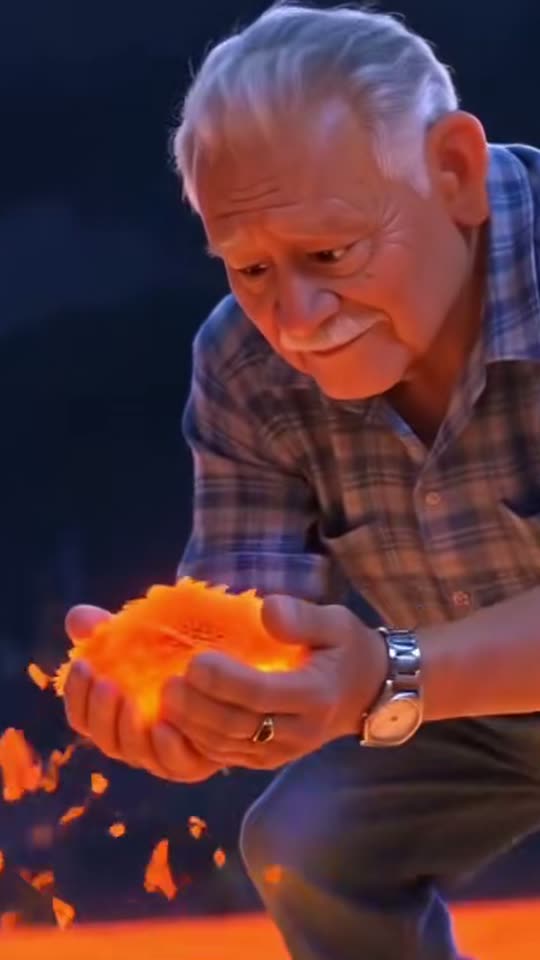
Marigold Bridge AI: A gentle imagined walk across a glowing marigold bridge.
Create a symbolic remembrance scene from a loved one’s portrait. The template uses a warm bridge of marigolds and an unhurried walking moment rather than a realistic reconstruction of an event.
A luminous path of orange petals becomes a place to remember someone you miss. The marigold bridge format turns an adult’s photograph into a stylized animated figure, taking careful steps through a warm night scene and gathering petals along the way. Its emotional center is remembrance, with imagery connected to Día de Muertos and the cempasúchil flower.
This is a newly generated memorial scene, not recovered footage or a claim about the afterlife. Smew’s template accepts one person and offers a 10-second vertical result. Consider how the person’s family might feel about an animated likeness before creating or sharing it. A quiet private keepsake can be as meaningful as a public post, and there is no obligation to turn grief into a trend.
Also called Also known as puente de cempasúchil AI, marigold bridge memorial and Día de Muertos photo animation.
Example
Preview the Marigold Bridge AI format
Visual references explain the format. Generated details and timing can vary.
The selected version defines the photo roles and recipe.
Choose a photograph with care
Add one clear photograph of the adult you want to remember. A straightforward portrait is enough; you do not need a picture on a bridge or in a costume. If the source is a printed photograph, make a sharp scan or glare-free copy first.
Review the memorial option
Choose Standard or Best on Create and check the current price. Both configured outputs are 10 seconds, 1080p and vertical 9:16. The scene and movement are already described in the template, so you can concentrate on the likeness and whether this style feels appropriate.
Review before sharing
Start the task and follow it from Dashboard. When the video is saved in Library, watch its face, hands and final frame in full. Show it privately to family first if you are unsure how an animated memorial will be received.
Choosing photos for this effect
Choose one adult’s photograph with a clearly recognizable face. An older print is usable as a starting point if you photograph it flat, keep the camera parallel to it and avoid reflections from the paper or frame. Crop away the album edge, surrounding pictures and written notes that are not part of the face. A focused scan is preferable to a screenshot of a small social-media thumbnail.
Use a picture that reflects how you want to remember the person. The template interprets their appearance in an animated style; it is not an age-restoration tool. If a group photograph is all you have, crop to one subject without cutting into their face. Ask close relatives about the choice when appropriate, particularly if you intend to publish the result or include personal memorial details.
The trend and its visual references
Marigold petals are associated with welcoming and guiding loved ones during Mexican Día de Muertos observances. The luminous bridge imagery is also familiar from the animated film Coco. Online remembrance posts bring those ideas together: the person’s likeness travels through an imagined landscape while a caption asks that they be accompanied on the journey.
The references below connect an earlier discussion of first-Day-of-the-Dead memorial posts with the later photo-animation format credited to @ia_chiomora and related tutorials. They help explain the emotional language and visual setting; they do not prove a single inventor or make spiritual promises. Families observe remembrance in different ways. Treat the bridge as a symbol chosen by the family, rather than a universal description of what everyone believes.
A remembrance article discusses the relationship between first Día de Muertos posts and imagery inspired by Coco. El Financiero
The @ia_chiomora reference illustrates a photo becoming a stylized figure on a glowing petal bridge. TikTok
A related tutorial shows the photo-animation workflow and helps explain how viewers adapted the memorial format. TikTok
The dated reference set also includes bridge and first-remembrance-season tags; reach figures are omitted because they change and are not independently established here.
Copy and paste
The recipe behind the result
The template applies its configured instructions. No prompt writing is required for this flow.
Loved one
1 photo: your loved one (an adult)Kling 3.010 s · 1080p · 9:1656 credits
1. Prepare the image · Nano Banana 2.1
Produce one 9:16 image. [Image 1] supplies the only foreground character. Base the personal likeness on the supplied photographs: retain face shape, complexion, age cues, eyes, hair and distinguishing details while applying the specified treatment. Do not substitute a recognizable public figure or invent a different identity.
Interpret that person as an original warm 3D animated character, with softly modelled forms and expressive eyes, while retaining their age, facial structure, hairstyle, complexion, distinguishing features and outfit. Extend a cropped portrait into a plausible clothed full body. Place the character three-quarters toward a low camera on a broad bridge densely covered with luminous orange marigold petals. Use a deep-blue night sky, warm distant city lights, a few tiny blurred figures far behind and drifting petals. Show the shoes resting among the glowing petals. No skeleton, face paint, wings, halo or imitation of a named film character.
Keep the composition readable, with correct separation between subjects, consistent lighting and plausible anatomy. Preserve intentional stylization without accidental duplicated faces, disconnected hands or merged bodies. If an input is an animal, preserve its own species, facial features and fur instead of adding human facial skin. No additional captions, labels, logos, signatures, watermark or interface elements.
This image is prepared automatically before the video step. Both steps are included in the displayed credit cost.
2. Animate the prepared image
Animate only the completed scene image supplied to this stage. Treat its characters, identities, costume, scale, layout, light and rendering style as the established first frame; do not rebuild the portrait or repeat the image-creation stage. Keep its framing and the subject count unless a camera move is described below.
Over the first three seconds, track gently backward at knee height as the character takes careful forward steps, petals brightening underfoot. Between seconds three and five, let them notice the petals, slow down and crouch while the camera rises slightly. Through seconds five to seven, both hands brush the surface and cup a generous handful. End still crouched, lifting the glowing petals toward the chest with a moved smile as a few particles float upward. Preserve the established stylized face, costume and night palette.
Use gentle original instrumental ambience, soft footfalls and delicate petal movement; no speech, sung words or recognizable film music. Keep faces and distinguishing marks consistent through expression changes. Prevent body merging, sliding contact points, extra limbs and abrupt changes of style or location. Any animal keeps its own furry anatomy and paws. The ending should settle into a coherent pose within the configured clip length. Do not add written titles, subtitles, brand marks, signatures or watermarks.
You pay in credits. The Generate button shows this price before you spend anything. These are the options on this page.
Option
Model
What you get
Credits
Loved one: Standard
Kling 3.0
10 s · 1080p · 9:16
56
Loved one: Best
Seedance 2.5
10 s · 1080p · 9:16
128
One-time packs and plans are on the pricing page. A failed video gives its credits back.
What the bridge scene shows
The scene is built around a gentle journey rather than a dramatic reveal. A stylized figure enters the warm orange light, looks down at the path and interacts with the petals. The small gestures give the viewer time to recognize the face and understand the setting. The night background and glowing flowers establish the symbolic world without requiring a written explanation inside the picture.
Smew’s clip remains on the bridge. It does not automatically cut to a framed original photograph or construct a family altar at the end. If that closing image matters to your tribute, place it after the saved clip in an editor or publish it as a separate image beside the video. Keep a clear distinction between the real photograph and the imagined scene.
Understanding the Spanish remembrance caption
The Spanish wording often associated with this format asks others to accompany someone crossing the marigold bridge for the first time. It expresses care and the difficulty of a first remembrance season after a death. The request is affectionate and communal; it should not be used to pressure a grieving family into taking part or accepting a particular belief.
You do not need to reproduce the complete viral caption to explain your own tribute. A few original words naming the relationship, a memory or a wish for companionship can carry the meaning more personally. If you use Spanish phrases, understand them before publishing and avoid including private dates or circumstances simply because another post used them.
Sharing a memorial gently
Speak with the people closest to the person before making a public tribute. Some may find a moving likeness comforting, while others prefer the original photograph to remain still. Both reactions are reasonable. You can show a preview privately, choose a smaller audience, or decide not to publish after seeing the result.
When you do share, describe it as an AI memorial or imagined tribute so viewers do not mistake it for authentic old footage. Keep the person’s dignity ahead of the trend format. A simple caption and a respectful cover image are often enough; there is no need to add a dramatic account of the death, ask strangers for engagement or expose a family disagreement.
Improving an unclear face or restless animation
If the likeness is weak, first check the source rather than adding more written description. A faded face occupying a small corner of a group photo contains little detail. A closer crop, a better scan or a different portrait can supply more useful information. Harsh reflections on a framed print may be interpreted as part of the face or clothing.
Review the petal gesture as well as the opening portrait. Hands and expressions can vary in generated motion, and an attractive first frame does not guarantee the whole sequence is suitable for a memorial. The animated style deliberately changes texture and proportions; if that feels wrong for your family, a still tribute may be a better choice than repeated attempts to force photorealism.
FAQ
Marigold Bridge AI questions, answered
What is the marigold bridge AI trend?+
It is a remembrance video in which a photograph becomes a stylized person walking on a luminous path of marigold petals. The image draws on Día de Muertos symbolism and the familiar bridge setting from animated storytelling. Smew creates an imagined 10-second scene from one adult’s photo. It is a memorial interpretation, not documentary footage of the person or evidence of a spiritual event.
How do I make the marigold bridge AI video?+
Open Create, upload one clear adult portrait, and select the option whose model and price you want. The template already contains the bridge scene and movement instructions. After you submit, Dashboard tracks the task and Library holds the saved result. Review the likeness and the emotional tone before sharing; you do not need to write a prompt or prepare a reference video.
What does "No lo dejen solito, es su primera vez cruzando el puente de cempasúchil" mean?+
The familiar caption asks that a loved one be accompanied on their first crossing of the marigold bridge. In the memorial context, it is an affectionate expression of concern during the first remembrance season after a death. It is not a command you need to repeat. You can convey the same care in your own language and choose words that fit your family’s beliefs.
What is the meaning of the marigold bridge?+
Cempasúchil flowers and their petals are part of Día de Muertos imagery, often associated with guiding and welcoming loved ones. The bridge makes that symbolic path visible in an imagined landscape. Traditions vary by family and community, so the video should not be presented as a complete explanation of the holiday or a claim that every family understands the flowers in precisely the same way.
Is this a Day of the Dead AI video?+
Yes, the orange petals, night setting and remembrance theme are designed around that visual context. It can be described as a Día de Muertos AI memorial, or a video animado in Spanish. The template is a creative tribute rather than a religious service. Choose it because the symbolism means something to you, not because a trending caption says a memorial has to look this way.
Can I make an AI video of a deceased loved one with an old photo?+
An old photograph can work if the face remains clear enough to recognize. Scan it or photograph it without glare, crop out the frame and focus on one adult. The template uses that appearance as its reference rather than automatically restoring age or damaged detail. Tell viewers it is an imagined animation; a generated movement is not a newly discovered memory of the person.
Can I make it for my mom, my grandpa or a friend?+
The one-person template can be used to remember an adult family member, partner or friend when using their likeness is appropriate. Select a photograph that those close to them are comfortable with. For two people, this page does not offer a shared two-person scene. Make separate tributes rather than uploading a couple and expecting the model to preserve both identities in one bridge journey.
Can I make it for my pet?+
This page’s input and recipe are for an adult person. A pet photograph is not a substitute for that slot. Smew has a separate Day of the Dead pet template built around animal subjects. Choosing the dedicated page keeps the proportions and scene appropriate, rather than asking a human memorial recipe to improvise an unsupported pet version.
Can the video end with their real photo, like the posts?+
The configured bridge clip ends within the imagined scene. A cut to the real portrait, a name card or an altar photograph is not included automatically. You can add such an image after downloading the result or place it next to the video in a post. Keeping that real photo distinct also helps viewers understand which part is authentic and which part was generated.
Which prompt does this template use?+
No. Smew already includes the scene instructions for the glowing path, the stylized likeness and the petal movement. The photo supplies the identity. The prompt section explains the recipe rather than requiring you to copy another creator’s private settings. If you want a different story or a second person, this fixed template is not a promise that free-form changes are supported.
Is it okay to make a video of someone who has passed away?+
That is a personal and family decision. An animation can feel warm to one person and unsettling to another. Discuss the photograph, intended audience and style before publishing, and give relatives room to decline. The generated video should be identified as a creative tribute. You can keep the result private or choose an ordinary photograph if motion does not feel respectful to you.
Where can I find the marigold bridge video on TikTok?+
The timeline includes credited links to posts and tutorials associated with the bridge format. Searches for puente de cempasúchil or marigold bridge memorial can also help you recognize the style. Those posts are context, not a promise about your output or proof of exclusive authorship. Look at the sequence and tone rather than treating changing view totals as a measure of a tribute’s value.
When is the first day of the Day of the Dead in 2026?+
The commonly recognized dates are November 1 and 2; in 2026 those fall on Sunday and Monday. Preparations and specific observances can begin earlier and vary across communities and families. If you are planning a tribute, follow your own household’s timing rather than a single internet schedule. It is also fine to remember someone on a personally meaningful day outside those dates.
How long is the video, and does it have sound?+
Both choices produce a 10-second, 1080p, vertical 9:16 video. Their configured models can generate audio for the scene; that is different from supplying the exact soundtrack of a social post. Do not expect a particular commercial song or a guaranteed spoken line. Watch and listen to the completed result before using it in a memorial or adding platform music.
Does the marigold bridge video cost credits?+
The current Standard choice uses Kling 3.0 and costs 56 credits. Best uses Seedance 2.5 and costs 128 credits. Both have the same listed duration and output dimensions, so compare the option rather than assuming the higher price buys a longer tribute. The live table and the selected Create button show the amount to review before you submit the task.
Are my photos private?+
A family photograph may be sensitive even when it is old. Upload only a picture you are entitled to use and avoid adding private circumstances of the death to the image or caption. Read Smew’s privacy policy for current handling information. This page does not promise a special deletion period, public-use permission or a different privacy arrangement for memorial uploads.
No watermark. A failed video gives its credits back. Secure checkout by Stripe.
Marigold Bridge AI video56 credits · ready in a few minutesCreate your own
Cookie Settings
We use cookies to improve your experience, analyze site usage and support our marketing. You can accept or reject non-essential cookies; essential cookies needed for sign-in always stay on.