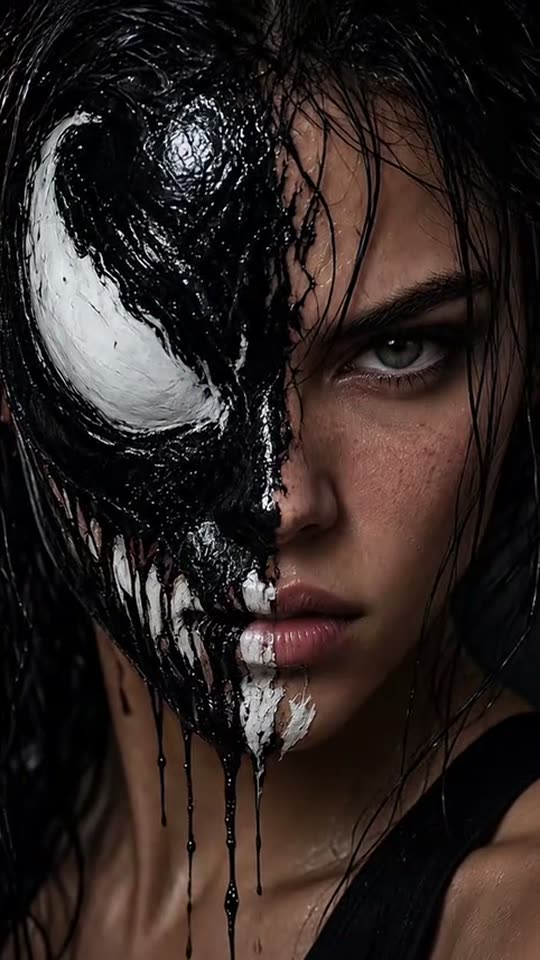
How the transformation reads on camera
The visible split is more important than covering the entire face. One side remains a recognizable portrait while the other gains a glossy dark surface, an enlarged pale eye shape and decorative tooth forms along the mouth and jaw. Thin neck details continue the design without requiring a full character costume.
In a video, the reveal gives those features a sequence; in a still, the face contrast has to work in one frame. Look for an intelligible midpoint, an eye that sits convincingly on the face and a mouth that remains part of the same person. These are AI interpretations of makeup. Fine details and transitions can change, so a reference should guide the look rather than be treated as a guaranteed exact result.
Choosing a video or a makeup reference image
Half face is the choice for a moving transformation and a short social reveal. Its current output is 10 seconds at 720p in vertical 9:16. Photo is a 2K vertical still for comparing the design, trying a cover image or keeping a concept board. It costs fewer credits because it produces an image rather than a moving sequence.
Neither option asks you to build a full suit or hide your face behind a mask. If your purpose is planning a real Halloween look, the still may be the more useful reference: you can pause over the eye and jaw arrangement without judging animated motion. It is still a generated design, not a product test or an exact diagram for recreating the materials.
AI inspiration and real face paint serve different jobs
A generated makeup concept can help you decide whether a bold half-face silhouette suits your costume. It can suggest a balance of dark surface, pale shapes and exposed skin before you spend time on a real design. It does not apply anything to your skin or demonstrate that a cosmetic product can safely create the same texture.
If you later paint the look, use products intended for that purpose and follow their instructions, especially around eyes and lips. Do not use the image as evidence that every black pigment, adhesive or decorative detail is suitable. When posting the AI version, label it clearly rather than presenting the result as a filmed makeup application or a tutorial you physically performed.
Fixing a muddled eye or an unrecognizable half
If both halves look equally painted, inspect whether the source already contains heavy makeup, a strong filter or deep shadow on one side. A simpler portrait gives the model a clearer difference to build. If the pale eye merges into hair or glasses, choose a source with the relevant area unobstructed instead of asking motion to invent what is hidden.
Review the jaw and mouth through the full video. Teeth-like decoration should read as a design, not an accidental second mouth. A sharp source helps, but hands and facial details may still vary in AI motion. If a result feels too intense for your intended audience, use a calmer source or choose the still concept rather than assuming every interpretation will be identical.