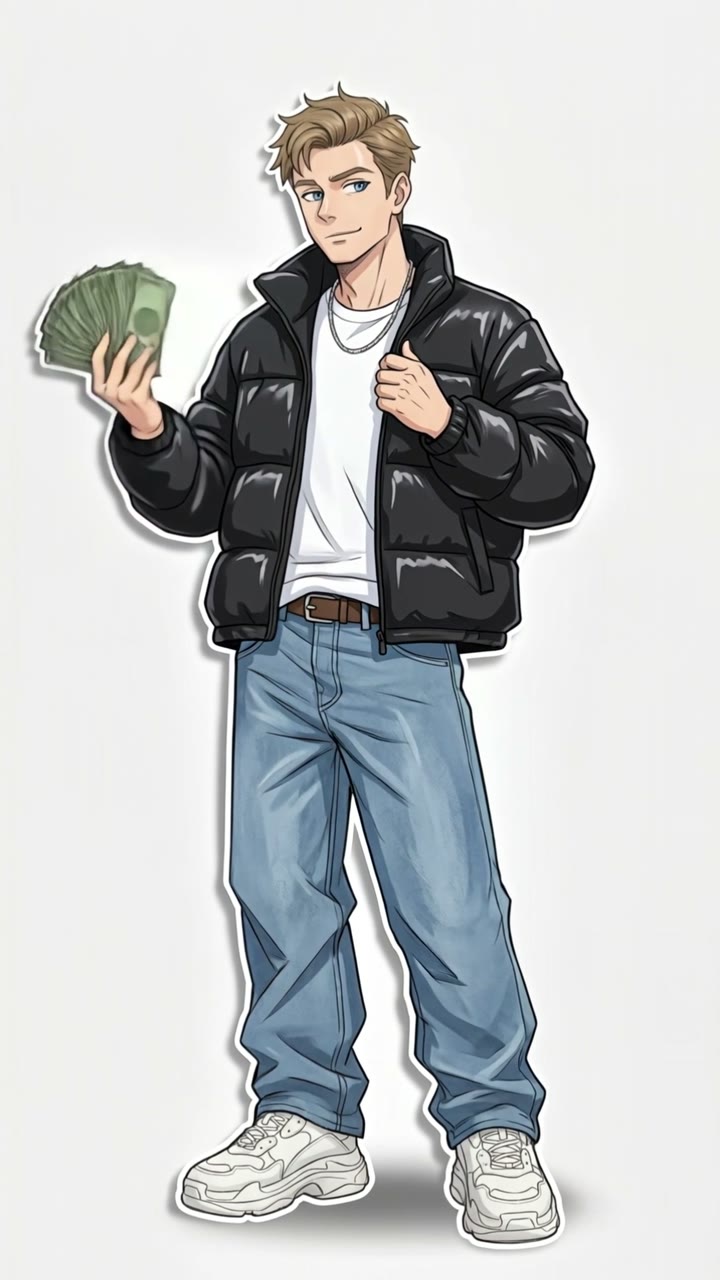
What changes when your portrait becomes this edit?
The intended result feels like an animated illustration placed over a clean background. A fixed composition gives viewers time to recognize the character, while small movements make the image feel alive. The important change from your upload is the illustrated styling: you become a new drawn figure rather than a person filmed doing a full dance routine.
| Detail | What the recipe aims to create |
|---|
| Character | A full-body anime interpretation informed by the uploaded face, hair and other visible identity features. |
| Wardrobe | Oversized streetwear, including a puffer-style jacket, loose jeans, sneakers and accessories. |
| Pose | A relaxed, confident stance, with the jacket and banknotes helping define the silhouette. |
| Setting | A white backdrop and a soft grounding shadow, keeping attention on the character. |
| Movement | A rhythmic lateral rock with secondary motion in clothing, hair and the held accessories. |
| Delivery | A 10-second, 9:16 video with generated audio and no watermark. |
Use the public example to understand the visual direction. It does not guarantee identical facial details or motion in every run. Check that your finished character remains recognizable and that the framing includes the parts of the outfit you want to show.
How the sound and Atlanta Lock styling work together
The club rhythm and the character design provide different parts of the effect. The musical association helps viewers recognize the edit, while the white background, loose clothing and compact motion give it a consistent visual language. Searching for Atlanta Lock, an anime sway or the character shake effect may lead you to closely related examples.
Atlanta Lock is a fan-art description associated with streetwear versions of Blue Lock-style characters. In Smew AI, your own portrait is the identity input. There is no fictional-character selector in this template, and wearing a football jersey or naming a player is not part of the required workflow. The recipe builds a fresh illustrated person in the streetwear look.
The downloaded clip includes sound generated during the video stage. It does not bundle the recognizable trend recording. If that recording is available in the destination app, select it there when preparing the post, and review the balance between it and the generated sound before publishing.
From a manual character edit to a one-photo workflow
A manual version usually involves preparing a drawing, separating the character from its background and animating the parts in an editor. The editor may position the head, torso and legs on separate layers, then repeat a small movement over the musical beat. That can give detailed control, but it also means several distinct editing tasks.
This template combines character preparation and animation into a single run. The still-image step establishes the outfit, pose and composition around your identity. The selected video model then adds motion to that prepared image. You upload once and do not need to manage a green-screen export or rebuild the character from multiple layers.
The two options use different video models: Standard is Kling 3.0 at 1080p for 56 credits; Best uses Seedance 2.5 at 720p for 128 credits. Both produce a 10-second portrait clip. Review the live option cards before starting, and compare the model and resolution rather than treating the labels as a promise that any specific detail will always be perfect. The displayed charge covers the template workflow; the intermediate drawing is prepared automatically, not offered as a separate still-only option on this page.
How to prepare the clip for a trend post
Start by watching the saved result from beginning to end. The face should remain recognizable, the feet should stay within the frame and the character should hold the intended pose as it rocks. Once you are happy with the take, download it from Library and prepare the post in your preferred app.
- Choose the platform sound deliberately. Search the trend name in the sound picker or open a reference post and follow its sound link. Availability can differ by platform and account.
- Check the audio mix. Lower or mute the generated audio if you are replacing it with a selected platform track. Preview the combined result before posting.
- Place the first movement with the beat. Trim the start or adjust the chosen audio segment in the publishing app so the entry feels intentional.
- Build a sequence with friends. Each run contains one character. Separate, consented adult portraits can be made into individual clips and arranged back to back in an editor.
- Keep the portrait composition. Extra crops or large captions can cover the face, hands or shoes that make the streetwear pose readable.
- Describe it accurately. Use an appropriate AI disclosure and a caption about your version of the edit. Relevant trend and animation tags can help describe the post without promising reach.