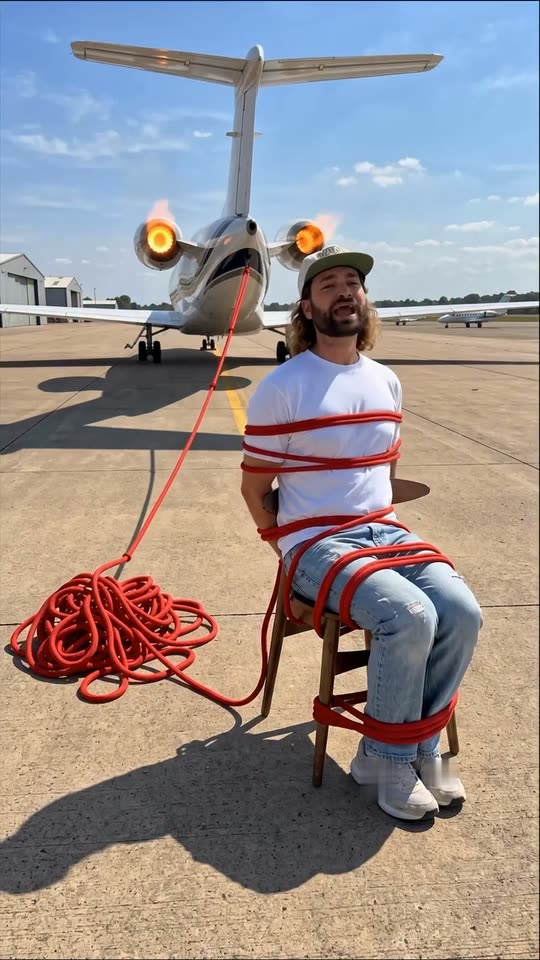
Five scene choices, one central contrast
Jet engine places a seated subject in a runway-style scene with a plane, a rope-like visual and engine activity behind them. Train tracks uses an approaching locomotive as the background tension. Tsunami puts a relaxed foreground figure near a large rising wave, while the surrounding scene reacts more urgently.
Car on the tracks moves the idea into a driver-seat composition, with a train approaching the vehicle's side. Surprise me asks for an interpretation suited to the supplied photo rather than a user-selected threat. Those choices should be read as cinematic premises, not directions for any real person to sit or drive in those locations.
The subject's calm expression is the common feature. The intended ending suggests imminent danger without depicting a crash or injury. Generated scenes can vary, so inspect what actually appears rather than treating the recipe's intention as a guarantee. The current choices all run for 7 seconds, keeping the visual premise short enough to serve as one shot in a larger edit.
Why the workflow first establishes a scene image
A foreground person, recognizable pose and new environment must fit together before convincing motion can occur. The recipe first prepares a scene image from your upload, then animates it with the selected video model. That gives the workflow a composition to work from rather than asking you to supply a real stunt clip.
Best is currently Seedance 2.5 at 91 credits and Standard is Kling 3.0 at 40 credits. Both list 7 seconds, 720p and vertical 9:16, with generated audio. A quality label and a higher price do not guarantee that every limb, vehicle or movement will look more realistic in every take; compare the actual result.
The audio direction supports the selected danger through scene sound rather than a configured original song. Engines, horns or waves are generated details and can vary. No voice-over recording is required here. The final video is the offered output, not a separate still-image product, even though a prepared image is part of its generation process.
Using the scene as the beginning of a larger post
A hook works by raising a question quickly. Here the viewer notices a threat that the foreground subject appears to ignore. A short caption or your own voice-over can then connect that surprise to the topic of the next shot. The continuation should deliver something relevant rather than using a fake emergency to mislead viewers.
You can trim a portion of the finished 7-second scene for an introduction in a separate editor. This page does not write the rest of your script or assemble a full marketing video. Choose a calm source pose and leave visual room for the background premise so the first seconds are understandable without a long explanation.
Keep the AI disclosure and avoid framing the result as genuine danger, news or a real rescue. A generated hook can be playful without claiming the subject survived an actual event. The template offers a visual opening, not a promise that a platform will reward it with more views.
What to check when the scene loses coherence
Begin with identity and framing. A dark or distant source can make the face look generic, while a narrow crop may force the environment to change more than expected. A seated photo with background space is more useful for a calm chair-based scene than a close selfie or a complicated action pose.
Then watch the danger's movement. A train that barely advances or a wave that arrives immediately can weaken the intended suspense. The camera should remain readable rather than cutting to an unrelated scene. Vehicles may also acquire invented letter-like marks or logos; review those details if a brand-neutral visual matters.
A future generation can differ, but another paid attempt is not a guaranteed timing repair. Improve weak source information first. Inspect the ending for unexpected impact, injury or a change in tone before publishing. If the output does not fit the intended fictional tease, do not describe it as something that happened to the subject.