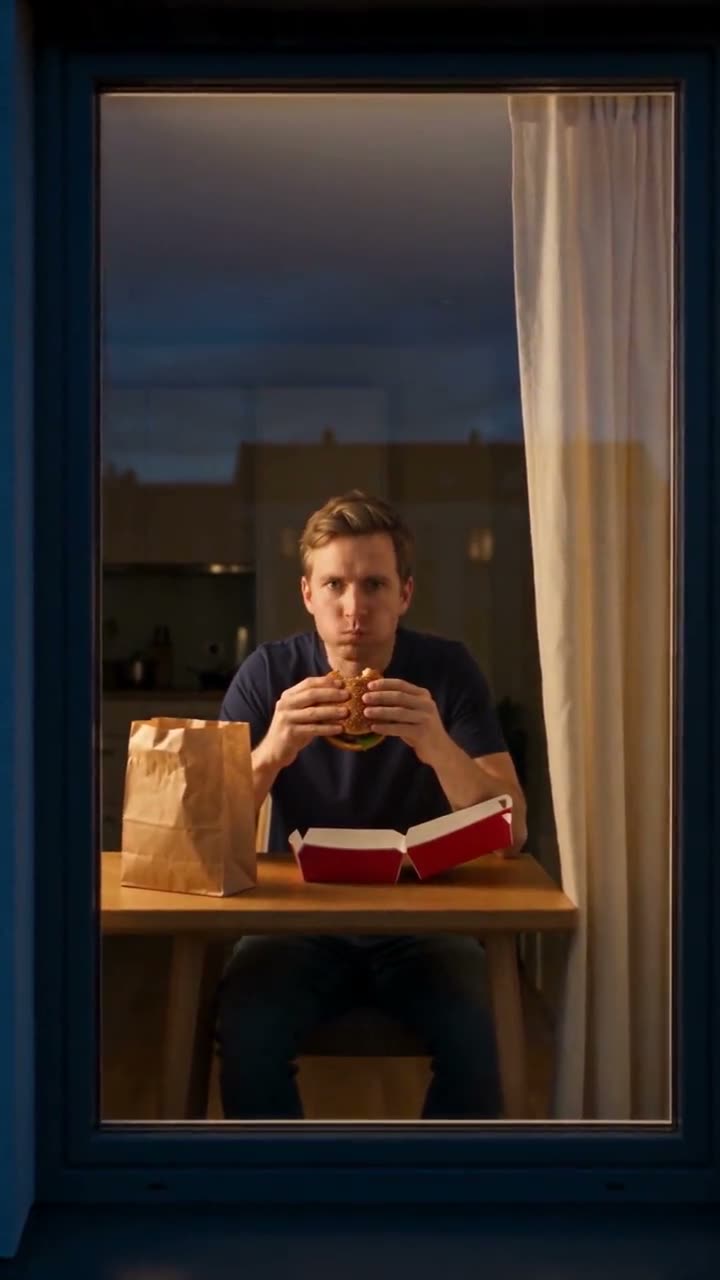
Window Peeper: A camera approaches the one lit window—and finds you mid-bite.

Create a nighttime window gag from one face photo. The camera crosses toward the lit room, catches the character eating and ends with the curtain closing.

Illustrative AI reference for Window Peeper FilterAI reference
  • 1 photo depending on version
  • 10 seconds
  • Price shown before generating

No prompt to write: Add your photo and tap once

Create your own

Ready in a few minutes · From 126 credits

One warm window interrupts a dark apartment block. The camera moves closer until it discovers someone enjoying a burger, then the eater notices the attention. The expression changes from private contentment to a long, offended stare. In the human version, closing the curtain supplies the final refusal to be watched.

The Window Peeper format turns that small, awkward moment into a generated scene using your face. Smew also has a Pet version, where the animal holds the burger and finishes by rising into a stare. Both are 10-second videos made from one photo. This is fictional AI imagery, not footage taken through anyone's real window.

Example

Preview the Window Peeper format

Visual references explain the format. Generated details and timing can vary.

Visual reference
A format reference, not a Smew customer result.
Use this reference
Step by step

Make your Window Peeper Filter video

Choose a version, add the required photos and check the displayed credits before generating.

  1. Choose who gets caught

    Select You for an adult portrait or Pet for one animal. Add a clear image of the subject with the face visible. The room, table, food and outside viewpoint are generated; you do not need to photograph a window or stage a late-night meal.

  2. Check the generated video and sound

    Both current versions use Seedance 2.5 at 126 credits for 10 seconds, vertical 9:16 and 720p. The current Seedance workflow generates audio with the scene. It does not attach the reference recording, so specific chewing, ambience or curtain sounds can differ.

  3. Review the reveal and ending

    Track the task from Dashboard, then play the saved result in Library. Check that the face becomes recognizable as the camera approaches and that the stare has room to land. The human curtain ending and pet standing ending are different scene choices.

Choose a photo that keeps the subject recognizable

Use one sharp front-facing adult portrait, head-and-shoulders or waist-up. The expression is the payoff, so eyes and facial detail matter more than a dramatic background. Even light, no sunglasses and no strong smoothing filter give the model more information for the close window view. Include clothing if you want the character to draw on your own outfit.

For Pet, show one dog or cat clearly, including its head, front paws and preferably the entire body. The generated paws interact with a burger, so avoid a blanket, leash or another animal crossing them in the source photo. Distinctive coat markings should remain easy to read.

Use an image you are entitled to provide and an adult's consent where relevant. The fact that some social examples use well-known faces is not a reason to upload a stranger or celebrity. No real covert filming or animal food stunt is needed.

Where the format comes from

The visual setup also appears in an AI concept-ad format: a camera approaches a lit window, discovers food being enjoyed and receives a defensive reaction. A referenced October 2026 post by @karina.aicontent supplies that advertising context. Later face-replacement and template promotions turn the same viewpoint into a personal joke rather than a product reveal.

The meme version is about the person being caught, not a brand. The plain food packaging and solo subject make the reaction the focus. Pet versions extend that idea by putting an animal in an implausibly human dinner scene. The timeline links are examples of the format's circulation; they do not establish a definitive first creator or permanent popularity ranking.

Smew's current implementation generates a new scene and its audio from the selected photo recipe. It is independent of the CapCut promotions and source advertisements mentioned below, and it should be presented as fictional AI comedy rather than a recording of a real neighbor.

  1. An AI concept advertisement uses the camera-to-window burger reveal. Concept-ad reference

  2. A face-replacement post illustrates the shift toward a personal reaction meme. Meme example

  3. A template promotion presents the scene as a one-photo effect. Template reference

  4. A bulldog account shares an animal interpretation of the burger-at-the-window joke. Pet example

  5. Another promotion demonstrates the recurring scene with a different face. Further example

  6. Tutorial and template posts use several Window Peeper labels; search names alone do not identify the software that made a clip.

  7. Dedicated pet interpretations use the same night-window reveal with dogs or cats.

  8. Later posts continue the format under overlapping window and burger labels; audience totals are omitted because they change.

Copy and paste

The recipe behind the result

The template applies its configured instructions. No prompt writing is required for this flow.

You

1 photo: you, face clearSeedance 2.510 s · 720p · 9:16126 credits
Video prompt

Create a 9:16 live-action-style clip for the configured duration. The sole apartment diner is [Image 1], with the uploaded face and hair retained. Preserve each supplied face, hair, complexion and build across shots; keep role assignments fixed and do not duplicate a supplied identity among supporting characters. Use a nighttime street with one brightly lit apartment window. The camera glides across the street and toward that window, then finds the subject sitting alone with a burger. Let the character chew, notice the approaching lens and hold an awkward stare before rising and drawing the curtain shut. Keep the snack and table coherent during the change from exterior establishing view to close portrait. End on the closed curtain rather than changing to another room or introducing a second diner. Generate quiet nighttime street and room ambience, subtle eating sounds and curtain movement. No music recording or spoken lyrics. Maintain believable contacts, stable clothing and natural anatomy: one head and the appropriate limbs per character. An animal identity stays that species with its own muzzle, fur, paws and markings, not a human wearing an animal head. Do not introduce unrequested lettering, brand marks, captions, signatures or watermarks.

1267 characters

Pet

1 photo: your pet, head and front paws clearSeedance 2.510 s · 720p · 9:16126 credits
Video prompt

Create a 9:16 live-action-style clip for the configured duration. The sole apartment diner is the pet from [Image 1], recognizable by muzzle, ears, fur pattern and proportions. Preserve each supplied face, hair, complexion and build across shots; keep role assignments fixed and do not duplicate a supplied identity among supporting characters. Use a nighttime street with one brightly lit apartment window. The camera glides across the street and toward that window, then finds the subject sitting alone with a burger. Let the character chew, notice the approaching lens and hold an awkward stare before rising and drawing the curtain shut. Keep the snack and table coherent during the change from exterior establishing view to close portrait. End on the closed curtain rather than changing to another room or introducing a second diner. Generate quiet nighttime ambience, small eating noises and fabric movement, without speech or a song. The pet may sit and act upright, but keeps a furry animal body, animal paws, one head and its own tail; do not invent human fingers or bare arms. Maintain believable contacts, stable clothing and natural anatomy: one head and the appropriate limbs per character. An animal identity stays that species with its own muzzle, fur, paws and markings, not a human wearing an animal head. Do not introduce unrequested lettering, brand marks, captions, signatures or watermarks.

1413 characters

Models, duration and credit cost

You pay in credits. The Generate button shows this price before you spend anything. These are the options on this page.

OptionModelWhat you getCredits
YouSeedance 2.510 s · 720p · 9:16126
PetSeedance 2.510 s · 720p · 9:16126

One-time packs and plans are on the pricing page. A failed video gives its credits back.

The reveal, the stare and two possible endings

The opening is deliberately distant. A mostly dark building has one inviting rectangle of light, and the camera moves toward it as if someone across the street has noticed activity. The shot then reveals a small table and an eater with a burger. That progression gives the viewer enough time to become the unwanted observer before the subject looks back.

The central pause is the joke. The adult freezes mid-meal, acknowledges the camera and lets the annoyance become obvious. Putting down the food and drawing the curtain closes the exchange without a speech. A version that shuts the curtain immediately can lose the awkward stare that makes the scene recognizable.

Pet uses the same discovery but changes the ending: the animal holds the food in its front paws, stops chewing and stands, still staring. It is not a curtain-pulling pet mode. Both choices currently run for 10 seconds at 720p in vertical 9:16. Seedance generates audio for the Smew scene; any particular ambience heard in a reference should not be treated as an exact soundtrack promise. Each take can vary in pacing, room detail and gesture.

A personal window joke versus an advertising scene

The window reveal can support two different ideas. An advertisement uses the camera movement to spotlight a product or logo, often with a staged reveal. The personal meme uses it to interrupt a private, ordinary moment. The eater's expression is more important than a package, which is why this template aims for plain burger packaging rather than an identifiable fast-food campaign.

This page takes a person or pet photo; it is not a logo-upload workflow. Do not expect it to place a business mark precisely on the box or close a branded curtain. Choose a dedicated product or advertising template if that is what you need. The common camera move does not make all window-scene tools interchangeable.

For a caption, invent a harmless situation around being found enjoying a late-night snack. Keep the subject in on the joke and make the AI nature clear. The outside-camera viewpoint is a storytelling device, not encouragement to film real people inside their homes. A generated scene can communicate embarrassment without pretending to document an actual intrusion.

Troubleshooting a shot that depends on timing

Start by checking the composition. If many windows glow equally, the viewer loses the intended path toward one subject. If the camera cuts abruptly, the continuous discovery can feel less convincing. These are generation variations rather than proof that the upload failed. The most important review points are the approach, the first recognizable face and the length of the stare.

Identity can drift when a small distant figure becomes a close subject. A sharp frontal portrait with visible eyes helps; a dark selfie with a heavy filter is a weak reference for that change in scale. In Pet, inspect the paws around the burger, facial markings and the rise at the end. Human-like fingers or a changed coat can undermine an otherwise readable scene.

Plain packaging is the intention, but AI can invent letter-like marks or a logo. Watch the complete take before posting, especially if the joke is meant to be brand-neutral. Another attempt may differ, but repeated submissions do not guarantee a fixed curtain or cleaner hands. Improve the source photo when it lacks useful detail, and review the model-generated audio as well as the picture instead of expecting an exact reference recording.

FAQ

Window Peeper Filter questions

What is the window peeper trend?

It is the night-window reveal where a camera discovers a burger eater, gets noticed and receives an unimpressed stare. The human version ends with a curtain closing. The recurring structure, rather than a particular famous face, defines the joke. Smew creates a new AI scene using your supplied adult or pet image.

How do I do the window peeper filter with my photo?

Choose You, upload one sharp front-facing adult photo and review the output and credits before generating. The current choice is 126 credits for a 10-second 720p vertical video. No real window recording is required. Track processing in Dashboard and review the finished scene in Library.

Is there a window peeper CapCut template?

No. CapCut promotions are among the examples linked in the background section, but Smew provides a separate browser workflow. You do not have to find a template link, export a CapCut project or open another editing app. The recipe and scene instructions are already included here.

What does window peeper mean?

The camera takes the peeper's position outside, while your character is the one being observed at the table. Outside this meme, the phrase can describe invasive behavior or novelty decorations. Here it names a fictional camera perspective. It does not justify recording a real person through their window or publishing such footage.

Why is it called the window burger meme?

The burger provides a very ordinary activity for the camera to interrupt. Searches for burger-window, eating-at-the-window and curtain-closing edits often lead to this same setup. The food is a prop, not a specific restaurant endorsement. Compare the reveal and stare to identify the format rather than relying on one search phrase.

What is the window peeper filter on TikTok?

The familiar posts usually show an already generated video uploaded to a social platform. Smew also creates a file from a still photo; it is not a live camera lens that changes your face while recording. You make the result here, then choose where to share it with an AI disclosure.

Which prompt does this window peeper AI trend use?

No. The selected recipe contains the dark-building approach, meal interruption and ending instructions. Your photo supplies the identity rather than the room or camera movement. The prompt section describes that recipe; it is not an extra upload requirement or a claim that a source creator endorsed the implementation.

Can I make the window peeper with my dog or cat?

Yes. Select Pet and use one clear animal photo with visible face and front paws. The intended scene has the pet stop mid-meal, stare and stand at the end. It does not use the human curtain-closing finish. The food and upright behavior are generated; do not feed or pose a real animal to match them.

Is there a window peeper app?

The creation workflow runs through the website on a phone or computer. You need a suitable photo and enough credits for the selected recipe, not a dedicated Window Peeper application. Your device uploads the image; generation continues as a tracked task rather than requiring you to film a performance.

How long is the video, and does it have sound?

Both current choices are 10 seconds, vertical 9:16 and 720p. Seedance generates audio with the new scene rather than attaching a reference soundtrack. The exact ambience, chewing or curtain sound can vary. Review the finished sound and picture before sharing, and handle any additional music permissions separately.

Can I put a celebrity in it?

Use your own face or a consenting adult's photograph. Familiar faces in social examples do not establish permission to reuse those likenesses. This template is intended for a consensual joke. A person should not be shown eating, hiding or reacting in a fictional situation without being comfortable with that depiction.

Is the video real?

No. The result is a generated scene constructed from a photo. Its building, camera move and dinner moment are fictional. Label it as AI when sharing so that the realistic viewpoint is not mistaken for an actual privacy incident. Never use the format to claim you secretly recorded a real neighbor.

Are my photos private?

The image is an input to an AI-generation task, so treat it as personal material and upload only what you are entitled to use. This page does not promise a new retention policy, local-only processing or automatic public sharing. Consult the site's privacy information and your account's available controls before submitting sensitive imagery.

Try Window Peeper Filter with your photos

Choose your version, review its output and credits, then start your own take.

No watermark. A failed video gives its credits back. Secure checkout by Stripe.