Pull Out of the TV: Bring someone through the television screen

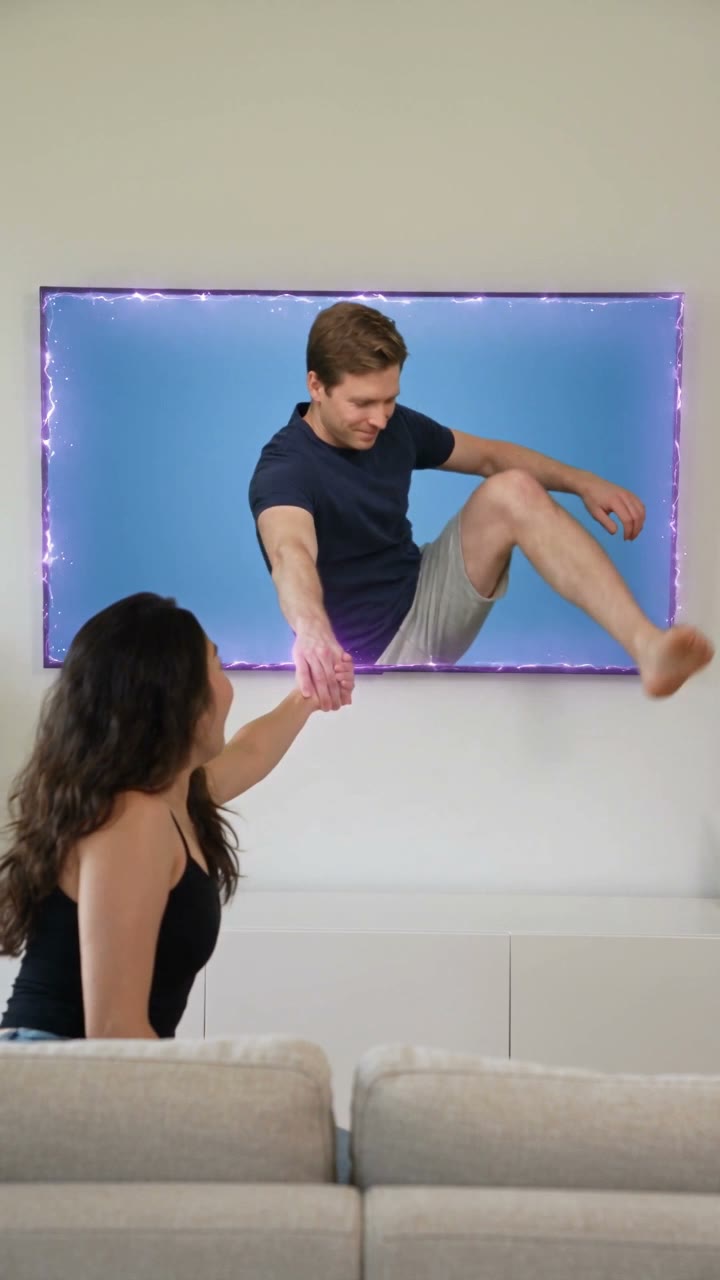
Place yourself beside a television and bring a partner or friend out of the screen. Two portraits become a short scene built around an outstretched hand, a pull through the frame and a reunion in the room.

Illustrative AI reference for Pull Out of the TVAI reference
  • 2 photos you add
  • 10 s video
  • No prompt to write
  • No watermark

No prompt to write: Add your photos and tap once

Create your own

Ready in a few minutes · From 126 credits

The TV-breakout scene makes a wish literal: someone you miss reaches out of a television and steps into the room for a hug. A hand crossing the screen’s boundary is the magical cue; the warm reaction keeps it a reunion joke rather than a horror scene. Two personal portraits supply the people, while the room and impossible movement are generated.

Smew offers Couple and Friend, both ten-second vertical videos with generated audio. Photo 1 is the person in the room and photo 2 the person on the screen. Choose the relationship and check the role order before uploading, because switching the pictures changes who is pulled into the scene.

Also called Trend da televisão, TV reunion, sortir quelqu’un de la télé

Example

See the Pull Out of the TV reference

Credited examples explain the trend’s staging. They are visual references, not Smew customer results; your generated details and movement can differ.

Trend reference

A reference for the scene and timing. This sample is not a Smew customer generation. Compare the framing and sequence rather than expecting a frame-for-frame duplicate.

Use this reference
Step by step

How to make your Pull Out of the TV version

Start with the right version and clear photos; the template provides the scene instructions.

  1. Choose the reunion

    Pick Couple for the sofa-side meeting or Friend for the beside-TV greeting. Both need two adult portraits and lead toward a warm reunion.

  2. Put each person in the right role

    Upload the room-side adult first and the on-screen adult second. Wait for the previews, then check the ten-second output and credit total before submitting. No real television photo is needed.

  3. Watch the screen crossing

    Follow the task on Dashboard and review the saved result in Library. Inspect the hands, television boundary and both faces through the crossing and final hug.

Which photo gives this template a fair start?

Upload one clear adult portrait for each role. Photo 1 is beside the television; photo 2 appears on it and comes into the room. Use sharp, unobstructed faces with normal hair visible. The people can be photographed separately because the model creates the shared room.

If you only have a photo together, make separate crops only when each face remains complete and clear. Do not put the same unseparated group photo into both slots. You do not need a real TV or a hand reaching toward a screen in the input. Both identities should be adults who agreed to appear.

The background of Pull Out of the TV

The source references use the Portuguese template name Trend da televisão and later French how-tos describing pulling someone out of a TV. The same effect can therefore appear in search as the TV trend, screen breakout or sortir quelqu’un de la télé. The naming follows the visible action rather than a single universal filter brand.

The collected tutorial shows a friendly reunion after the screen interaction. Smew uses two individual adult photos and a ten-second output, even if an external template describes a different input count or duration. The credited how-to is background for the scene, not a Smew customer result or proof that the two people were ever in the same room.

  1. The Portuguese-named editor template provides background for the person-stepping-out-of-TV idea.

  2. A French how-to demonstrates the hand contact, screen crossing and reunion as the credited reference. TikTok

  3. The same tutorial’s discussion adds context for the TV-trend naming without a verified popularity claim.

Copy and paste

The scene instructions are already included

The built-in recipe sets the setting, roles and sequence. Your photos provide the subjects; you can read the recipe below without needing to paste or rewrite it.

Couple

2 photos: you, on the sofa (18+), face clear + the one on the tv (18+), face clearSeedance 2.510 s · 720p · 9:16126 credits
Video prompt

Film a bright living room from beside and slightly behind a sofa, with both faces readable in three-quarter view. During 0–2 s the seated viewer notices their partner on a television against a blue studio background. From 2–4 s a hand passes outward through the screen; the viewer reaches toward it. Hands connect during 4–6 s as subtle purple sparks trace the television edge. The partner climbs over the cabinet into the room during 6–8 s, leaving an empty blue screen. Finish with a seated hug and shared smiles to camera through 10 s. The viewer is [Image 1]; the person entering from the television is [Image 2]. Keep assigned human faces individually recognizable: preserve facial structure, complexion, eye and hair coloring, age, and characteristic accessories through movement. Use the source hairstyle and clothing unless this scene explicitly changes them. Keep bodies coherent and identities attached to their own roles. Maintain spatially connected arms and believable feet stepping onto the floor. Do not create a third visible person or duplicate either partner. Use light room ambience, a brief magical electrical effect and natural delighted reactions; no existing song or quoted speech. Avoid unintended duplicates, fused bodies, extra limbs, captions, logos, watermarks and visible interface elements.

1325 characters

Friend

2 photos: you, by the tv (18+), face clear + your friend on the tv (18+), face clearSeedance 2.510 s · 720p · 9:16126 credits
Video prompt

Set a warmly lit evening living room with a large wall-mounted television on the left and the waiting friend on the right. During 0–2 s the person inside the screen looks out from a blurred street setting. A fist reaches through the glass for a bump during 2–4 s, then opens into a handclasp. Pull the screen-side friend forward during 4–6 s; they step over the cabinet and onto the room floor by 8 s. Leave only the empty street on the display. End with the two friends laughing in a hug and facing camera. Waiting friend is [Image 1]; the friend crossing the screen is [Image 2]. Keep assigned human faces individually recognizable: preserve facial structure, complexion, eye and hair coloring, age, and characteristic accessories through movement. Use the source hairstyle and clothing unless this scene explicitly changes them. Keep bodies coherent and identities attached to their own roles. Create ordinary room ambience with a short screen-transition effect and natural laughter; avoid recognizable music and intelligible dialogue. Avoid unintended duplicates, fused bodies, extra limbs, captions, logos, watermarks and visible interface elements.

1158 characters

Current Smew choices and credit prices

You pay in credits. The Generate button shows this price before you spend anything. These are the options on this page.

OptionModelWhat you getCredits
CoupleSeedance 2.510 s · 720p · 9:16126
FriendSeedance 2.510 s · 720p · 9:16126

One-time packs and plans are on the pricing page. A failed video gives its credits back.

The hand crosses the screen before the reunion

The person in the room first sees the second identity on the television. A hand reaches through, contact is made and a soft glow emphasizes the screen boundary. Pulling then becomes a full-body exit over the cabinet or frame, followed by a hug and a shared reaction.

The sequence needs that gradual transition to make sense. Review hands, the screen edge and the moment the second body enters the room. A model can draw a warm final hug yet make the crossing confusing. Both faces should remain recognizable before and after the impossible movement.

Couple or Friend changes the meeting’s tone

Couple uses the sofa-side romantic reunion. Friend puts the first person by the TV and can begin the connection with a friendly fist-bump before the pull and hug. Both still use the same role order: room first, television second.

The current choices share the model, duration and credit price. They are not different output-quality tiers or a way to add more people. Pick the relationship and staging you want, then use two separate identity photos so each role has a clear reference.

The current Smew options are listed below. The photo count belongs to the selected version: an extra person in a single upload is not a substitute for an additional photo slot. The model name describes how the output is made; it does not promise identical faces or motion on every run. Review the selected option and credit total on Create before submitting.

ChoicePhotosModelOutputCredits
Couple2Seedance 2.510 seconds, 9:16, 720p126
Friend2Seedance 2.510 seconds, 9:16, 720p126

Sound: these choices produce sound generated with the scene, rather than a promised copy of a social-platform recording. Sound heard in a credited reference is not automatically included in every Smew option. If you add platform music later, choose it from that platform’s available library and check the intended use; generating a video does not transfer music rights.

Trend da televisão and the French TV-trend name

Trend da televisão means the television trend in Portuguese. French descriptions such as sortir quelqu’un de la télé explain the same visible action: bringing someone out of the screen. English posts may call it pull someone out of the TV or simply TV trend AI.

These overlapping names help identify the scene, but do not add a celebrity, cartoon or extra cast mode. The current Smew choices remain two consenting adults in a generated reunion. Compare the role labels rather than relying on another app’s tutorial wording.

A friendly screen escape rather than a horror reveal

A person climbing out of a television can recall horror-film imagery, but this template’s goal is the opposite mood. The second person smiles, accepts a hand and joins a warm reunion. The effect around the screen is a transition cue rather than an attack or scare.

If you want a frightening character or a dramatic monster breakout, that is a different scene. Review the completed expressions and body movement before sharing, especially if the greeting is intended for someone who is sensitive to uncanny imagery.

Make the reunion personal with the caption

The clip can express missing a partner or wishing a friend could step out of a video call. A short caption explains that personal meaning without covering the television or hands. Add exact names and messages in your publishing editor rather than expecting generated room details to spell them.

Listen to the generated audio before adding music, and keep the AI label. The result is a fictional meeting from photos, not proof that the people were together or that the screen interaction happened. Use the warmth of the ending as the point of the post.

FAQ

Pull Out of the TV — questions before you create

What is the pull out of the TV AI trend?

It is the generated reunion where a person on a screen reaches into the room, is pulled through and joins the first person for a hug. Smew makes a Couple or Friend interpretation from two adult portraits. The screen crossing is fictional, with no real television stunt required.

How do I pull someone out of the TV with AI?

Choose Couple or Friend, upload the room-side person first and the on-screen person second, then review the output and credits. The template supplies the room and action. Follow the submitted task on Dashboard and inspect the completed crossing and hug in Library.

Which photo goes where?

Photo 1 is the adult already in the room, on the sofa or beside the television. Photo 2 is the adult shown on the screen who comes out. Use one clear face per upload and check that role order before submission; it determines the direction of the reunion.

Can I use one photo of the two of us?

The template needs two individual identity images. You can crop a shared photo into two separate portraits only if each remains sharp and unobstructed. Do not use an unseparated group picture as a substitute for the role slots; that leaves the model uncertain which face belongs where.

Can I pull a celebrity or a cartoon character out of the TV?

The supported personal cast uses your own adult photo and another adult who agreed to appear. It is not a celebrity, TV-star or cartoon-character mode. A character seen on a real television or in a public meme does not provide permission or establish that input as supported here.

What does trend da televisão mean?

It is Portuguese for the television trend. French how-tos use wording about pulling someone out of the TV, and English searches describe the same screen-crossing action. Those are discovery names for the scene, not different Smew models, cast sizes or output lengths.

Can I use a photo of a child or a teenager?

Both roles are for consenting adults aged 18 or over. This template is not configured for a child or teen reunion. Use images each person agreed to submit and keep the AI disclosure so the fictional room and interaction are not mistaken for real footage.

Make your own Pull Out of the TV scene

Choose a version, add the requested photos and check the output and credit total before you start.

No watermark. A failed video gives its credits back. Secure checkout by Stripe.