Window Dance: A camera discovers your private dance

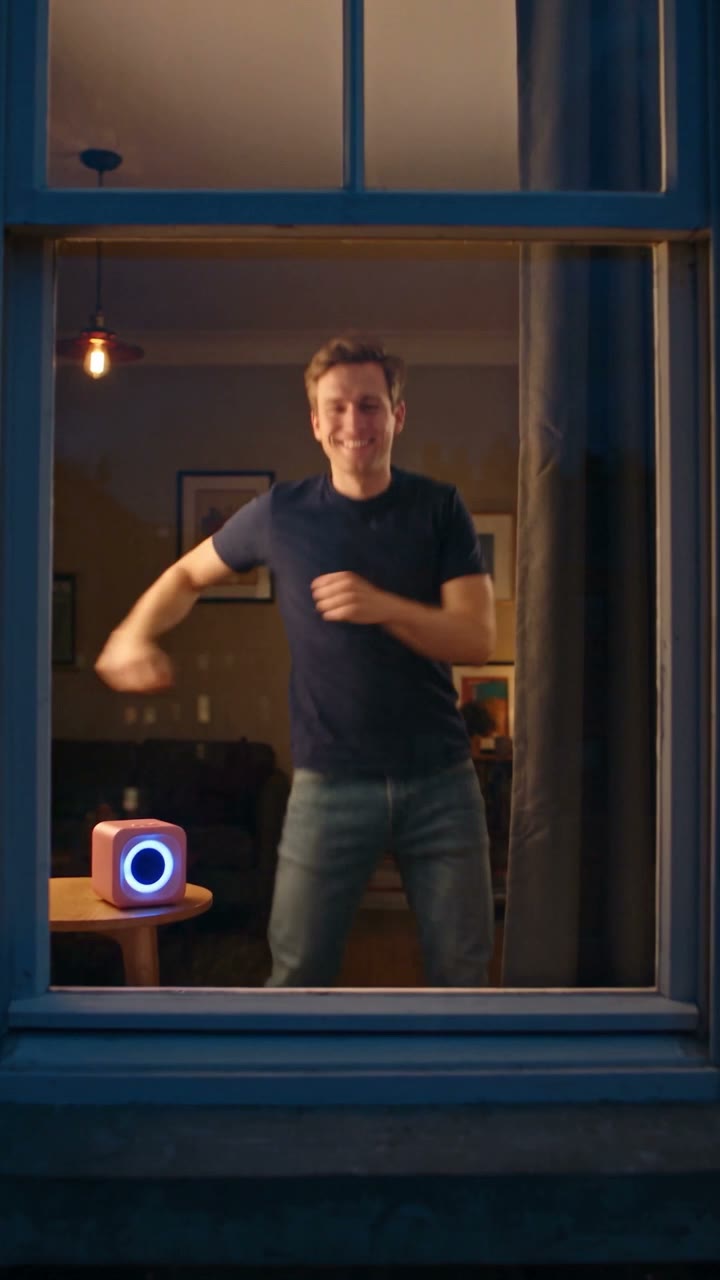
Become the dancer inside a single bright window at night. The camera approaches from across the street, catches the performance and ends with a reaction and a closed curtain. A pet version brings the same idea to an animal photo.

Illustrative AI reference for Window Dance TrendAI reference
  • 1 photo you add
  • 10–12 s video
  • No prompt to write
  • No watermark

No prompt to write: Add your photo and tap once

Create your own

Ready in a few minutes · From 126 credits

The window-dance scene begins outside a dark apartment building, where a single warm window gives away someone’s private dance party. The camera moves closer, the dancer notices it, and a smile turns into a curtain-closing exit. That small change from uninhibited dancing to being caught is the entire joke. The apparent neighbor’s viewpoint is generated, not a real recording through a window.

Smew has You and Pet choices. You creates a twelve-second scene; Pet uses ten seconds and puts the animal into a stylized dance by the speaker. Both start from one photo. The video includes generated scene audio; a musical reference on this page should not be mistaken for a promise of that exact recording in your result.

Also called Window peeper dance, window speaker dance, peeking-through-the-window dance

Example

See the Window Dance Trend reference

Credited examples explain the trend’s staging. They are visual references, not Smew customer results; your generated details and movement can differ.

Trend reference

A reference for the scene and timing. This sample is not a Smew customer generation. Compare the framing and sequence rather than expecting a frame-for-frame duplicate.

Use this reference
Step by step

How to make your Window Dance Trend version

Start with the right version and clear photos; the template provides the scene instructions.

  1. Choose the scene and cast

    Open Create and choose the version that matches the result you want. Check the photo-slot labels before uploading: one identity belongs in each slot. A reference sample shows the idea; the choices on Create define which people or pets Smew can actually place in that scene.

  2. Add photos and review the output

    Upload the requested photos, wait for processing and confirm that the preview shows the correct subject. Compare the selected output, model and credit total. You do not need to record the action or paste a prompt: the template supplies the setting and movement. Submit only when those details match your choice.

  3. Follow the task, then review the finished file

    After submission, follow the task on Dashboard while it generates; you can browse templates and see your other tasks there. Once it finishes, open the saved result in Library and inspect the whole clip before downloading. The generated interpretation can vary, especially during fast turns, occlusion and close contact.

Which photo gives this template a fair start?

For You, use one sharp adult portrait with a clear face and unobstructed hair. A chest-up or wider picture with natural proportions gives more useful identity information than a tiny face in a group. You do not need to stand at a window or include a speaker: the scene is generated around the photo. Avoid a dark night selfie simply because the output is set at night.

For Pet, show the whole animal alone with the paws, body outline and face visible. A simple background helps separate fur and limbs. Use your own pet or one you have permission to depict. One subject per upload keeps the intended identity clear; a collage does not add a second dancer. The human version is for consenting adults.

The background of Window Dance Trend

This scene shares its visual setup with the window-peeper meme: darkness, one bright apartment and a curtain at the end. The peeper version catches someone eating, while the dance version changes the discovery into a private performance. Tutorial captions use names such as window dance, window peeper dance and peeking-through-the-window dance for that variation.

The collected October references include @dancevault14’s dance post, later template tutorials and pet interpretations. They show a family of edits rather than a verified inventor or a precisely ranked viral sequence. Smew uses the framing idea for a photo-to-video scene with its own configured outputs. The result should be presented as a fictional AI joke, not evidence that you or a neighbor was actually filmed at home.

  1. A window-peeper post illustrates the earlier bright-window setup with an interrupted meal. TikTok

  2. @dancevault14’s post replaces the meal with a dance beside a speaker and a curtain ending. TikTok

  3. Another template example reuses the same window-dance premise with a different subject. TikTok

  4. How-to posts describe the outside viewpoint as peeking through the window, adding another search name. TikTok

  5. Pet interpretations extend the premise to upright dancing animals; Smew offers a separate Pet choice.

Copy and paste

The scene instructions are already included

The built-in recipe sets the setting, roles and sequence. Your photos provide the subjects; you can read the recipe below without needing to paste or rewrite it.

You

1 photo: you, face clearSeedance 2.512 s · 720p · 9:16152 credits
Video prompt

Start outside a dark brick apartment building at night, with one warm window illuminated. During 0–2 s physically move the camera through the night air toward that window; do not imitate the move with a sudden crop. Inside, the subject dances beside a small speaker, unaware of being watched, using knee bounces, raised fists and side steps through 7 s. From 7–10 s they notice the lens, reduce the dance to a shoulder groove and give a caught-out smile. Only during 10–12 s do they pull the curtain closed and leave a warmly glowing window. The sole dancer is the adult in [Image 1]. Keep assigned human faces individually recognizable: preserve facial structure, complexion, eye and hair coloring, age, and characteristic accessories through movement. Use the source hairstyle and clothing unless this scene explicitly changes them. Keep bodies coherent and identities attached to their own roles. Use muffled room music with a generic bouncy rhythm, light exterior ambience and a soft curtain sound; no intelligible words. Avoid unintended duplicates, fused bodies, extra limbs, captions, logos, watermarks and visible interface elements.

1145 characters

Pet

1 photo: your pet, whole body clearSeedance 2.510 s · 720p · 9:16126 credits
Video prompt

Begin outside a dark brick building and glide toward its single warmly lit window during 0–2 s. The wide windowsill holds the uploaded animal. Through 7 s it dances upright: hind-leg hops, head bobs, front-paw waves and a small turn, apparently unaware of the approaching camera. At 7 s it notices the lens, stops in the middle of a movement and returns to all four paws. Hold its puzzled, ears-up, tilted-head stare through 10 s. Keep the window open to view: this pet version does not close a curtain. Use only the pet in [Image 1], with its real species, coat and proportions. Retain the uploaded animal’s species, breed, muzzle, ears, coat pattern and natural body volume. Use real paws and the correct limbs, never human hands or a human torso wearing an animal head. Keep its appearance consistent through turns and close-ups. Create soft room rhythm and quiet night ambience. The animal makes no spoken words. Avoid unintended duplicates, fused bodies, extra limbs, captions, logos, watermarks and visible interface elements.

1036 characters

Current Smew choices and credit prices

You pay in credits. The Generate button shows this price before you spend anything. These are the options on this page.

OptionModelWhat you getCredits
YouSeedance 2.512 s · 720p · 9:16152
PetSeedance 2.510 s · 720p · 9:16126

One-time packs and plans are on the pricing page. A failed video gives its credits back.

The approach, the dance and the curtain ending

The opening uses a dark building to make one illuminated window the target. As the view approaches, the person inside dances beside a small speaker, with relaxed bounces, arm movements and an unguarded expression. The moment of recognition comes near the end: the dancer looks toward the camera, acknowledges being seen and draws the curtain. The curtain is the closing punchline, not just a background prop.

The generated scene should read as one continuous observation rather than unrelated shots. Inspect whether the grin happens before the curtain and whether the subject remains recognizable as the window fills more of the frame. In Pet, the animal is stylized into an upright dance; the ten-second length means the timing differs from the twelve-second human scene. Fine paw and curtain contact may vary.

How the dance differs from the window-peeper gag

Both ideas use the same visual question: what is happening behind the only bright window? Window peeper answers with someone being interrupted while eating. Window dance answers with a private party, making the reaction more amused than annoyed. They can be related posts, but choosing one template does not switch the action inside the other.

The speaker is a scene cue, not a branded product placement. The current template does not offer a particular device, apartment or song selector. Its sound is generated with the scene, rather than a supplied copy of the trend recording; choose a platform sound separately if you want a specific track. The table below gives the actual two Smew choices rather than another app’s export claims.

The current Smew options are listed below. The photo count belongs to the selected version: an extra person in a single upload is not a substitute for an additional photo slot. The model name describes how the output is made; it does not promise identical faces or motion on every run. Review the selected option and credit total on Create before submitting.

ChoicePhotosModelOutputCredits
You1Seedance 2.512 seconds, 9:16, 720p152
Pet1Seedance 2.510 seconds, 9:16, 720p126

Sound: these choices produce sound generated with the scene, rather than a promised copy of a social-platform recording. Sound heard in a credited reference is not automatically included in every Smew option. If you add platform music later, choose it from that platform’s available library and check the intended use; generating a video does not transfer music rights.

Review the room as well as the face

If several windows are bright or the camera cuts abruptly, the intended single-window setup has weakened. If the curtain closes too soon, the recognition beat may be lost. Those are scene-interpretation problems, separate from a blurred identity photo. A sharper portrait helps facial detail but cannot guarantee the camera path or curtain timing.

For a pet result, check whether the animal keeps its own head and fur rather than becoming a human body with an animal face. A full-body input is the best starting point, though upright movement still requires invention. Avoid treating an accidental logo or background word as a requested feature. Review the entire clip and change the input or version deliberately before paying for another take.

FAQ

Window Dance Trend — questions before you create

What is the window dance trend?

It is the scene of a camera approaching a lone bright apartment window, finding someone dancing and catching their reaction before they close the curtain. The funny part is the change from private confidence to knowing they have been seen. Smew creates that fictional scene from a photo.

How do I do the window dance trend with my photo?

Choose You on Create, add one clear adult portrait and check the duration and credit total. The template supplies the building, speaker, movement and curtain ending. Submit and follow the task on Dashboard, then review the saved video in Library. No footage from your own home is required.

Is there a window dance CapCut template?

No. The linked tutorials describe a phone-editor route to the trend. Smew makes a separate generated version in the browser, using the requested photo. A CapCut link, live camera filter or manual window edit is not needed, and another app’s sound and output settings do not define this result.

Is the window peeper dance the same as the window peeper filter?

They share the dark-building and bright-window setup, but the discovered action changes. Window peeper usually centers an interrupted eating gag; window dance centers a speaker-side dance and a smile before the curtain closes. Choose the template that matches the action you want rather than relying on the overlapping hashtags.

Why is it called the peeking through the window dance?

The camera appears to look into the apartment from outside, so captions describe the viewpoint rather than a particular model. Window peek, window speaker dance and dance of the window are other discovery names for the same idea. They do not imply that the scene is real surveillance footage.

Is it a window dance filter or a prank?

Those are informal labels for a generated scene. It can be posted as a joke that a neighbor caught your private dance, but it is made from a still photo rather than an actual observation. Keep the AI label and avoid presenting it as evidence that someone was filmed through a real window.

Can my dog or cat do the window dance?

Choose Pet and provide one clear full-body animal photo. The model creates a stylized upright dance by the speaker inside the lit window. Review the paws, body proportions and face in the finished take. A pet photo is supported, but exact markings and anatomy are not guaranteed through every movement.

Which song is in the window dance trend on TikTok?

The current Smew choices generate scene audio rather than attach the reference song. A recording heard in the trend reference is not a promise of the same music here. Add suitable music in the publishing app if you want it, using the sound library and rights appropriate to your intended post.

How long is the video, and does it have sound?

You is twelve seconds at 152 credits; Pet is ten seconds at 126 credits. Both currently use Seedance 2.5, vertical 9:16 and 720p, with generated scene audio rather than the reference song. Check those settings on Create before submitting, especially if you are comparing with a tutorial that describes a musical version.

Which prompt does this template use?

No. The included recipe describes the outside approach, private dance, recognition and curtain. Your photo provides the identity. The recipe guides the model but cannot guarantee a seamless single take, an exact speaker shape or the curtain closing on a particular frame.

Can I put a celebrity in it?

Use your own adult photo or an adult friend who agreed to appear. Celebrity examples in tutorials are trend background, not permission to upload a public figure or stranger. The template’s supported personal use is clearer when the subject knows the fictional window scene is being made.

Is the video real?

Your Smew result is generated from a still image. No real apartment footage is required, and the scene does not document what anyone did at home. Label it as AI when sharing. There is no reason to film an unsuspecting person through a window to recreate this joke.

Are my photos private?

Read Smew’s privacy policy for its data handling before uploading a personal image. The public trend references are separate from your photo and result. Do not assume the storage, deletion or sharing promises of an external template app apply to this service.

Make your own Window Dance Trend scene

Choose a version, add the requested photos and check the output and credit total before you start.

No watermark. A failed video gives its credits back. Secure checkout by Stripe.