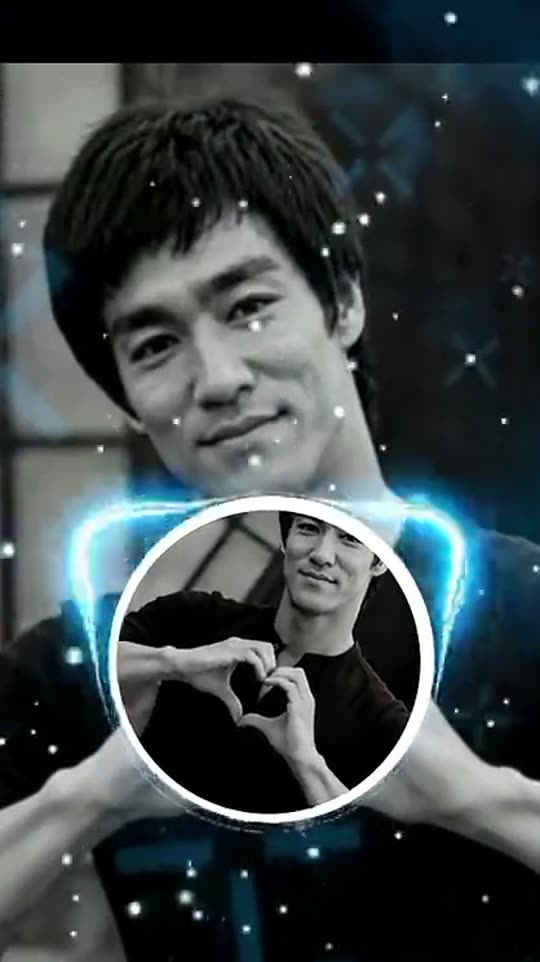
Hole in Shirt: A miniature version of you inside a surreal shirt window.

Use a waist-up photograph to build the round-window effect in your shirt. Choose an animated mini-you scene or a still image of the finished composition.

The original Hole in Shirt reel by @mercicv1000000Original reel
  • 1 photo depending on version
  • 8 seconds
  • Price shown before generating

No prompt to write: Add your photo and tap once

Create your own

Ready in a few minutes · From 3 credits

The hole-in-shirt effect places a small version of you inside a round window in your own top. A glowing blue ring and floating sparkles make the opening look like a tiny portal, while the nested face turns a simple portrait into a picture-within-a-picture joke. The intended opening shows another clothed miniature portrait, not the wearer’s body.

Smew offers a still 2K Photo or an eight-second Video. The video first prepares the effect image and then animates the miniature subject with a wave and small gestures. You only need one adult photo with the shirt visible; you do not need a damaged shirt, a real cut-out or a second miniature photo. The choice is an AI reinterpretation rather than a live camera effect.

Also called Mini me inside my shirt, photo in photo, blue-ring portal

Example

See the Hole in Shirt reference

Credited examples explain the trend’s staging. They are visual references, not Smew customer results; your generated details and movement can differ.

Trend reference

A reference for the scene and timing by @mercicv1000000. This sample is not a Smew customer generation. Compare the framing and sequence rather than expecting a frame-for-frame duplicate.

Use this reference
Step by step

How to make your Hole in Shirt version

Start with the right version and clear photos; the template provides the scene instructions.

  1. Choose the scene and cast

    Open Create and choose the version that matches the result you want. Check the photo-slot labels before uploading: one identity belongs in each slot. A reference sample shows the idea; the choices on Create define which people or pets Smew can actually place in that scene.

  2. Add photos and review the output

    Upload the requested photos, wait for processing and confirm that the preview shows the correct subject. Compare the selected output, model and credit total. You do not need to record the action or paste a prompt: the template supplies the setting and movement. Submit only when those details match your choice.

  3. Follow the task, then review the finished file

    After submission, follow the task on Dashboard while it generates; you can browse templates and see your other tasks there. Once it finishes, open the saved result in Library and inspect the whole clip before downloading. The generated interpretation can vary, especially during fast turns, occlusion and close contact.

Which photo gives this template a fair start?

Use one adult photo from the waist up with the front of the top clearly visible. The opening belongs at the chest, so crossed arms, a bag strap or an object covering the torso can leave the model without a clean place to put it. Keep the face sharp too: the same identity appears at two scales.

A plain, fully clothed top is a straightforward starting point. Avoid busy text or large graphics if you want the blue ring to remain the main detail. You do not need to cut the shirt or prepare a mini version of the image. Use one consenting adult and keep other faces out of frame. For Video, allow the image-preparation stage to complete before expecting the final motion.

The background of Hole in Shirt

The collected references connect this look with a CapCut template credited to BABLO and tutorials circulating in Burkina Faso. The edit repeats a photo inside a round shirt opening, adds a tilted blue ring and uses a slow spin to make the nested image noticeable. Later social posts reuse the same visual idea with different portraits.

Smew’s version extends that picture effect into a generated miniature performance. The reference history explains the shirt window, ring and repeated identity; it does not mean the output is made with the same editor or copies its pixels exactly. The related picture-within-a-picture idea is often called the Droste effect, although this template uses one miniature subject rather than an endless recursive tunnel. The original source posts remain credited as references, not customer results.

  1. The CapCut format credited to BABLO combines a repeated portrait, shirt window and blue ring.

  2. @yr5sdowfg6’s tutorial demonstrates the effect and provides a credited visual reference. TikTok

  3. The linked sound page collects user interpretations using the same nested-photo idea. TikTok sound

  4. Further user examples show the shirt window repeated with new identities. TikTok sound

  5. The sound page remains a way to compare the reference style; no current usage total is needed to describe it. TikTok sound

Copy and paste

The scene instructions are already included

The built-in recipe sets the setting, roles and sequence. Your photos provide the subjects; you can read the recipe below without needing to paste or rewrite it.

Video

1 photo: you, waist up, your top in viewKling 3.08 s · 1080p · 9:1646 credits
1. Prepare the image · Nano Banana 2.1

Produce one 9:16 image. [Image 1] supplies the full-size adult and the only miniature copy. Base the personal likeness on the supplied photographs: retain face shape, complexion, age cues, eyes, hair and distinguishing details while applying the specified treatment. Do not substitute a recognizable public figure or invent a different identity. Preserve the source picture’s person, pose, outfit, camera, light and surroundings. In the centre of the shirt, create a round opening roughly a third of the torso width with a fine pale fabric rim. It reveals a small copy of the same environment and the same adult, waist-up, whose own shirt is intact. Never show bare chest, internal anatomy or underwear through the opening. A thin tilted blue luminous ring circles the rim and a few pale sparkles float nearby. The miniature must share the adult face, hair and clothes, not appear as a child. Exactly two scales of the same identity are visible, with no nested third figure. Keep the composition readable, with correct separation between subjects, consistent lighting and plausible anatomy. Preserve intentional stylization without accidental duplicated faces, disconnected hands or merged bodies. If an input is an animal, preserve its own species, facial features and fur instead of adding human facial skin. No additional captions, labels, logos, signatures, watermark or interface elements.

This image is prepared automatically before the video step. Both steps are included in the displayed credit cost.

2. Animate the prepared image

Animate only the completed scene image supplied to this stage. Treat its characters, identities, costume, scale, layout, light and rendering style as the established first frame; do not rebuild the portrait or repeat the image-creation stage. Keep its framing and the subject count unless a camera move is described below. During seconds zero to two, brighten the blue ring and start its tilted orbit while a few sparkles descend. From two to five, the miniature becomes animated, smiles, looks toward the camera, waves and makes a small peace sign; the large figure only breathes and nods gently. For the last three seconds, rotate the round inner scene once about its centre, returning it upright with the small figure waving again. Keep the ring orbiting, the shirt edge fixed to the torso and the outer background unchanged. Generate a new dreamy instrumental with a light chime as the ring brightens; no speech or identifiable melody. The opening always shows the miniature scene, never skin or a bodily interior. Keep faces and distinguishing marks consistent through expression changes. Prevent body merging, sliding contact points, extra limbs and abrupt changes of style or location. Any animal keeps its own furry anatomy and paws. The ending should settle into a coherent pose within the configured clip length. Do not add written titles, subtitles, brand marks, signatures or watermarks.

1401 characters

Photo

1 photo: you, waist up, your top in viewNano Banana 2.1Photo · 2K · 9:163 credits
Photo prompt

Produce one 9:16 image. [Image 1] supplies the full-size adult and the only miniature copy. Base the personal likeness on the supplied photographs: retain face shape, complexion, age cues, eyes, hair and distinguishing details while applying the specified treatment. Do not substitute a recognizable public figure or invent a different identity. Preserve the source picture’s person, pose, outfit, camera, light and surroundings. In the centre of the shirt, create a round opening roughly a third of the torso width with a fine pale fabric rim. It reveals a small copy of the same environment and the same adult, waist-up, whose own shirt is intact. Never show bare chest, internal anatomy or underwear through the opening. A thin tilted blue luminous ring circles the rim and a few pale sparkles float nearby. The miniature must share the adult face, hair and clothes, not appear as a child. Exactly two scales of the same identity are visible, with no nested third figure. Keep the composition readable, with correct separation between subjects, consistent lighting and plausible anatomy. Preserve intentional stylization without accidental duplicated faces, disconnected hands or merged bodies. If an input is an animal, preserve its own species, facial features and fur instead of adding human facial skin. No additional captions, labels, logos, signatures, watermark or interface elements.

1397 characters

Current Smew choices and credit prices

You pay in credits. The Generate button shows this price before you spend anything. These are the options on this page.

OptionModelWhat you getCredits
Video: StandardKling 3.08 s · 1080p · 9:1646
Video: BestSeedance 2.58 s · 1080p · 9:16103
PhotoNano Banana 2.1Photo · 2K · 9:163

One-time packs and plans are on the pricing page. A failed video gives its credits back.

A shirt window with a moving miniature inside

The intended still keeps the larger portrait recognizable while a round fabric-rimmed opening appears on the chest. A smaller clothed version of the same identity sits inside, surrounded by a light-blue orbital ring and small sparkles. The miniature is the visual payload: it should be a recognizable nested portrait rather than a dark hole or an exposed-body effect.

Video adds movement after preparing that image. The small subject can look up, wave or gesture before the portal-like window turns, while the ring provides gentle motion around it. Inspect the little face at full size as well as the overall portrait. Small facial details are easier to blur during a wave or spin than the larger face outside the window.

An editor’s repeated picture versus AI animation

The reference editor template repeats and transforms a photo inside a masked circle. That is a direct image-compositing operation. Smew instead generates the effect from a description and your input, then animates it for Video. This allows a moving miniature subject, but also means the nested face and ring are redrawn rather than guaranteed pixel copies.

Photo is the simpler route if you want a single post to inspect and caption. Video offers Standard and Best with different models and credit amounts; both currently use the same eight-second duration and 1080p frame. Choose the output according to whether movement adds to your joke, not because you expect a different number of input identities.

The current Smew options are listed below. The photo count belongs to the selected version: an extra person in a single upload is not a substitute for an additional photo slot. The model name describes how the output is made; it does not promise identical faces or motion on every run. Review the selected option and credit total on Create before submitting.

ChoicePhotosModelOutputCredits
Video · Standard1Kling 3.08 seconds, 9:16, 1080p46
Video · Best1Seedance 2.58 seconds, 9:16, 1080p103
Photo1Nano Banana 2.19:16, 2K3

Sound varies by choice. Video uses sound generated with the scene, rather than a promised copy of a social-platform recording. Photo uses a still image, without an audio track. A reference clip’s audio is not evidence that every option includes it. Music rights remain with the rights holders.

Why it resembles a Droste effect

A picture that contains a smaller version of itself creates a recursive visual idea. Here the shirt is the frame for that inner picture, so viewers see you looking out from your own clothing. The blue ring makes the opening feel more like a portal than a normal printed photograph.

This template does not promise an infinite chain of smaller and smaller portraits. One miniature is easier to recognize and gives the video room for a wave. If you are searching for mini me, photo in photo or you-inside-your-shirt, those names describe the same intended relationship. The result is a playful portrait effect, not a precise mathematical recursion tool.

Fixing placement, likeness and the inner portrait

If the opening lands away from the chest, use a more straightforward waist-up photo with the torso uncovered. If the miniature loses your face, provide a sharper main portrait rather than a distant full-body input. Busy prints or hands across the shirt can make the small window harder to separate from the original clothing.

For Video, inspect the miniature’s hand and face during motion and after the spin. The intended result stays clothed, with another portrait inside the window. If an output shows something else, do not treat that artifact as a supported feature. Review the completed file before sharing and make a deliberate input or quality change before trying another paid take.

FAQ

Hole in Shirt — questions before you create

What is the hole in shirt trend?

It is a portrait effect with a round window in the front of the shirt and a small copy of the same person inside. A glowing blue ring and sparkles make it look like a portal. Smew offers a still image or a short video that animates the miniature.

Where does the hole in shirt effect come from?

The collected references associate the shirt window with a CapCut template credited to BABLO and tutorials shared in Burkina Faso. The linked how-to shows the nested photo and blue-ring treatment. That is trend background, not proof of a unique inventor or a claim that Smew uses the same editing software.

How do I make the hole in shirt effect?

Choose Photo or Video, upload one clear waist-up adult portrait with the top visible, then review the selected price and output. The template creates the shirt opening and miniature, so a second small photo is unnecessary. Video includes image preparation before animation; follow the task on Dashboard until the result is ready.

Is it a filter? Is there a hole in shirt filter app?

It is a generated effect in the browser. You upload a photo and receive a finished image or video after processing, rather than seeing a live camera mask. You do not need to find an editor template link or install a dedicated hole-in-shirt app.

Is it the same as the ripped shirt prank?

No. A torn-shirt prank changes clothing to look damaged. This effect makes a clean portal-like window containing another clothed miniature portrait. The repeated identity and blue ring are the main cues. Choose it for the mini-me joke rather than expecting a realistic tear or exposed-body effect.

Can I get just a picture, like the CapCut template?

Yes. Photo uses Nano Banana 2.1 to make one vertical 2K image at 3 credits. It includes the opening, miniature subject, ring and sparkles without a video animation. Review the preview and selected output so you do not accidentally choose a moving version when you only want a photo post.

Is this a mini me AI or a mini me effect?

Yes. The miniature is intended to resemble the same person as the larger portrait, with related hair and clothing cues. It is not a second cast slot or a different person. Because the small face is generated, fine details can vary; a sharp input gives both sizes a better starting point.

Does the hole show my body?

The intended scene is a clothed picture-within-a-picture: the opening contains the miniature portrait, not skin or underwear. Use a fully clothed input with a clear torso. If a generation departs from that intended design, treat it as an unwanted artifact and review it before sharing.

Does the video have the trend's sound?

The Video choices use generated scene audio rather than the supplied recording from a social tutorial. You can choose a particular platform sound when publishing if it is available for your use. An effect name and a credited reference do not transfer rights to the original recording.

Who can use it?

Use yourself or a consenting adult, one person per image. This template is not configured as a child or celebrity effect. Keep other faces out of the frame so the model can use the same intended identity for the larger portrait and the miniature inside the shirt.

Does it cost credits?

Photo is 3 credits. Video Standard uses Kling 3.0 at 46 credits; Best uses Seedance 2.5 at 103 credits. Both video choices are eight seconds, vertical 9:16 and 1080p, with image preparation followed by animation. Confirm the selected total on Create before submitting.

Is my photo private?

Read Smew’s privacy policy for its handling of uploaded images. The examples on this public page are credited trend references, separate from your own photo. Do not assume that another editor’s promises about storage, deletion or public sharing define this service’s policy.

Make your own Hole in Shirt scene

Choose a version, add the requested photos and check the output and credit total before you start.

No watermark. A failed video gives its credits back. Secure checkout by Stripe.