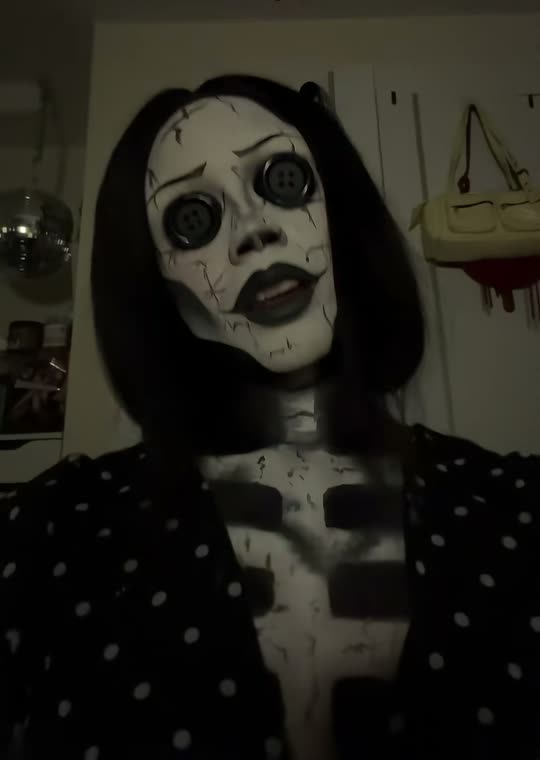
The video starts with an ordinary-looking portrait in a dim room. A hand passes across the lens and briefly hides the face, giving the transformation a clear edit point. After the swipe, doll-like skin, black button eyes and an uneasy expression replace the everyday look. The approach toward the camera makes the altered face the final information rather than a distant full-body costume.
Inspect the eyes after the reveal, not only the swipe itself. Real eyes may remain visible beside a button, a hand may distort or the new face may lose the uploaded identity. The template directs a creepy visual change but does not guarantee a flawless prosthetic-style effect. The configured ten-second video has generated scene audio. You can choose a separate platform track if you want a particular musical atmosphere when publishing.
A doll portrait told through four small scenes
Doll photo is a single vertical image arranged as four frames. The intended scenes vary the setting and distance while keeping the same personal puppet recognizable: a dim hallway, a candlelit table, an outdoor eerie setting and a closer look at the button-eyed face. It is a collage-style image, not four separate downloadable videos.
The model interprets the uploaded face as a handmade doll with fabric and clay-like textures. Hair and clothes should provide continuity, but tiny details may change between panels. Compare all four frames before sharing. This is the lower-credit still-image route if you want the doll look without a moving transformation, and it uses a different model from the video choice.
The current Smew options are listed below. The photo count belongs to the selected version: an extra person in a single upload is not a substitute for an additional photo slot. The model name describes how the output is made; it does not promise identical faces or motion on every run. Review the selected option and credit total on Create before submitting.
| Choice | Photos | Model | Output | Credits |
|---|
| Button eyes reveal | 1 | Seedance 2.5 | 10 seconds, 9:16, 720p | 126 |
| Doll photo | 1 | Nano Banana 2.1 | 9:16, 2K | 3 |
Sound varies by choice. Button eyes reveal uses sound generated with the scene, rather than a promised copy of a social-platform recording. Doll photo uses a still image, without an audio track. A reference clip’s audio is not evidence that every option includes it. Music rights remain with the rights holders.
A personal button-eyed doll, rather than an official character
The useful distinction is identity. Your face, hairstyle and clothing are the starting point; the doll texture and button eyes supply the eerie transformation. A recognizable film costume, actor or official character likeness is not the promised result. Search terms such as Coraline filter and Other Mother AI help people locate the style, but do not imply a studio connection.
A real costume walk is another branch of the trend and requires a different scene. If that is what you saw, compare the example carefully before choosing this page’s reveal or photo collage. Keeping the output choice explicit prevents the disappointment of expecting a multi-person Halloween walk from a single-face doll template.
When eyes, hair or collage continuity drift
Begin with the eyes open and unobstructed. If a button floats away from an eye or real eyes remain beside it, the result has not cleanly interpreted the transformation. A sharper straight-on selfie gives a better starting point, but the model can still make eye and hand artifacts. Review the final close-up rather than deciding from a small thumbnail.
For Doll photo, check that every panel is the same person-like doll with coherent hair and clothing. For the video, check the face on both sides of the swipe. An unexpected wig or costume is not a personalization setting. Only repeat a paid generation after deciding whether a clearer upload or a different output choice addresses the problem you saw.