Skyfall: A cinematic fall through a sunset sky

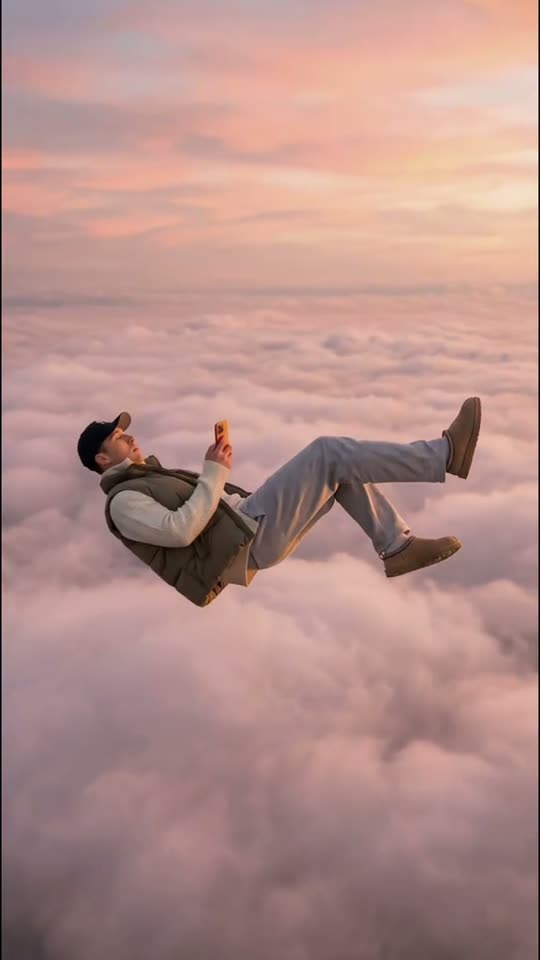
Place yourself or your pet in a slow, cinematic descent above the clouds. The sequence moves from a small figure in the sky toward closer views, with a warm sunset setting and a calm, dreamlike mood.

The original Skyfall AI reel by @stevenwommackOriginal reel
  • 1 photo you add
  • 10 s video
  • No prompt to write
  • No watermark

No prompt to write: Add your photo and tap once

Create your own

Ready in a few minutes · From 56 credits

The Skyfall AI look is a slow, dreamlike fall through a rose-colored sky. The camera starts far away, then follows the subject closer until the clothes, hair or animal fur become the main detail. It is more like a floating fashion editorial than a disaster scene: the clouds and gentle movement matter more than a destination.

Smew offers You for an adult portrait and Pet for a dog or cat. Each makes a ten-second vertical video with generated audio. The pet route prepares an image before animation and offers two model choices. You do not need to make the far-away and close images yourself, and the title does not mean the result includes the famous film song.

Also called Falling from the sky, sky falling AI, pink-cloud fashion fall

Example

See the Skyfall AI reference

Credited examples explain the trend’s staging. They are visual references, not Smew customer results; your generated details and movement can differ.

Trend reference

A reference for the scene and timing by @stevenwommack. This sample is not a Smew customer generation. Compare the framing and sequence rather than expecting a frame-for-frame duplicate. View the credited creator’s post.

Use this reference
Step by step

How to make your Skyfall AI version

Start with the right version and clear photos; the template provides the scene instructions.

  1. Choose the scene and cast

    Open Create and choose the version that matches the result you want. Check the photo-slot labels before uploading: one identity belongs in each slot. A reference sample shows the idea; the choices on Create define which people or pets Smew can actually place in that scene.

  2. Add photos and review the output

    Upload the requested photos, wait for processing and confirm that the preview shows the correct subject. Compare the selected output, model and credit total. You do not need to record the action or paste a prompt: the template supplies the setting and movement. Submit only when those details match your choice.

  3. Follow the task, then review the finished file

    After submission, follow the task on Dashboard while it generates; you can browse templates and see your other tasks there. Once it finishes, open the saved result in Library and inspect the whole clip before downloading. The generated interpretation can vary, especially during fast turns, occlusion and close contact.

Which photo gives this template a fair start?

For You, choose one consenting adult whose face is sharp, ideally with the whole body visible. The scene begins at a distance and then comes closer, so both body proportions and facial detail are useful. Show the clothes and hair you want used as cues; a silhouette or a tiny face gives the model little to preserve.

For Pet, upload the whole animal alone in good light, including ears, paws and body shape. Normal posture is enough; there is no need to photograph the subject lying on its back or near a ledge. The sky, fall and camera movement are generated. Avoid multiple people or pets in a single upload, and do not use a child for the human version.

The background of Skyfall AI

The reference look is associated with AI fashion tutorials from January 2026. Those how-tos describe making distant and closer images of a backward-leaning fall, then using video generation to travel between them. The linked posts by @mina.ai0 and @stevenwommack helped document the visual recipe; the references also credit @lesya.neuro in the broader fashion context.

Later ads and templates reuse the same pink-cloud idea, sometimes under falling from heaven or falling from the sky. Those are discovery names for the generated fashion scene, not evidence of a real jump. Smew combines the setup into a ready template. It is separate from Roblox clips called Skyfall and from the song sharing the title, so compare the visuals rather than assuming all search results describe the same thing.

  1. A January tutorial explains the two-scale image-and-video approach to the falling-sky look. TikTok

  2. @mina.ai0 shares another prompt-based interpretation of the pink-cloud scene. TikTok

  3. @stevenwommack’s tutorial documents the distant start and camera-following fall used as a reference. TikTok

  4. Later promotional uses revisit the same dreamlike fall under a fall-from-heaven caption.

  5. Several search labels continue to describe the pink-cloud idea; they do not define a separate song or game feature.

Copy and paste

The scene instructions are already included

The built-in recipe sets the setting, roles and sequence. Your photos provide the subjects; you can read the recipe below without needing to paste or rewrite it.

You

1 photo: you (18+), face clear, full body if you canSeedance 2.510 s · 720p · 9:16126 credits
Video prompt

Create a calm, cinematic vertical descent through rose-and-gold sunset clouds. Use [Image 1] for the sole adult’s identity and their recognizable clothing. Start very wide, making the falling figure small against the sky. Follow downward in slow motion, then move into closer shoe and face details as the sequence progresses. Let loose hair and fabric respond upward to the air while the person remains peaceful, blinking slowly with a faint smile. Preserve their face across the changing scale and keep the cloud horizon softly defocused. Keep assigned human faces individually recognizable: preserve facial structure, complexion, eye and hair coloring, age, and characteristic accessories through movement. Use the source hairstyle and clothing unless this scene explicitly changes them. Keep bodies coherent and identities attached to their own roles. This is a dreamlike float, without panic, injury, impact, visible ground, harness, parachute, aircraft, extra people or sudden camera shake. Generate soft wind and an original spacious cinematic instrumental, without singing or dialogue. Avoid unintended duplicates, fused bodies, extra limbs, captions, logos, watermarks and visible interface elements.

1212 characters

Pet

1 photo: your pet, whole body in viewKling 3.010 s · 1080p · 9:1656 credits
1. Prepare the image · Nano Banana 2.1

Compose a cinematic vertical still of the uploaded pet high above a sea of pink and golden sunset clouds. Show its complete body falling backward in a relaxed horizontal pose, with loose natural paws, slightly lifted ears and fur, and a calm expression. Keep its species, breed, face, coat pattern, eye color, body volume and tail recognizable. View it at roughly eye level with room around the silhouette for later camera movement. Use soft background blur, warm graded light and realistic fur rather than a cartoon or toy appearance. The cloud layer is the only environment: show no ground, sea surface, building or aircraft. Include one animal only, with no clothes, collar tag, harness, parachute, wings, human hands, writing, logo, watermark or border.

This image is prepared automatically before the video step. Both steps are included in the displayed credit cost.

2. Animate the prepared image

Animate the prepared animal floating downward through the sunset clouds. Preserve its backward-leaning horizontal body, face, fur pattern, scale and the pink-and-gold environment from the still. During 0–4 s follow its gentle descent with loose paws and upward-moving fur and ears. Move the camera nearer the face during 4–7 s for a slow calm blink. Over 7–10 s continue the same peaceful fall with a small turn. Keep the movement continuous, weightless and unhurried rather than frightened or struggling. Animate the prepared still as the established starting frame. Preserve its cast, face design, body proportions, styling, palette, outfit and background; do not redraw the scene or replace it with a new character between movements. Keep the prepared animal’s specified anatomy, with its own species-appropriate paws or feet; never substitute a human torso or human hands. Do not introduce land, impact, wings, harness, parachute, airplane or a second animal. Create a soft rush of air and an original dreamy instrumental texture; the pet makes no words. Avoid unintended duplicates, fused bodies, extra limbs, captions, logos, watermarks and visible interface elements.

1179 characters

Current Smew choices and credit prices

You pay in credits. The Generate button shows this price before you spend anything. These are the options on this page.

OptionModelWhat you getCredits
YouSeedance 2.510 s · 720p · 9:16126
Pet: StandardKling 3.010 s · 1080p · 9:1656
Pet: BestSeedance 2.510 s · 1080p · 9:16128

One-time packs and plans are on the pricing page. A failed video gives its credits back.

A distant fall that becomes a close portrait

The intended opening shows a small figure above pink clouds. The camera descends with the subject, bringing the body closer while hair, fabric or fur responds to the imagined air movement. The human version uses fashion-like detail shots and a final close view; Pet focuses on the animal’s calm floating pose and face.

There is no need for a visible landing to make the concept work. The soft sky and controlled movement distinguish it from an accident clip. Review how the subject grows from distant to near, and check the final readable face or muzzle. A beautiful cloud background alone does not establish that the uploaded identity survived the full camera move.

Adult fashion scene or floating pet

You is the direct adult-photo route with Seedance 2.5. Pet first prepares the animal in the sky scene, then animates it with Standard or Best. The pet qualities have different models and credit prices but the same configured ten-second duration and 1080p frame. The human output is 720p.

Choose the subject type explicitly rather than placing several kinds of subject into one image. The far-away start is part of the scene, not an instruction to upload a distant face. Generated wind or musical atmosphere can vary with the take; the template does not attach a particular commercial song recording.

The current Smew options are listed below. The photo count belongs to the selected version: an extra person in a single upload is not a substitute for an additional photo slot. The model name describes how the output is made; it does not promise identical faces or motion on every run. Review the selected option and credit total on Create before submitting.

ChoicePhotosModelOutputCredits
You1Seedance 2.510 seconds, 9:16, 720p126
Pet · Standard1Kling 3.010 seconds, 9:16, 1080p56
Pet · Best1Seedance 2.510 seconds, 9:16, 1080p128

Sound: these choices produce sound generated with the scene, rather than a promised copy of a social-platform recording. Sound heard in a credited reference is not automatically included in every Smew option. If you add platform music later, choose it from that platform’s available library and check the intended use; generating a video does not transfer music rights.

What the shared Skyfall prompts were trying to achieve

The public tutorial approach uses two scales of the same scene: a very small falling figure to establish height and a closer body view to preserve fashion and identity. Video instructions then describe the camera following the downward motion. That relationship between scale and camera movement is more important than copying a line of prompt wording.

Smew includes its own ready scene instructions, so you do not have to generate and join those pictures manually. The pet route includes image preparation internally. A prompt remains a direction to the model, not a guarantee of exact cloud formations, pose, camera speed or consistent small clothing details across every frame.

Skyfall, sky falling and falling from heaven

The names overlap because people describe what they see: a subject moving backward through clouds in sunset light. A fall-from-heaven caption may make it a playful compliment; a fashion caption may focus on the outfit. Neither requires the result to be connected with a film or a game.

The title is especially ambiguous in search. A Roblox jump clip is a different trend, and the song called Skyfall is a different audio reference. Smew’s file has generated scene audio. If you want a specific platform recording, choose it separately where available and check the mix and intended-use rules before posting.

FAQ

Skyfall AI — questions before you create

What is the skyfall AI trend?

It is the slow backward-falling scene above pink sunset clouds, usually with a camera move from a distant figure to a closer fashion or portrait view. Smew makes that dreamlike interpretation from one adult or pet photo. It is generated imagery, not a real jump or a filmed fall.

How do I make the falling from the sky trend video?

Choose You or Pet, upload one clear photo and review the model, output and credits. The template handles the sky and camera movement; you do not need to supply two separately generated pictures. Follow the submitted task on Dashboard and review the saved video in Library.

What is the skyfall AI video prompt?

No. Those tutorials explain a distant-image and close-image workflow, but the template already includes the scene direction. Your job is to choose the subject and provide a useful identity photo. The model still interprets the fall and clouds, so the recipe does not guarantee a frame-identical tutorial result.

Is this the Roblox skyfall trend or the Skyfall song?

No. The shared name also appears in game clips and as a song title, but this page is the pink-cloud AI fashion scene. No supplied copy of the song is included. Compare the reference visually if search results have mixed those different meanings together.

Is there a skyfall AI video generator or app?

No. Smew runs in your browser with the ready template. The manual tutorial workflow and other generator apps are background alternatives, not dependencies. You can select the adult or pet choice, upload the photo and receive the completed video without assembling a two-image sequence yourself.

Can I make it with my dog or cat?

Yes. Choose Pet and use a clear full-body animal photo. The model prepares the sky composition and animates a relaxed floating fall. Inspect the ears, paws and coat markings in the final close view, since movement and small scale can change fine details.

What caption should I post it with?

A short dream, fashion or falling-from-heaven joke fits the slow movement. The intended video does not need embedded text, so add your own caption in the publishing app and keep it away from the final face close-up. Use the AI label rather than presenting the fall as a real event.

Is it scary?

The intended tone is soft and dreamlike, with clouds and slow movement rather than impact or injury. A generated take can still feel unsettling to someone who dislikes heights, so review it before sharing as a greeting. No real high-place photo or stunt is needed to create the effect.

Can I use a photo of my baby or a child?

The human choice is for adults who agreed to appear. Use your own adult image, another consenting adult or the separate Pet choice for an animal. A child or celebrity example found elsewhere does not establish support for those identities in this template.

Make your own Skyfall AI scene

Choose a version, add the requested photos and check the output and credit total before you start.

No watermark. A failed video gives its credits back. Secure checkout by Stripe.