Talk Dirty dance: Take the lead in the concert dance break

Replace the central performer in a concert dance-break scene with yourself or your pet. The ensemble, stage effects and reference timing give the clip its scale while the uploaded subject takes the lead.

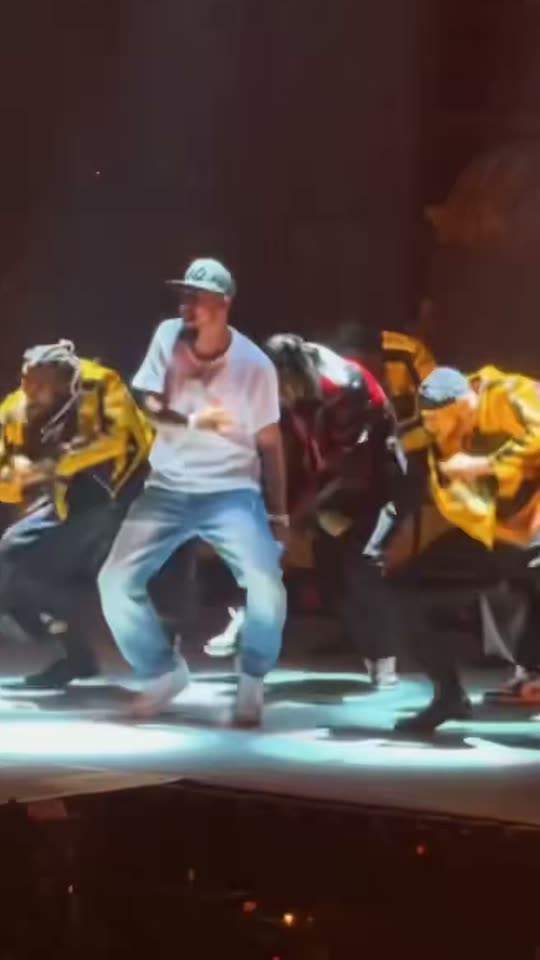
The original Talk Dirty Dance AI reel by @guamboyjOriginal reel
  • 1 photo you add
  • 9–15 s video
  • No prompt to write
  • No watermark

No prompt to write: Add your photo and tap once

Create your own

Ready in a few minutes · From 228 credits

A stadium-size dance break is the setting; the joke is who gets to lead it. The Talk Dirty AI format takes the crowd-camera view of a concert routine and gives the front position to the person in your photo. A line of dancers, hard stage lighting and bursts of flame make an ordinary portrait feel unexpectedly theatrical.

Smew offers a Lead dancer version for an adult and a separate Pet version. The human routine lasts 15 seconds; the pet take lasts 9 seconds. Neither requires you to film choreography. Your photo supplies the subject, while the saved recipe supplies the performance. The reference clips on this page explain the format and are not examples of customer results.

Example

A closer look at Talk Dirty dance

Visual references for the format, not Smew customer results. Your generation can change fine details, expressions and movement.

Lead dancer visual reference

A visual reference, not a Smew customer result. Your generated details will differ.

Use this reference
Pet visual reference

A visual reference, not a Smew customer result. Your generated details will differ.

Use this reference
Step by step

Make your Talk Dirty Dance AI video

Choose a version, add the required photos and check the displayed credits before generating.

  1. Choose the performer

    Select Lead dancer for an adult or Pet for an animal. Add one clear photo with enough body visible for a wide stage shot. The two versions have different durations, so check the selection rather than assuming every reference runs for the same time.

  2. Check the output and generate

    The selected choice shows its credits before submission: both current versions use Seedance 2.5 at 720p in a vertical 9:16 frame. You do not need to find a prompt, upload a concert video or record yourself dancing.

  3. Review the finished performance

    Dashboard tracks the accepted task while you browse. When processing and the soundtrack step are complete, open the finished video in Library. Watch the lead through the zooms and flame effects before downloading or sharing it.

Choose a photo that keeps the subject recognizable

For Lead dancer, use one consenting adult aged 18 or over, facing the camera. A waist-up or full-body photo gives the model clothing and body information that a very tight selfie cannot provide. Keep the face sharp, both eyes visible and the lighting even. Strong beauty filters, sunglasses and another person close behind the subject make identification harder.

The lead is meant to retain the uploaded person's hair, clothing and appearance, rather than inherit every accessory of the reference performer. Show the outfit clearly if that matters to your version. A cap or a necklace can still change during a generated dance; the photograph is guidance, not a frame-by-frame guarantee.

For Pet, include one dog or cat from ears to paws, preferably sitting or standing toward the camera. Coat markings should be easy to distinguish. Do not hold an animal upright or make it perform for the photograph: the impossible stage movement is generated.

Where the format comes from

The name comes from Jason Derulo's 2013 song Talk Dirty, featuring 2 Chainz. That song has supported several different social-video routines. Earlier posts show people learning and performing choreography themselves; the concert-replacement format uses AI to place a different subject at the center of a stage scene. Those are related by music, but they are different kinds of video.

October 2026 examples show the stage edit circulating in creator posts and template promotions, followed by versions with pets. A crowd viewpoint helps explain the appeal: the viewer sees a familiar-looking arena performance before noticing an unlikely lead. The links below provide examples of that progression. They are background references, not proof that any single account invented the effect, and their audience numbers change over time.

  1. An earlier self-performed routine illustrates the song's pre-existing dance life. Earlier dance post

  2. A concert-style AI lead replacement appears in @guamboyj's feed. Creator example

  3. A later written roundup describes template-based versions of the concert edit. Background roundup

  4. A template promotion demonstrates the one-photo stage format. Template promotion

  5. The same roundup compares multiple posts using the recurring concert composition. Format discussion

  6. Pet versions place dogs and cats in the lead position, extending the visual joke beyond human portraits.

  7. The format also appears as a dedicated AI-template offering; availability should not be confused with ownership of the song or stage material.

  8. A corgi version shows the animal-led interpretation of the stage routine. Pet example

Copy and paste

What the built-in recipe controls

These instructions are included in the template. Your uploads provide the identities; the selected version controls the scene and movement.

Lead dancer

1 photo: you (18+), face clear, from the waist up or full bodySeedance 2.515 s · 720p · 9:16228 credits
Video prompt

Use [Video 1] as the fifteen-second concert camera and choreography guide. Preserve the audience-side handheld perspective, LED wall, jackets on the backup line, spotlights and timed flame columns. Bring the lead forward during 0–1.5 s and follow the zoom through 3 s. Reproduce the low wide stance and swinging limbs during 3–5 s, synchronized line routine during 5–10 s, large foreground flame and lighting change during 10–12 s, then the advancing line and crouched bounce to 15 s. Keep the lead identifiable through bright and dark lighting changes. Replace only the front lead performer with the adult in [Image 1]; preserve all backup dancers and their own identities. Keep assigned human faces individually recognizable: preserve facial structure, complexion, eye and hair coloring, age, and characteristic accessories through movement. Use the source hairstyle and clothing unless this scene explicitly changes them. Keep bodies coherent and identities attached to their own roles. For a human, use their own top and clothes; add a plain covered top if the upload lacks one. For a pet, retain its own fur and anatomy with no cap, chain or human clothes unless present in the photo. Keep performance and mouth timing aligned with the reference, but produce no new lyrics, vocals or known song recording. The soundtrack is added after generation. Avoid unintended duplicates, fused bodies, extra limbs, captions, logos, watermarks and visible interface elements.

1473 characters

Pet

1 photo: your pet, whole bodySeedance 2.59 s · 720p · 9:16228 credits
Video prompt

Use [Video 1] as the actual nine-second concert camera and choreography guide. Preserve the audience-side handheld view, LED wall, jacketed backup line, spotlights and flame accents. Follow the reference order: the animal lead approaches the front, the view moves closer, it takes the low broad stance, then joins the line’s coordinated bounces and foreleg gestures. Keep the reference lighting changes and final group movement in their existing rhythm; do not stretch a longer routine into new shots. Complete the selected duration with the final coherent movement or pose instead of inventing extra choreography. Replace the entire front lead performer with the pet in [Image 1], using an upright animal body rather than an animal head pasted onto the human. Retain the uploaded animal’s species, breed, muzzle, ears, coat pattern and natural body volume. Use real paws and the correct limbs, never human hands or a human torso wearing an animal head. Keep its appearance consistent through turns and close-ups. For a human, use their own top and clothes; add a plain covered top if the upload lacks one. For a pet, retain its own fur and anatomy with no cap, chain or human clothes unless present in the photo. Keep performance and mouth timing aligned with the reference, but produce no new lyrics, vocals or known song recording. The soundtrack is added after generation. Avoid unintended duplicates, fused bodies, extra limbs, captions, logos, watermarks and visible interface elements.

1497 characters

Models, duration and credit cost

You pay in credits. The Generate button shows this price before you spend anything. These are the options on this page.

OptionModelWhat you getCredits
Lead dancerSeedance 2.515 s · 720p · 9:16228
PetSeedance 2.59 s · 720p · 9:16228

One-time packs and plans are on the pricing page. A failed video gives its credits back.

How the concert routine unfolds

The human reference begins with the stage seen from the audience, then draws attention to the performer moving ahead of the backing line. A closer phone-camera view makes the central identity readable before the dance settles into a low, rhythmic stance. Bright spotlights and short flame bursts provide the accents. The supporting group follows the same broad rhythm, then advances with the lead.

That changing distance is part of the effect. It should feel like a spectator caught a concert moment, rather than a stationary portrait suddenly moving its arms. The stage is busy, but the central figure needs to remain the obvious subject through changes in light and scale.

Smew's Lead dancer take is 15 seconds. The Pet choice condenses the idea into 9 seconds and asks for an animal-bodied lead, including hind-leg movement and front-paw gestures. It is not the same duration as the human reference. Timing, faces, stage screens and individual gestures can vary because each output is a new generation, rather than an exact substitution into every source frame.

What your uploaded photo changes

The design concentrates on one lead position. It does not cast your whole friendship group or replicate the uploaded face across the backup formation. In the adult version, the photo provides the lead's recognizable features and clothing cues. In the pet version, it provides the animal's face, fur and proportions; the intended joke is a pet dancing in its own coat, not an animal head attached to a dressed human body.

Both current choices output vertical 9:16 video at 720p and use Seedance 2.5. They each cost 228 credits, while their lengths differ. The original-song soundtrack is handled separately from picture generation, then the finished file is saved with sound. Library preview and download use that saved result.

You can make the video through the browser without installing an editor or assembling a timeline. That convenience does not make the result an official performance or endorsement by the artist. The reference describes the scene, and the photograph guides the subject, but neither guarantees every accessory or expression will survive fast motion unchanged.

Checking faces, costumes and fast stage effects

A face can look convincing in the opening view and drift when the camera pushes in or a flame crosses the frame. Review those transitions in particular. Clear source photography gives the model more useful information, although it cannot eliminate all artifacts in a wide shot with several moving people. Tiny lettering on the LED wall is another detail likely to be redrawn imperfectly.

If the lead gains a hat, chain or clothing detail associated with the reference, compare it with your upload. A photograph that clearly shows your own outfit is more useful than one cropped below the chin. For pets, check that the forelegs remain paws and that human trousers, hands or accessories have not appeared as the model follows the concert pose.

An extra limb, unstable face or missing coat marking is a reason to reconsider the take before posting. A clearer photo may help a new attempt; repeated generation is not a guaranteed repair. Avoid enlarging a tiny face with an aggressive crop, since that can make the limits of a distant audience-camera composition more obvious.

Sharing the performance with context

The finished Smew file includes the reference soundtrack for the selected version. The song is Talk Dirty by Jason Derulo featuring 2 Chainz; including music in a generated file does not transfer music rights. Check the destination platform's rules, especially for advertisements, business accounts and sponsored posts. A platform's licensed sound option may have different permissions from audio embedded in an uploaded MP4.

A good caption explains the unexpected casting without pretending the clip records a real appearance. For example, describe being promoted from the crowd to the front of the dance line, or appointing your dog as the new tour leader. The entertainment comes from the replacement, so there is no need to reproduce lyrics or invent an endorsement.

Use a clear AI disclosure and a few descriptive tags such as the trend name and the pet or dance category. There is no reliable reach promise attached to a hashtag. For a related creation, browse other dance templates using their actual supported cast sizes rather than expecting this one-lead recipe to become a group routine.

FAQ

Talk Dirty Dance AI questions

What is the Talk Dirty dance trend?

It is the concert-style edit in which a new subject leads a dance break while a backing line and stage effects continue around them. The crowd-camera angle and flame accents distinguish it from a simple dancing portrait. People also call it the Talk Dirty stage effect or concert dance edit. Here the saved recipe recreates that format with the person or pet you upload.

How do I make the Talk Dirty dance AI video?

Open Create, choose Lead dancer or Pet, then add the one required photo. Review the duration and credits for that selection before starting. The adult take is 15 seconds and the pet take is 9 seconds; both currently cost 228 credits. The scene instructions are already included, and the completed result appears in Library after processing.

Is this the same as the talk dirty dance tutorial videos?

The template creates an AI performance; it is not a choreography lesson with counts, demonstrations and practice sections. You do not need to perform the moves for an upload. If your goal is to learn the routine and dance it yourself, look for a teaching video. Choose this format when the joke is seeing yourself unexpectedly take the lead on stage.

Is there a talk dirty capcut template?

CapCut promotions are part of the wider history of the one-photo concert edit, and examples are linked in the background section. Smew is a separate browser workflow with its own generation recipe, choices and credit prices. You do not need a CapCut project or account to use this page, and the two services should not be treated as the same product.

Will the singer be in my video?

The song identifies the trend, but the intended central performer is the adult or pet from your upload. This is not an official artist video, an artist endorsement or a promise to reproduce a celebrity's likeness. The backing formation provides concert context. Use an image you are entitled to upload rather than a celebrity photograph taken from a search result.

Can a woman be the lead dancer?

Yes. The Lead dancer choice is for an adult subject rather than a particular gender. Use a clear photograph showing the person's own appearance and clothing, with their permission. The recipe follows the same concert idea while using that identity. As with other AI motion, the exact body shape, outfit and gestures can vary and should be reviewed in the finished take.

Does the video come with the song?

The current Lead dancer and Pet configurations use an external reference soundtrack. It is added after picture generation, and the finished file is saved with sound before it is marked complete. That is separate from the model generating original music. Song inclusion does not grant a license for every publishing context; check the rules of the service where you intend to post.

Why do people call it a K-pop dance?

That wording describes the large stage, coordinated backing line and performance styling seen in some promotions. It is not the origin of the song itself: Talk Dirty is a 2013 American pop release. Treat the label as a visual description used around the effect, not as evidence of an official K-pop collaboration or a new song genre.

Is it the old talk dirty to me tiktok trend?

The earlier trend generally involved people filming their own routine to the song. This version centers on an AI replacement inside a concert-like performance. You can recognize the difference by looking for the crowd camera, backing dancers and flames. Shared song titles make search results overlap, so compare the scene rather than relying on the title alone.

Can I make the Talk Dirty dance with my dog or cat?

Choose Pet and upload one clear full-body image of the animal. The intended result uses its fur, face and animal body for a 9-second stage take, with exaggerated hind-leg dancing. No real stunt or standing pose is needed from the pet. Check paws, coat markings and proportions in the result because those details can become unstable during fast choreography.

Can I make it with my friends?

There is one uploaded lead per generation. The people in the supporting formation are not extra photo slots, and a group photograph will not assign each friend a reliable stage role. Use one consenting adult for Lead dancer. If you want multiple identifiable participants, choose a separate template whose Create page explicitly provides enough named photo slots.

What do I need for the talk dirty dance with your photo?

For an adult, choose a sharp front-facing waist-up or full-body photo with visible eyes and a clear outfit. For Pet, include the whole animal and only one subject. Current outputs are vertical 9:16 at 720p: 15 seconds for Lead dancer or 9 seconds for Pet. Processing time varies; Dashboard shows the task while it runs.

Try Talk Dirty Dance AI with your photos

Choose your version, review its output and credits, then start your own take.

No watermark. A failed video gives its credits back. Secure checkout by Stripe.